
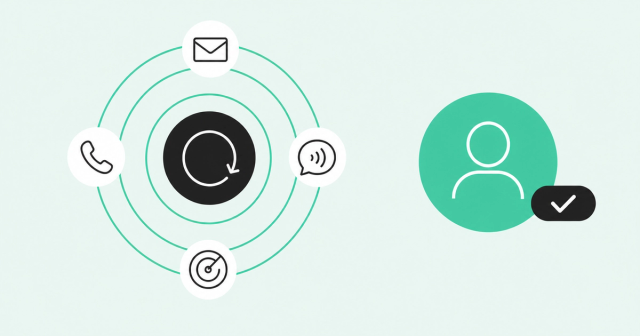

I'm Miguel Moreno, Product Lead for Zoom Revenue Accelerator. In my work, here's what I've seen over and over: many traditional prospecting stacks tend not to be built for the way SDRs actually do business today. You've got a sequencing tool for emails, a dialer for calls, a signal platform for intent data, and a CRM to log it all. Four systems. Four logins. Every time a rep toggles between them, they lose context. The buyer's story fragments across tools, and nobody has the full picture.
When we built Engage, we started with that fragmentation problem. The cost shows up everywhere. Reps skip call steps because the dialer's in a different tool. Sequences run single-threaded because multithreading across three stakeholders takes too much manual work. Managers can't coach the full motion because the data's split across platforms. The tools sort of work together through integrations, but the motion never flows.
So we made a different architecture decision: sequencing, dialing, and buyer intelligence aren't three integrated tools, they're one product. One platform, one data model, one motion. I'm going to walk you through what that actually looks like when a rep prospects inside Zoom Revenue Accelerator.
Where the rep starts: the Action Items list
When a rep opens Engage in the morning, they don't see a static call list or a generic "contacts to reach today" queue. They see a prioritized Action Items list, ranked by buyer signals pulled from Common Room.
Here's what a rep's screen might look like — the following is an illustrative example.
Top of the list: Sarah Chen at Acme Corp. The signal that surfaced her? She visited our pricing page twice yesterday, spent four minutes on our ROI calculator, and engaged with a post in our community Slack three days ago. She didn't fill out a form. She's not in the funnel yet. But Common Room tracked her digital body language across the open web, our community, and our product, and flagged her as high-intent. (Common Room's data practices are governed by its privacy policy, available at zoom.us/privacy.)
Below Sarah: Mike Torres at the same account. Different signal. He changed jobs two months ago — left a competitor, joined Acme as VP of Sales. Common Room caught the job change and flagged him as a champion who moved. He knows our product. He has a new team to build. He's worth a different message than Sarah.
Third on the list: an expansion signal at an existing customer account. Product usage spiked in a new business unit. Common Room identified three new stakeholders who weren't part of the original deal but are now active users.
That's where the motion starts. Not with a cold list. With context.
Building the sequence: multithreading from the jump
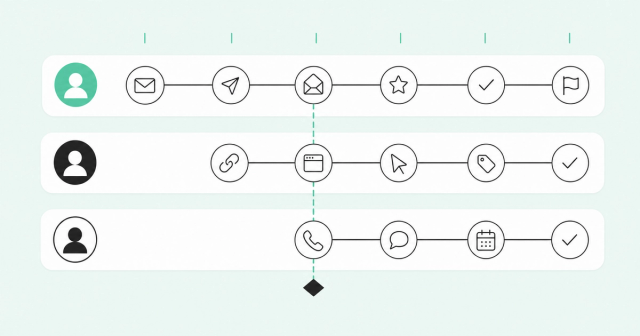
Let's say I want to run a sequence at Acme. I'm not going to single-thread Sarah and hope she's the right contact. I'm going to multi-thread across Sarah (technical evaluator), Mike (economic buyer), and Jamie (end user who's active in the community).
Inside Engage, I select all three contacts and enroll them in role-specific sequences. Sarah gets a technical sequence: case studies, ROI data, integration details. Mike gets an executive sequence: business outcomes, team ramp time, competitive win stories. Jamie gets a user-focused sequence: community invites, quick-win workflows, peer intros.
Here's what the sequence builder looks like. Each contact has their own sequence, but I'm managing all three from one view. Sarah's sequence starts with an email on Monday. Mike's sequence starts with a LinkedIn Connect on Tuesday (I want him to see Sarah's email first, so when my name shows up on LinkedIn, there's recognition). Jamie's sequence starts with a call on Wednesday.
The sequence steps are multichannel by default: email, call, LinkedIn Connect, LinkedIn Message. Not in separate tools, in one workflow. If I add a call step to Sarah's sequence, I'm not creating a task that sends the rep to a dialer. I'm adding a step that is the call. Same for LinkedIn. The step executes in the platform.
I can see all three sequences side-by-side in one view. Here's how I coordinate them. First, staggered timing: let's say Sarah's sequence sends an email on Monday at 9 AM. I don't want Mike to get an email from me the same day that looks uncoordinated to the account. So I adjust the delay on Mike's sequence by adding a two-day wait before his first step. Now Mike's email goes out Wednesday, giving Sarah's email time to land first. That's what "adjust the delay" means in practice. I'm setting the number of days (or hours) between steps, or between when someone enters the sequence and when the first step executes.
Second, conditional triggers: instead of advancing Jamie's sequence on a fixed timeline, I can set a rule that says "only move to the call step if Sarah has opened her email at least twice." Now Jamie's call doesn't happen until there's a signal that Sarah is engaged. If Sarah never opens the email, Jamie's call step doesn't fire. That's a conditional trigger — a step that waits for a specific engagement behavior before it executes.
Why does this matter in a multithreaded motion? Because it lets me sequence my outreach around what's actually happening at the account, not just what day it is. I'm not running three independent sequences that happen to target the same company. I'm running one coordinated account strategy across three stakeholders.
Some tools let you enroll multiple contacts from the same account. But they don't tell you which contacts are worth multithreading, and they don't make it easy to coordinate across them. Common Room solves the first problem. Engage solves the second.
The call step: no toggle, no friction
It's Wednesday. Jamie's sequence hits a call step. Here's what happens next.
The rep sees the call step in their Action Items list. They click it. Zoom Dial connects the call. They don't open a separate dialer. They don't look up the number. They don't leave the platform.
While the phone rings, here's what the rep sees on screen: Jamie's full engagement history. Every email we've sent to anyone at Acme. Every open, every click. Sarah opened the ROI calculator email twice. Mike accepted the LinkedIn Connect but hasn't replied. Jamie clicked the community invite link but didn't join yet.
The call connects. Jamie picks up. The rep isn't walking in cold. They know Jamie clicked the community link. They open with: "Hey Jamie, I saw you checked out our community earlier this week. Curious what caught your attention?"
Context travels with the call. The rep isn't guessing what the buyer's seen. They know.
The call wraps. Jamie's interested but wants to loop in Sarah before booking a meeting. The rep selects "Connected – Follow-up needed" from the outcome dropdown. The sequence logs it instantly. No manual note-taking in the CRM. No going back to the sequencing tool to mark the step complete. The outcome feeds the next step automatically.
The call wraps. Jamie's interested but wants to loop in Sarah before booking a meeting. The rep selects "Connected – Follow-up needed" from the outcome dropdown. The sequence logs it instantly. No manual note-taking in the CRM. No going back to the sequencing tool to mark the step complete. The outcome feeds the next step automatically, with reps remaining in control of the motion.
Because Jamie said to loop in Sarah, the sequence surfaces a recommended adjustment. Sarah's next email (scheduled for Friday) can move up to today and change: "Jamie and I just spoke. He mentioned you're evaluating tools to cut ramp time. Thought I'd send over the case study he asked about."
Here's why that matters. But only if the channels actually execute and coordinate. When the call step has the same friction as the email step (zero), reps run the sequence as designed. When the call step requires a tool switch, they skip it.
After the call: What conversation intelligence does next
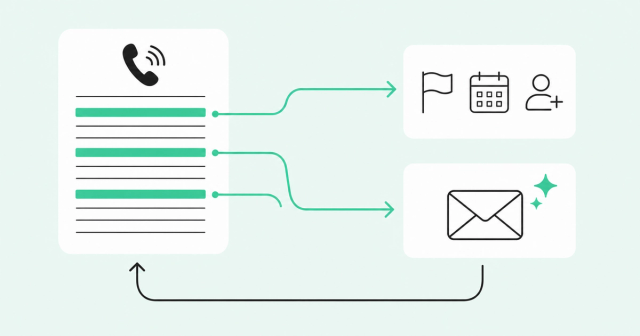
The call with Jamie is recorded and transcribed automatically. Here's what I'm looking at now in the Conversation Intelligence view.
The transcript highlights key moments: Jamie mentioned they're evaluating two other tools. He said their current ramp time is 90 days and they want to cut it to 60. He asked whether we integrate with their CRM (Salesforce). He said the decision timeline is end of quarter.
All of that context feeds back into the deal record. The competitive mentions flag the deal as "competitive." The timeline sets the close date. The integration question triggers an alert to loop in a solutions engineer.
But it also feeds back into the sequence. Sarah's next email doesn't just reference the call. It addresses what Jamie said on the call: "Jamie mentioned you're looking to cut ramp time from 90 to 60 days. Here's how three other teams did exactly that."
This is the difference between conversation intelligence that lives in a separate tool and conversation intelligence that's part of the same platform as the sequence. When they're separate, the transcript lives in one place and the sequence runs in another. The rep has to manually connect them. When they're unified, the sequence uses the conversation data automatically.
Most teams treat conversation intelligence as a coaching tool. It is. But when it's part of the same platform as your prospecting motion, it's also a sequencing tool. What the buyer said informs what you send next.
What the manager sees: Coaching the full motion
Let me switch views. Here's what a frontline manager sees when they open the Engage dashboard.
They're not looking at email metrics in one place and call metrics in another. They're looking at the full multichannel engagement arc for every rep, every sequence, every account.
Rep-level view: How many sequences is each rep running? What's their email open rate, call connect rate, and LinkedIn acceptance rate? Where are they executing multichannel steps — and where are they defaulting to one channel? These metrics are currently visible at the activity level and will soon be consolidated into a rep-level summary report, rolled up across all sequences.
Sequence-level view: Which sequences are driving meetings? Which steps are working? Where are contacts dropping out?
Account-level view: For multithreaded accounts, how many stakeholders are engaged? Are all three contacts advancing, or is one stalled? Which channel is driving the most engagement at this account?
Here's the coaching insight that a fragmented stack can't give you: this rep has a 40% email open rate and a 25% call connect rate, but their multichannel sequences aren't converting. Why? Because they're skipping the LinkedIn steps. The sequence design is sound. The execution is incomplete. That's a coachable moment. But you can't coach it if you can't see it.
We built Engage and Dial and Common Room as parts of the same platform because prospecting isn't three separate activities. It's one motion. The email primes the call. The call informs the next email. The buyer signal tells you who to reach and when. The conversation data tells you what to say next. If those pieces live in different systems, the motion breaks.
Why this architecture matters
Walk through what I just showed you and ask: where did the rep toggle between tools? Where did they manually log activity? Where did data get stuck in one system instead of feeding the next action?
Nowhere. Because the sequence, the call, the conversation intelligence, and the buyer signals aren't four integrated tools. They're one product.
That's not a feature. It's a design decision. We built Engage and Dial and Common Room as parts of the same platform because prospecting isn't three separate activities. It's one motion. The email primes the call. The call informs the next email. The buyer signal tells you who to reach and when. The conversation data tells you what to say next. If those pieces live in different systems, the motion breaks.
Some revenue tools tend to be built to solve one problem and then integrated to solve the next. That's how you end up with a stack of eight tools that sort of work together. We built the other way: one platform, one data model, one motion.
Here's what that means for your team. Reps may spend less time toggling and more time talking. Sequences can run as designed because executing a call step is as easy as sending an email. Multithreading can go from aspirational to operational because managing three stakeholders at one account doesn't require heroic effort. Managers can support coaching the full motion because they can see the full motion. And the data you need to improve your prospecting can live in one place where you can act on it.
That's what it looks like inside. That's how it works.
Want to see it in action? I can walk your team through the same motion I just showed you — how your reps would actually work a deal from signal to sequence to call. Book a demo here.