
Map the whole buying committee, not just the champion
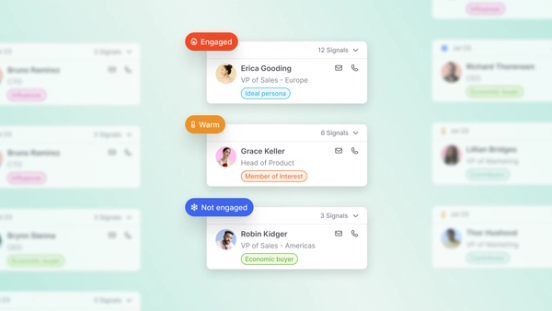
Hot accounts stall when one champion looks healthy and the rest of the buying group stays invisible. Buying committee maps the full group at the person level to flags who is engaged, warm, or cold, and shows coverage gaps before you engage.
Teams running their outreach on Common Room






















































Coverage
Map the full buying group, not just one contact
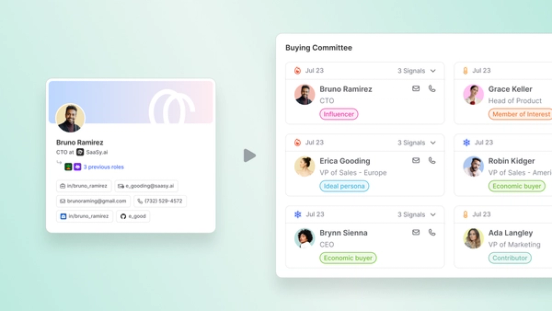
Buying committee starts from the people who should shape the deal, not whoever last opened an email. It matches decision makers, economic buyers, champions, influencers, technical evaluators, blockers, end users, and gatekeepers to your ICP. A 400M+ contact directory and live employment context tie each person to the account. Reps stop guessing group size and work from a complete, named stakeholder map.
Completeness
Find every missing stakeholder on the account
Account profiles surface economic buyers already in view and economic buyers not yet tracked in Common Room or your CRM. You see inactive contacts, single-thread risk, and roles still blank on the map.
Priority
Prioritize who to engage next, and meet with role-aware context
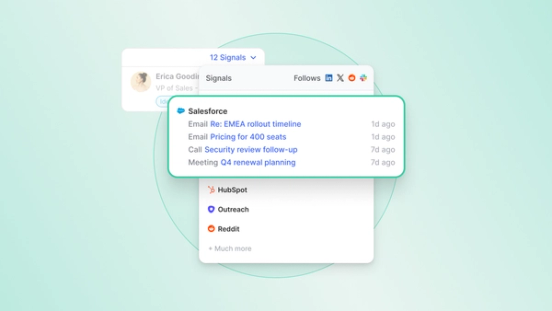
Every committee member carries engagement status and person-level buyer intelligence. Activity, web visits, and account research sit in one place. Cold-fit stakeholders become the clear next multi-thread moves. Warm and engaged contacts show what already happened and what to say next. Teams reach the right people with role-aware context before the first meeting.
Real results from real teams

Learn how Common Room’s buyer intelligence informs our full revenue OS.
Common questions
Buying committee is Common Room's person-level view of the buying group on an account, grounded in buyer intelligence tied to real people, not account-only scores. It shows who belongs to the group, how engaged each person is, where coverage is thin, and who to multi-thread next.
Buying committee opens on the account and builds a live group map from Common Room's contact directory, your ICP, CRM associations, and buyer activity. Buying committee labels each member by buying role and engagement status such as engaged, warm, or cold. Prospector helps reps fill gaps and act with person-level context. Buying committee data can surface in the Chrome extension, MCP workflows, and in the CRM. Coverage stays visible where teams already work. Identity and enrichment underneath run through Person360™.
Account-level intent tools flag that a company is in market. Buying committee names the people inside that company who shape the purchase. Buying committee shows their roles, engagement status, and stakeholders still missing from CRM or outreach. That person-level map turns a hot account score into a concrete multi-thread plan. Buying committee supports the same shift teams make when they move from intent data alone to full buyer intelligence.
Buying committee helps sales leaders, AEs, SDRs, ABM and demand gen leaders, and RevOps teams build reliable multi-threading and buying-group coverage. Buying committee helps anyone who owns pipeline quality, account plays, or forecast confidence when deals depend on more than one champion.
Buying committee helps teams identify the roles that show up across real B2B deals. Those roles include decision makers, economic buyers, champions, key influencers, technical or implementation stakeholders, blockers, end users, and gatekeepers. Buying committee aims for a complete count of who can advance or stall the purchase, not a static org chart.
Managers use buying committee coverage across accounts to see which deals have an identified, engaged buying group and which still run on a single relationship. Buying committee gives managers a book-level view that supports coaching on multi-threading before pipeline reviews. Teams can report on buying committee data after their CRM syncs it.
Yes. Buying committee and account profiles surface economic buyers who fit the account but are not yet tracked. That includes budget holders who are inactive in product or missing from CRM. Reps can move from buying committee gap lists into Prospector, import the right people, and enrich them into person-level profiles before outreach.
Find your best buyers.
We think you'd like these
Blog post
Dots: A New Way to Use Common Room Where Your Team Already Works
Oct 27th, 2026·5min readCommon Room's connector is live in ChatGPT's plugin directory. See how Dots turns your buyer intelligence into daily briefings, recaps, and answers.Blog post
How Much Editing Do AI Drafted Sales Emails Need?
Oct 22nd, 2026·12min readAI-drafted sales emails shouldn’t need a full rewrite—they should need a fast check of facts, tone, and CTA before send. This guide explains what drives editing time, what reps should...Blog post
How to Reduce New Sales Rep Ramp Time with AI
Oct 22nd, 2026·10min readNew sales reps don’t stall on effort—they stall on context. This guide shows how AI can speed ramp time with instant account briefs, signal-ranked priorities, and on-demand coaching so reps...