
Headless buyer intelligence, built to inform your AI stack
Make all your GTM workflows smarter. Connect AI assistants to your buyer intelligence through the MCP Server or access it headlessly through our CLI for automation pipelines, scheduled jobs, and custom AI agents.
Teams running their outreach on Common Room




























































One Source of Truth
Ground your AI tools in the same intelligence that powers Common Room
AI is only as good as what's underneath it. Common Room gives your AI assistants and automation systems access to the same continuously updated, identity-resolved, signal-unified buyer intelligence that powers the platform wherever they're running.
Learn more about Person360™
Natural Language
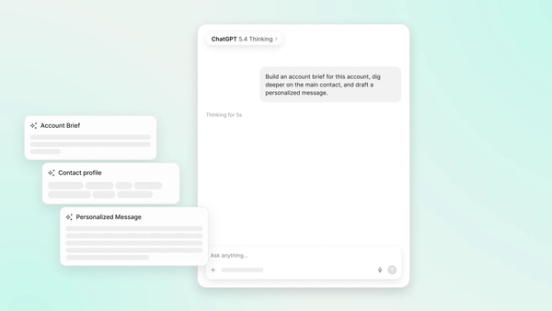
Ask about your book of business the same way you’d ask a colleague
Common Room MCP enables any MCP-compatible AI assistant to query buyer intelligence in natural language. Research accounts, understand contact profiles, prepare call briefs, build prospect lists, and draft personalized outreach that are all grounded in real, continuously refreshed GTM data.
GTM Engineering Made Simple
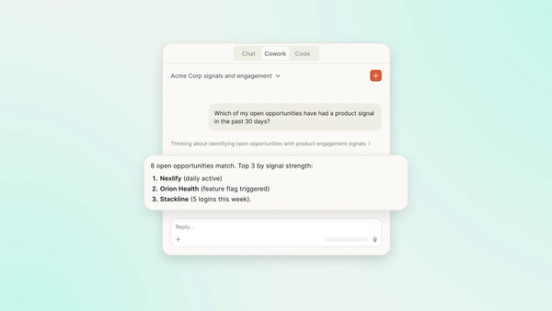
AI everywhere you need it, with all the context you could want
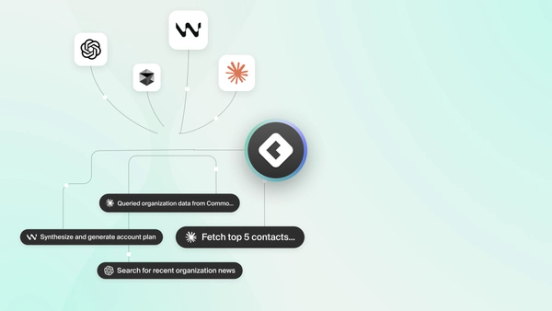
Common Room connects AI tools to your full GTM system: first-, second-, and third-party signals, product activity, website engagement, CRM data, enrichment, and identity resolution across contacts and accounts. Whether your team lives in an AI assistant or builds automation pipelines from the terminal, that same intelligence is available. MCP for conversational workflows. CLI for deterministic execution. Same data underneath. No new infrastructure required.
Real results from real teams

Learn how Common Room’s buyer intelligence informs our full revenue OS.
Common questions
MCP & CLI is headless access to Common Room buyer intelligence through two surfaces: an MCP Server for MCP-compatible AI assistants and a CLI for automation pipelines, scheduled jobs, and custom agents. Both run on the same identity-linked, continuously enriched buyer data that powers the Common Room platform, so teams can prioritize the right people and accounts from trusted context.
MCP & CLI exposes unified buyer intelligence over standard interfaces. Teams can connect an MCP client to the hosted MCP endpoint for natural-language research and write-backs on contacts, organizations, activities, segments, and notes, or use the Common Room CLI for scriptable, JSON-first operations in pipelines and agent backends. Auth uses OAuth or tokens, and it's the same permission model as the Common Room UI.
MCP & CLI serves complete buyer intelligence as one layer. That includes identity matching across people and accounts, enrichment, and first-, second-, and third-party buyer activity that's already unified for GTM. Assistants and automations query that foundation directly for research, prioritization, and write-back instead of gluing partial sources into every prompt or job.
Common Room MCP & CLI doesn't require the full Zoom Revenue Accelerator platform. You can use it standalone when you need buyer intelligence inside AI assistants and automation pipelines. It becomes more powerful as part of Zoom Revenue Accelerator when you want orchestration and action on the same intelligence layer.
RevOps engineers, GTM engineers, and technical teams use Common Room MCP & CLI to build custom AI workflows or automation on GTM data. You'll want it when you need assistants and agents grounded in trusted buyer context and don't want to force every workflow through a single UI.
Teams research accounts, inspect contact profiles, prepare call briefs, build prospect lists, and draft personalized outreach grounded in live data. They can also create or update records such as notes and segments from MCP-compatible assistants against continuously refreshed buyer intelligence rather than static spreadsheets.
Use the Common Room CLI for deterministic, repeatable work such as production automation, scheduled jobs, batch operations, and custom agent backends that need JSON output, typed filters, dry-run checks, and scriptable auth. Use the Common Room MCP Server when conversational daily work in assistants is the priority.
MCP & CLI aligns access with the Common Room product model. The MCP Server uses OAuth and per-user permissions, and admins can disable MCP when it's needed. The CLI supports browser OAuth, device flow, and API token authentication so automated systems only see what's allowed by policy.
Find your best buyers.
We think you'd like these
Blog post
Meet the Frankenstack: Why Your AI Tools Don't Talk to Each Other
Oct 9th, 2026·8min readMost revenue teams now run AI inside a dozen disconnected tools, and none of those tools sees the full buyer journey. When a do-not-contact flag lives in the CRM...Blog post
Sales Methodologies: How to Choose the Right Framework for Your Deals
Oct 8th, 2026·15min readNot all sales methodologies solve the same problem—this guide breaks down MEDDPICC, SPIN, Challenger, Sandler, BANT, and Solution Selling so you can match...Blog post
Best Sales Analytics Tools: How to Compare Pipeline, Forecast, and Signal Analytics
Oct 8th, 2026·16min readMost sales dashboards tell you what already happened, but the best sales analytics tools help you decide what to do next. This guide...