
Turn your contact list into more conversations
Work multiple calls at once, drop voicemails automatically, and log every outcome back to your CRM, with helpful actions like live transcription during calls, in-call scheduling, and instant post-call follow-up, so reps can get into more conversations and stay present with each prospect.
Teams running their outreach on Common Room
























































Conversation Intelligence
Better calls, start to finish
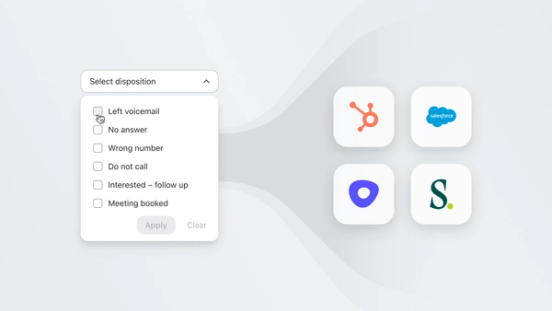
95% of customer interactions take place over the phone. Make sure your team nails it every time, with live transcription during calls, in-call scheduling, and instant post-call follow-up, so reps stay in the conversation instead of managing the admin around it. Once a call ends, disposition logging and call notes write back to the CRM on their own.
Efficiency
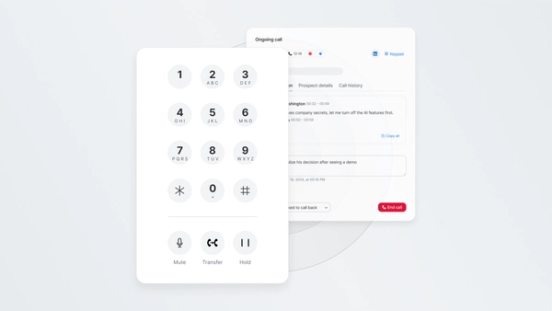
More at-bats, without more hours on the phone
It takes an average of 8 cold call attempts to reach a prospect, and 75% of dedicated outreach time is consumed by waiting, voicemail drops, and administrative busywork. Zoom Auto Dialer works your contact list automatically with cascading and parallel dialing, so reps get more live connections per hour. Plus, local dial improves answer rates, and automated voicemail drop moves you to the next call the moment one goes unanswered.
Context On Demand
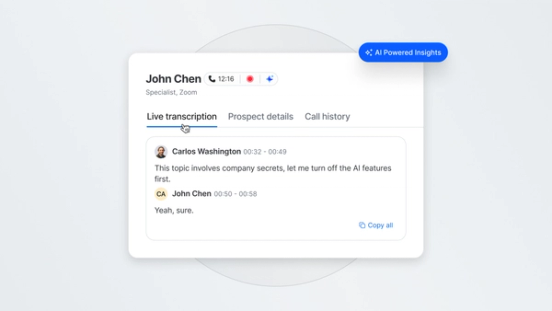
Have a question mid-call? Just ask ZRA
Ask ZRA lets reps and managers query transcripts, deals, CRM data, and account history using natural language, mid-call or during prep. Instead of digging through dashboards or replaying recordings, reps get deal context on demand: what was said, what changed, and what the buyer's history looks like.
Real results from real teams

Learn how Common Room’s buyer intelligence informs our full revenue OS.
Common questions
Zoom Auto Dialer is an automated calling tool built into Zoom Phone and Zoom Revenue Accelerator. It works contact lists on a rep's behalf, using cascading and parallel dialing to connect more calls per hour, with automated voicemail drop, live transcription, and CRM logging handled for you.
Dial pulls a contact list from your CRM or sales engagement platform and dials multiple prospects at once using cascading or parallel dialing. When a call connects, the rep is brought in live; when it doesn't, a pre-recorded voicemail drops automatically and the dialer moves on. After the call, disposition, transcript, and next steps log back to the CRM without manual entry.
No. Zoom Auto Dialer works standalone with Zoom Phone. It becomes more powerful as part of Zoom Revenue Accelerator, but that's not a requirement to use it.
Most dialers are a separate tool reps have to log into alongside the rest of their stack. Zoom Auto Dialer is built directly into Zoom Phone and Zoom Revenue Accelerator, so calendar, scheduler, email, and call history are all available from the same interface a rep is already dialing from. No toggling between tools mid-call.
Yes. Dial includes real-time analytics, a searchable call library, disposition logging, and automated scorecards, so managers can review call quality and outcomes without pulling reports from a separate system.
Dial handles the follow-up automatically: it logs the call and disposition back to the CRM, updates the contact list, and lets reps schedule next steps in-call or immediately after, so meetings get booked without extra admin work.
Find your best buyers.
We think you'd like these
Blog post
Dots: A New Way to Use Common Room Where Your Team Already Works
Oct 27th, 2026·5min readCommon Room's connector is live in ChatGPT's plugin directory. See how Dots turns your buyer intelligence into daily briefings, recaps, and answers.Blog post
How Much Editing Do AI Drafted Sales Emails Need?
Oct 22nd, 2026·12min readAI-drafted sales emails shouldn’t need a full rewrite—they should need a fast check of facts, tone, and CTA before send. This guide explains what drives editing time, what reps should...Blog post
How to Reduce New Sales Rep Ramp Time with AI
Oct 22nd, 2026·10min readNew sales reps don’t stall on effort—they stall on context. This guide shows how AI can speed ramp time with instant account briefs, signal-ranked priorities, and on-demand coaching so reps...