
Get better ROI on LinkedIn ads with synced buyer intelligence data
Connect LinkedIn Ads to your buyer intelligence, so you only pay to reach the people and accounts you already track. Build live-matched audiences from signal, then push them to LinkedIn for better ad spend value.
Teams running their outreach on Common Room



























































Alignment
Sales sees what marketing already knows
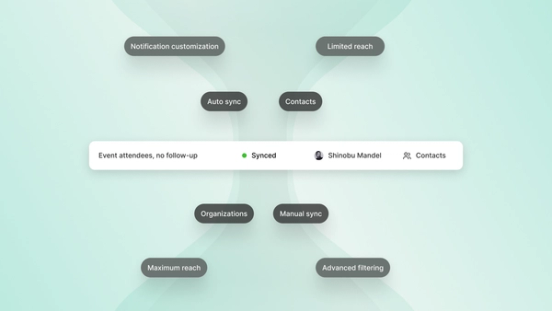
Connect LinkedIn Ads, pick the ad accounts that matter, and manage connection health without engineering. The same graph that powers audience activation shows ad engagement to SDRs and feeds filters and scores for RevOps. You stop CRM hops to LinkedIn, drop stale lists sales can’t trust, and put paid and pipeline on one buyer truth.
Visibility
Every LinkedIn ad touch mapped to an account
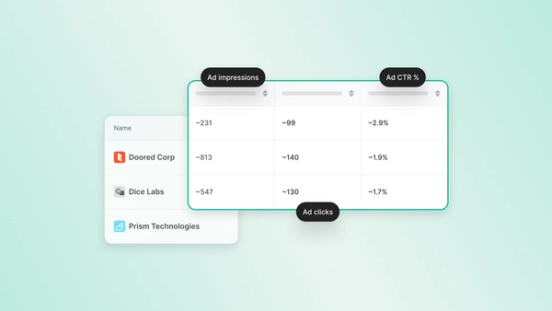
Common Room Ads ingests LinkedIn ad impressions and clicks. Lead Gen Form fills land on the contact with the source campaign, and Common Room matches or creates the member. SDRs stop guessing whether paid touched an account, and RevOps prioritizes accounts already in motion.
Reach
Let buyer intelligence build your audiences for better targeting
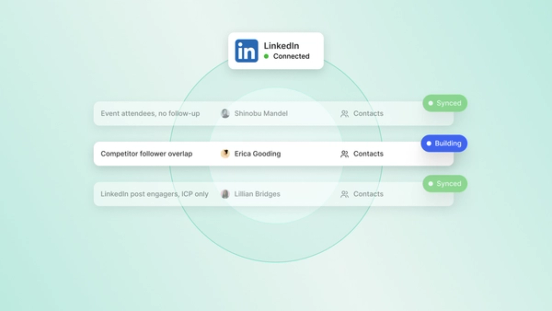
Build audiences from Common Room signals and filters, then push contacts or organizations to LinkedIn as matched audiences. Live sync adds and removes members as fit changes, so paid lists stay current instead of freezing last week’s CSV. Choose company or person audiences, set sync cadence, check match coverage, and keep Campaign Manager for creative while Common Room keeps lists honest.
Real results from real teams

Learn how Common Room’s buyer intelligence informs our full revenue OS.
Common questions
Ads is a native LinkedIn Ads connection that brings ad engagement into Common Room and activates live matched audiences back to LinkedIn. It links paid activity to the same buyer intelligence graph your go-to-market (GTM) team already uses for people and accounts. It’s not a media-buying, bidding, campaign-management, or creative tool, and it doesn’t replace LinkedIn Campaign Manager.
It connects to your LinkedIn ad accounts, where you can easily sync company or person matched audiences as criteria change and as your ad campaigns evolve.
Ads is a native path for both signal-in and activation-out on the same identity and buyer intelligence graph. CSV uploads go stale when fit changes, and webhook, Zapier, or CRM hops break when tokens or field mappings fail. Ads keeps audiences live from filters you trust and shows ad warmth on accounts sales already works, without a separate project per list.
Ads closes both sides of the loop on one graph, with paid engagement in and matched audiences out from the same buyer intelligence. Many ABM tools push lists without paid context on people your reps prioritize. Ads makes spend visible in the GTM buyer graph without replacing Campaign Manager.
Ads brings account-level LinkedIn ad impressions and clicks with derived click-through rate onto organization timelines. It also brings lead gen form submissions as high-intent contact activity, and Common Room matches or creates members for segments, workflows, and scores.
Yes. Build audiences from Common Room signals and filters, then push company or person matched audiences to LinkedIn with automatic or manual sync as criteria change. Match-coverage views show field readiness before you push, and sync health plus notifications flag errors or undersized audiences.
No. Ads doesn’t buy media, set bids, manage campaigns, or build creative, and we don’t position it as a full ABM platform replacement. It ties paid data to buyer intelligence, improving your ROAS and informing your marketing experiments.
Find your best buyers.
We think you'd like these
Blog post
Dots: A New Way to Use Common Room Where Your Team Already Works
Oct 27th, 2026·5min readCommon Room's connector is live in ChatGPT's plugin directory. See how Dots turns your buyer intelligence into daily briefings, recaps, and answers.Blog post
How Much Editing Do AI Drafted Sales Emails Need?
Oct 22nd, 2026·12min readAI-drafted sales emails shouldn’t need a full rewrite—they should need a fast check of facts, tone, and CTA before send. This guide explains what drives editing time, what reps should...Blog post
How to Reduce New Sales Rep Ramp Time with AI
Oct 22nd, 2026·10min readNew sales reps don’t stall on effort—they stall on context. This guide shows how AI can speed ramp time with instant account briefs, signal-ranked priorities, and on-demand coaching so reps...