

Your reps are dialing all day, and the pipeline still isn't moving. That's not a hustle problem.
When a full list of dials yields only a handful of live conversations, doubling the dial count just doubles the dead ends. The dialer isn't the bottleneck. The data feeding it is.
In a sales dialer with data, buyer signals and resolved identity build and rank the call list, so speed finally points at the right people. Here's what that means, how the dialer types differ, and what to look for before you buy.
Key Takeaways
- Cold-call connect rates sit near 10% per dial, so dialing faster only multiplies dead ends when the underlying data is wrong.
- A sales dialer with data lets buyer signals and resolved identity build and rank the dial list, not a static import.
- Dialer modes (power, parallel, predictive, preview) control speed, while data controls who you reach and whether they convert.
- Stale CRM data quietly caps every dialer's ceiling, and 76% of teams say less than half their CRM data is accurate.
- The strongest outbound pairs real dialing speed with intelligence that decides who to call and why.
What Is a Sales Dialer?
A sales dialer is software that automates outbound calls. Reps skip the mechanical work of punching in numbers, waiting through rings, and logging every attempt by hand. Instead of dialing one contact at a time from a spreadsheet, reps work a queue while the software handles the connection.
Most sales dialer software includes a familiar set of capabilities. Think CRM sync, call logging, local presence, voicemail drop, recording, transcription, and analytics on connects and outcomes. Those features make a rep's day faster and cleaner, and they're worth having.
But draw a line early. The dialer is the action layer: It places and manages the call. The data decides who the dialer calls, when, and why.
Speed lives in the dialer. Pipeline lives in the data. Keep that distinction in mind, because the rest of this piece hinges on it.
The Types of Sales Dialers: Power, Parallel, Predictive, and Preview
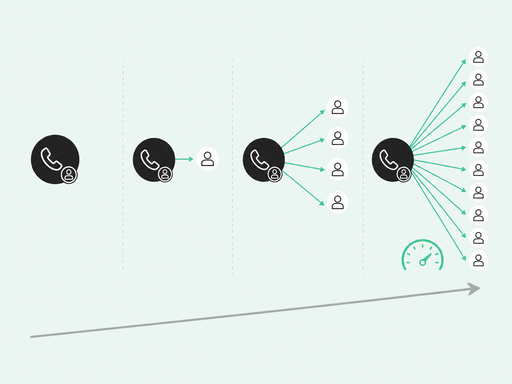
Dialer modes mostly answer one question: how many calls can a rep place per hour? Here's how the common types compare.
- Preview (click-to-call): The rep reviews context, then dials one contact at a time. Slowest, highest control, best for high-value accounts.
- Power (progressive) dialer: Places one call at a time, then moves on automatically once a call ends.
- Parallel (multiline) dialer: Rings several numbers at once and connects the rep to whoever answers first.
- Predictive dialer: Over-dials ahead of rep availability, so it's the fastest mode and the most sensitive to compliance rules.
Throughput climbs with each step. According to Kixie, manual dialing runs near 15-20 calls an hour, power dialing 60-90, and parallel or predictive as high as 110-300.
Speed has a cost, though. Parallel dialing trades connect quality for volume. You place more calls, but a smaller share become real conversations, and some prospects get dead air while the system connects a rep.
So mode is a throughput setting, not a pipeline strategy. It changes how fast you work a list, not whether the list is worth working. That's the part every dialer comparison skips, and the part that decides your results.
Why Speed Alone Won't Fill Your Pipeline
Start with the connect math. Belkins's 2026 study of more than 175,000 dials found a 9.9% per-dial connect rate, or roughly one in ten calls reaching a live person.
Faster dialing multiplies the connects and the misses alike. If the list is wrong, you mostly get more misses.
Answer rates are also working against raw volume. According to Hiya's 2024 State of the Call, 46% of unidentified calls go unanswered. In the same study, 92% of consumers assume an unknown caller is fraudulent. People are also 77% more likely to answer when they recognize the number.
Local presence used to paper over this. Its returns are shrinking, though, as carriers and consumers flag unknown numbers more aggressively.
Then there's how reps spend the week. Salesforce's State of Sales pegs selling time at about 28% to 30% of the week. HubSpot data puts active selling near two hours a day.
Treat that as an established baseline, not a fresh measurement. Either way, dialing faster through a bad list just burns more of an already-scarce hour.
And the list itself is usually the weak link. Validity's State of CRM Data Management 2025 found that 76% of organizations say less than half their CRM data is accurate. The same report found that 37% lose revenue directly to poor data quality.
A dialer inherits every one of those wrong numbers and stale titles. It can't tell a decision-maker from a contact who left the company six months ago.
The good news: You can fix this. After putting identity resolution behind its CRM, incident.io cut account duplicates from about 3% to 0.8% across more than 140,000 accounts. It also recovered thousands of contacts that routing had lost.
As we say internally, AI without context is just noise. Any automation is only as good as the data going in. That's why "just add more dials" hits a ceiling no dialer mode can raise.
What a Sales Dialer With Data Really Means
"Data" in a dialer means two very different things, and most vendors sell buyers only the first one.
The first meaning is contact data and logging: phone numbers, CRM fields, and automatic call records that sync back so reps skip manual entry. That's genuinely useful, and it's table stakes. Every serious dialer should do it.
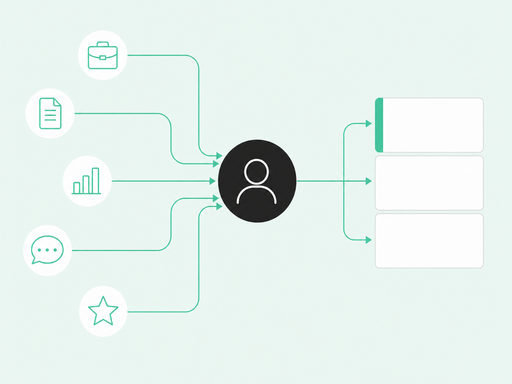
The second meaning is buyer intelligence: the signals and resolved identity that decide who to call and when. This is the higher-leverage layer, and it separates a dialer with data from a dialer with a directory.
A data-driven dial list should answer three questions before a rep ever picks up:
- Who to call: the specific person showing intent, not just the company.
- When to call: the moment activity spikes, while interest is live.
- Why now: the signal that makes the call relevant, so the rep opens with context instead of a guess.
Signals build and rank the queue: a job change, a pricing-page visit, product-usage patterns, community activity, and review-site research. Identity resolution then stitches that activity to a real person and an accurate number, so you dial the right individual rather than a switchboard.
Timing is the multiplier that ties it together. Chili Piper's 2025 benchmark found that instant self-scheduling booked 66.7% of meetings, versus 30% for standard follow-up.
Speed on the phone matters, but only once you're calling the right person at the right moment. A dialer that surfaces the signal and puts the rep on the phone while the buyer is still evaluating beats one that only dials faster.
Common Room by Zoom works in exactly this territory. Person360 resolves identity across anonymous and known activity, and Context360 turns that into a person-level view of each buyer.
RoomieAI surfaces the highest-priority signals and helps automate outreach. As reps act, outcomes write back to that shared view, so the next call list gets sharper.
What to Look For in a Sales Dialer With Data (Buyer's Checklist)
If you're evaluating tools, judge them on the data behind the dial as much as the dialing itself. Here's a practical checklist.
- Signal-driven call lists: Does the queue update from live buying signals, or is it a static import that goes stale on day one?
- Identity and enrichment: Look for person-level resolution and verified phone data, since accurate mobile numbers connect far faster than switchboard lines.
- Context on every call: Reps should see account, contact, and prior-conversation context before and during the call, without switching tools.
- Real dialing modes: Power, parallel, and staggered options matter when you genuinely need volume, so throughput and control both stay in reach.
- Native CRM and sales engagement platform (SEP) logging: Calls should auto-log to Salesforce, Outreach, and Salesloft, so no one rebuilds the record afterward.
- Compliance built in: Do-not-call handling, timezone-aware calling windows, and consent-aware controls should ship with the product, not bolt on later.
A quick gut check helps here. If a vendor spends the whole demo on calls per hour and skips how the list gets built, watch out. You're looking at a faster way to work a bad list.