
The deal looked like a lock. Then your champion went quiet, and two weeks later the opportunity slipped to "closed lost."
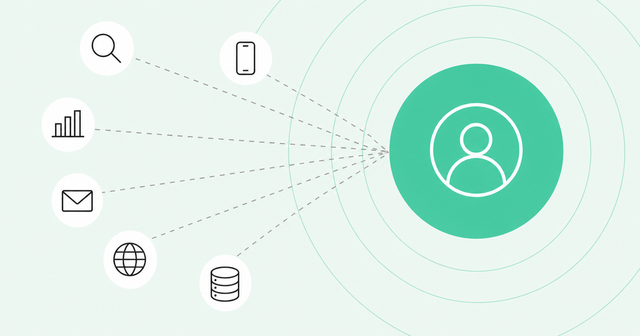
The signal was there the whole time. Your enrichment tool caught the champion's job change, and your intent tool saw a new evaluator researching your category. Nobody connected the two, because they lived in different tabs.
That's the real question behind GTM tech stack consolidation, and it has less to do with how many tools you pay for than you'd think.
What Is GTM Tech Stack Consolidation?
There's no magic number. Sales teams without an all-in-one platform average about eight standalone tools, according to Salesforce, and broader GTM teams often run 11-15, according to a vendor survey. The time to consolidate is when your tools stop sharing one view of the buyer.
GTM tech stack consolidation means reducing the number of separate systems your go-to-market (GTM) team uses to find, prioritize, and engage buyers. A point solution is a tool built to do one job, like enrichment, intent data, or dialing. A platform handles several connected jobs on one shared set of data.
Point solutions aren't bad on their own. The trouble starts when each one holds a different slice of the buyer and nothing ties those slices together. So instead of counting logos, count your sources of buyer truth: the places a rep has to check to understand one person or account.
How Many Tools Does a Typical GTM Stack Run?
The Salesforce State of Sales report found teams without an all-in-one platform use a mix of standalone tools, "an average of eight per team." Only about a third of sales teams run on a single platform. Salesforce surveyed 4,050 sales professionals across 22 countries in late 2025.
The same report found that 42% of sales reps feel overwhelmed by too many tools. It also found that 84% of teams without an all-in-one platform plan to consolidate their tech. Keep in mind that Salesforce sells a platform, and planning to consolidate isn't the same as doing it.
Widen the lens past sales and the numbers climb. "The median GTM team runs 11-15 SaaS tools," according to a 2026 GTM operations survey from GTMStack. That's a vendor survey of 847 self-selected respondents, and its largest single group actually ran 6-10 tools.
Counts vary for a few practical reasons:
- Motion: In our experience, inbound and product-led teams add web and product signals, while outbound teams stack prospecting and dialing tools.
- Company size: Larger companies run more teams, more regions, and more approvals, so they often add more specialized systems.
- History: Every new hire, initiative, and budget cycle can leave a tool behind, even after its owner moves on.
Linda Lian, co-founder and CEO of Common Room, described the result plainly. "A dozen systems that each know something about the customer, but none of them know the whole customer," she said.
5 Signs It's Time to Consolidate
Benchmarks tell you whether your stack is normal. They don't tell you whether it works.
These five signs matter more than any tool count. If several sound familiar, it's time to plan your GTM tech stack consolidation.
1. The Same Buyer Lives in Five Places
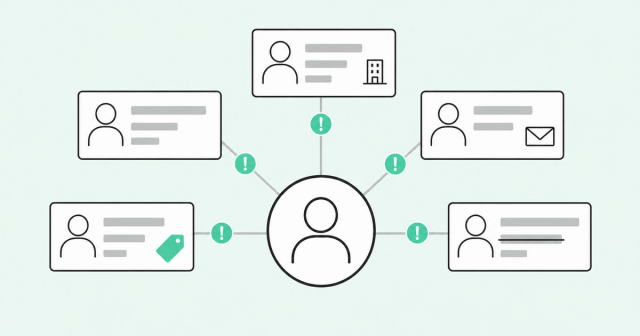
Pull up one active buyer. Check your CRM, your enrichment tool, your engagement platform, and your intent provider, and you'll likely find different titles, emails, or even companies.
That's a duplicate record problem, and it's common: Salesforce ranks duplicate data as the No. 2 data issue for teams using AI agents, right behind manual errors. Each copy drifts a little further from the truth with every sync, which is the real cost of fragmented data.
- Reps lose trust: When records disagree, reps stop believing any of them and start doing their own research.
- AI gets worse: AI agents can only reason over the data you give them, so conflicting records produce conflicting answers.
2. Reps Toggle More Than They Sell
Context switching is the time you lose moving between apps and refocusing on the task. It's easy to ignore because it happens in seconds, but those seconds add up across a day.
One study on app toggling found "workers toggled roughly 1,200 times each day, which adds up to just under four hours each week reorienting themselves after toggling." Harvard Business Review published it in 2022, and it covered 137 digital workers at three Fortune 500 companies, not sellers.
Sales-specific data is thinner, but the pattern is familiar. A rep who checks four tools to prep one call loses time and, more importantly, the thread of the story.
3. Your Scores Disagree With Each Other
Your intent tool says an account is hot. Your fit score says it's a poor match. Your engagement score says nobody has opened an email in a month.
When three scores point three ways, reps often ignore all of them and go with their gut. A score only helps if reps understand why it says what it does. That's the case for transparent AI lead scoring built on one shared view of the buyer.
4. Integration Upkeep Eats Your RevOps Calendar
Every point solution needs a connection to something else. Those connections run on syncs, webhooks, and field mappings that break when a vendor changes its API or someone renames a field.
If you've ever heard "only ops really understands how it works," you know the feeling. Your RevOps team ends up maintaining plumbing instead of improving how the team sells. Moving that work into the RevOps orchestration layer gives your team one place to build and govern workflows.
5. You Pay for Seats Nobody Opens
Overlap shows up on the invoice, too. Two tools enrich contacts, three send alerts, and half the seats haven't logged in since onboarding.
Across all company software, not just GTM, Zylo's 2026 SaaS Management Index found "organizations leave an average of 36% of their SaaS licenses unused." Zylo sells SaaS management software, and its data comes from its customers. The cost is real, but it's a symptom: Unused seats can signal that a tool never fit how reps actually work.
What to Consolidate vs. What to Keep Separate
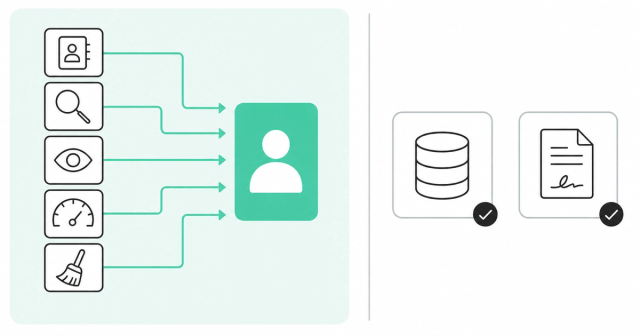
Not every tool belongs in the same bucket. Consolidate the context layer first. That's every tool whose main job is telling you who the buyer is and whether they're ready.
A system of record is the official home for a type of data, like your CRM for deals and contracts. You keep systems of record and specialized workflow tools. You consolidate the tools that each hold a partial picture of the same buyer.
| Category | What it does | Keep or consolidate | Why |
|---|---|---|---|
Enrichment | Fills in contact and company details | Consolidate | It should feed one buyer profile, not compete with others |
Intent data | Shows who's researching your category | Consolidate | Intent only matters next to fit and engagement |
Web visitor identification | Matches site visits to people and accounts | Consolidate | Anonymous visits need identity resolution to become action |
Scoring | Ranks people and accounts by readiness | Consolidate | One explainable score beats three competing ones |
Data hygiene | Deduplicates and updates records | Consolidate | Clean data should be a continuous process, not a project |
CRM | Stores deals, contacts, and contracts | Keep | It's your system of record for revenue |
Dialer and sequencing | Calls and emails buyers | Consolidate when native to the intelligence layer | Action works best on the same data that triggered it |
CPQ and legal tools | Handle quotes, pricing, and contracts | Keep | These are specialized workflows with their own owners |
Identity resolution is the process of matching scattered activity, like an anonymous web visit and a known email, to the same real person. It's the piece that makes the context layer work. Unified buyer intelligence combines enrichment, signals, and identity resolution into one person-level view that your CRM and reps can use.
How to Plan a Consolidation Without Disrupting Reps
The biggest risk in GTM tech stack consolidation isn't technical. It's reps quietly going back to the old tools because the new setup slowed them down.
A good plan protects rep habits while you change what runs underneath. Here's an order that works for most RevOps teams.
Audit Every Tool by Job and Buyer Data
List each tool, the job it does, who uses it, and what buyer data it holds. Then mark where two or more tools hold the same data.
- Job: Write the one task each tool exists to do, in plain words.
- Buyer data: Note which fields and signals the tool owns or copies.
- Real usage: Check logins and activity, not just seat counts.
Pick One Source of Buyer Truth
Decide which system owns the complete view of each person and account. Everything else should read from it or write back to it.
For enterprise teams, this is also a governance decision. You'll want granular permissions, clear ownership, and security controls like SSO and SOC 2 before the whole team depends on one layer.
Migrate One Motion at a Time
Don't switch everything on one Monday. Start with a single motion, like inbound lead routing or one outbound segment, and prove it works before you move the next one.
Embed Insights Where Reps Already Work
Reps live in the CRM, Slack, and email. Push prioritized accounts and next steps into those surfaces instead of asking reps to learn a new place.
Clean Data as You Go
Consolidation is the best moment to fix duplicates, because you're already touching every record. Automated CRM data hygiene keeps records accurate after the migration ends, so you don't slide back.
Measure Adoption and Pipeline
Savings are easy to measure, but they're the wrong headline for GTM tech stack consolidation. Track whether reps act on the insights, how fast they follow up, and how much pipeline comes from prioritized accounts.
If you own this process, see how Common Room for RevOps teams handles routing, scoring, and workflow governance in one place.
Consolidation Is the Easy Part. Shared Context Is the Point.
In our view, the market is consolidating fast. But bundling acquired tools under one contract doesn't make them share context, and product integration alone won't fix a fragmented view of the buyer.
That's why Common Room and Zoom built Revenue OS around three connected steps:
- Know: Common Room's buyer intelligence gives you one trusted, person-level view of every buyer, from anonymous research to renewal.
- Act: Zoom's native calling, sequencing, coaching, and forecasting turn that view into coordinated action, with no separate tool to integrate.
- Learn: Every closed deal, coached call, and buyer signal writes back to the shared context, so prioritization gets sharper over time.
Your team already has plenty of data and plenty of activity. What it needs is a layer that turns that volume into the right next step for the right person. Here's what a Revenue OS looks like in practice.
FAQ
How Many Separate Point Solutions Does a Typical GTM Stack Need Before Consolidating?
No number triggers it: Salesforce reports that sales teams without an all-in-one platform average about eight standalone tools, and a GTMStack vendor survey reports a median of 11-15. Consolidate when your tools stop sharing one view of the buyer.
What Is a Point Solution in GTM?
A point solution is a tool built for one job, like enrichment, intent data, or dialing. It becomes a problem when its data stays siloed from the rest of your stack.
Should You Replace Your CRM When Consolidating?
Usually not, because your CRM is your system of record for deals and contracts. Consolidate the buyer context around it so the CRM gets cleaner, more complete data.
What Should You Consolidate First?
Start with the context layer: enrichment, intent, web visitor identification, scoring, and data hygiene. These tools hold overlapping views of the same buyer, so combining them delivers the biggest gain in clarity.
How Do You Measure Whether Consolidation Worked?
Track rep adoption, speed to follow-up, data quality, and pipeline from prioritized accounts. Cost savings matter, but they should be a result, not the main goal.