
In a recent webinar, Erin Kriese from the Zoom Revenue Accelerator product marketing team and Jared Wexler, head of solutions consulting at Common Room, walked through how to make your many automations actually work for you: by making them work together.
Take a look at the full webinar here:
Here are the takeaways you can use, whatever your stack looks like.
What is the real problem with sales automation?
Sales automation breaks down when each tool works from its own slice of data. Nearly every tool in the stack now has its own AI, covering signals, enrichment, sequencing, and calling. But six sets of intelligence that don't share context aren't an advantage. They're just six more tools you have to check, and odds are good they contradict each other.The result is a handoff chain that looks like this:
- Discovery happens in one system.
- The follow-up gets drafted in another.
- Notes get retyped into the CRM, or they don't, and the record quietly stops being true.
- The forecast gets assembled last, from whatever survived the handoffs.
In short: you're missing a lot of context by having to play this game of telephone with your workflows. No good. At the webinar, we asked attendees how often a buyer signal reaches the right rep with context attached. Most landed in the middle: "sometimes, but only after someone passes it along by hand," or "usually, but the context gets lost along the way." The integration layer, in other words, is a person. And that doesn't scale.
How do you decide which automations are worth keeping?
Run every automation through four questions. This is the framework from the webinar, and it works as a quick audit for any alert, sequence, or workflow you've built.
| Ask | If the answer is no... |
|---|---|
Does it trigger from a real buyer signal, not just a date or field change? | It's a step behind the buyer. Rebuild it on signal. |
Does it carry the context with it: who, why, and what happened? | The next person starts from zero. Connect it to shared context. |
Can another team reuse it? | It's a one-off. Turn it into a play or template. |
Does its outcome feed back into what you know? | It can't get smarter over time. Close the loop. |
If an automation passes all four, keep it. If it fails most of them, that's likely where pipeline is slipping through, and you'll need to reevaluate the "work" it's doing for your sales motion.
How to apply the test this week
- List your top 10 automations: alerts, sequences, routing rules, and roll-ups.
- Score each one against the four questions.
- Start with the ones that fail question one. A date-based trigger is the most common culprit, and the easiest to rebuild.
- For anything that fails question three, ask whether another team is already solving the same problem a different way.
The common thread across all four questions is context. An automation that fires on a real signal but arrives without the who and why still sends your rep digging.
What does a signal-based workflow look like in practice?
Jared demoed three moments in one buyer's journey, using a fictional prospect named Laura. Clips of each are embedded below.
1. Capture the signal and unify the identity
Laura visited the pricing page, a webinar page, and a page about a specific product SKU. She also engaged with the company LinkedIn page and replied to a post on X. None of that is unusual. The problem is that most of it never reaches sales.
Two things made the difference in the demo:
- Signals from outside the CRM sit next to CRM data. Website visits, social engagement, CRM records, and historical call context appear in one activity view in Common Room.
- Identity resolution treats Laura as a person, not an email. She had a current work email, a previous employer's email, a Twitter handle, and a LinkedIn profile. A webinar she attended a year ago at her old company still counts, because the history stays attached to her.
Person360, Common Room's identity resolution engine, handles that matching. Person-level enrichment (firmographic, demographic, and technographic) then rolls up to the company level, so you see Laura's context alongside everyone else engaging at her company.
Takeaway: If your signals are keyed to an email address, every job change resets the buyer's history. Resolve identity at the person level first, and everything downstream improves.
2. Tell the rep what to do next
Once the system knows who Laura is and why she matters, the rep doesn't have to hunt. As Jared put it, the rep wakes up, pours a coffee, and the next task is already waiting: email or call Laura, from the same screen.
In the demo, that happened in Engage, the multichannel sequencing tool, where the rep could send the email or place the call without leaving the task. For call-heavy teams, Zoom Auto Dialer handles the dialing directly, including from an Engage sequence.The tools aren't the point. Nobody had to form the hypothesis by hand. The signal was picked up, the reason to reach out was clear, and the rep got everything needed where they already work. That frees reps to send emails, make calls, and book meetings, not dig through the CRM and six tabs.
Takeaway: Judge your outreach workflows by how much research a rep has to do before the first touch. If the answer is "a lot," the signal isn't carrying its context.
3. Recover quiet deals with judgment, not a fixed rule
Most stalled-deal alerts work like this: flag the deal if there's been no activity in 7 days. The problem with that method is that it treats every deal the same.
Jared showed a different approach, built in the agentic workflow builder. A weekly workflow takes a snapshot of every account you're working, then runs an AI reasoning step that asks whether the account is worth re-engaging. Instead of one rule, it weighs several signals together:
- Is the account visiting the pricing page?
- What was the customer's talk time on the last call?
- Are economic buyers engaged?
- Are there stakeholders you should be talking to but aren't?
Based on what it finds, the workflow can notify the rep, add the contact to a sequence, write updates to the CRM, and ask the rep to approve the action. You can build in a delay and branch on how the revival effort goes. The key reframe from the webinar? A stalled deal isn't a dead deal if the buyer signals are still active. The question isn't "is this stalled?" It's "is this recoverable?"
Takeaway: Replace one-rule stall alerts with a short list of signals that separate recoverable deals from dead ones. Then match the rescue effort to the deal.
How do you build a play for your own team?
When building for your revenue motion, try this, whether you're automating deal recovery, forecast accuracy, or another piece of the puzzle. Start from a template, then tune three things:
- Trigger: Which signals fire the play?
- Audience: Which segments, stages, or regions does it cover?
- Action: What happens next? A follow-up, a CRM update, or a summary for the manager.
Or skip the template and build a custom agent for a play only your team runs.
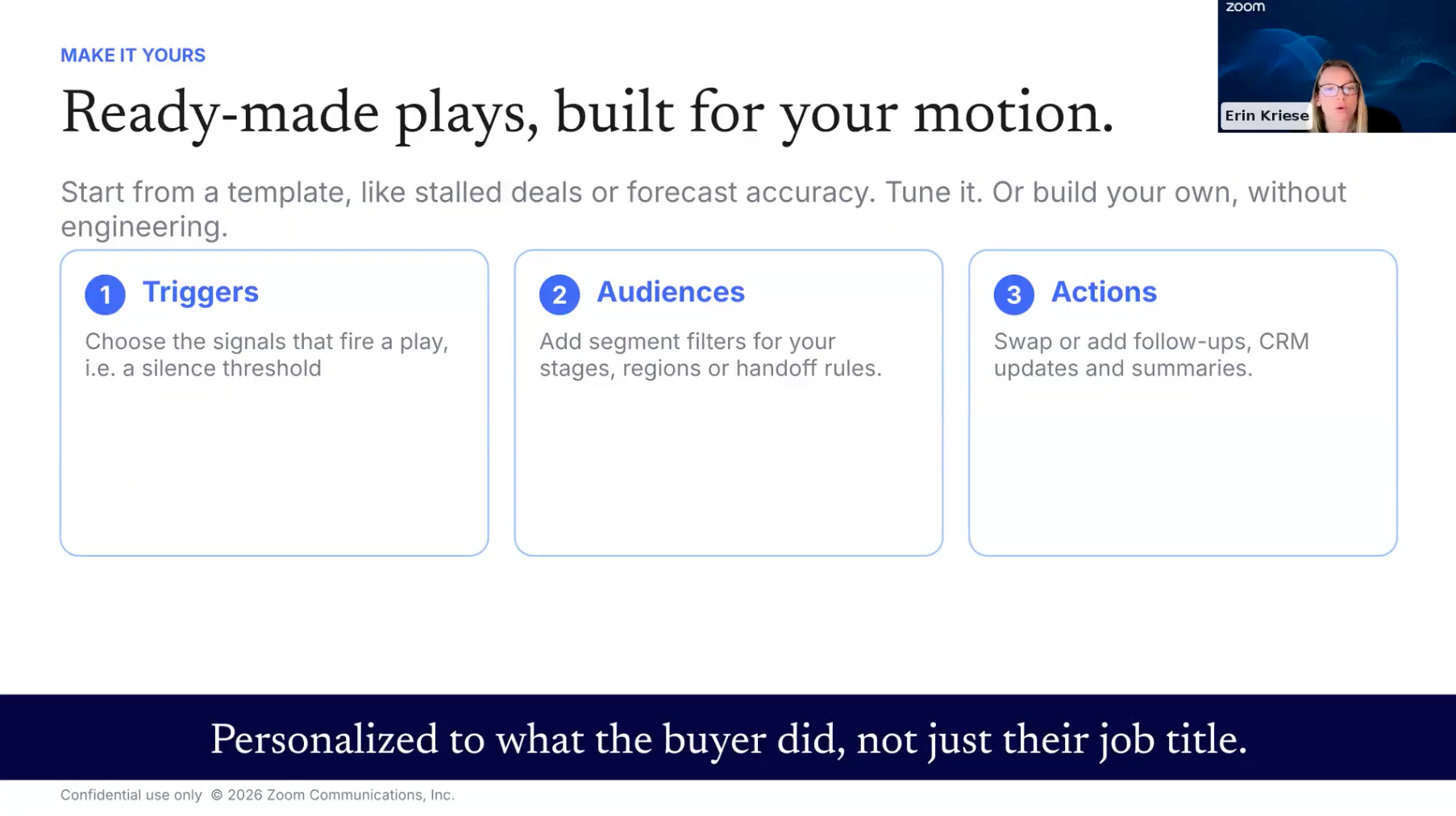
The webinar's point was that RevOps shouldn't need to file a ticket or wait a quarter to do this. Whatever tooling you use, that's a good standard to hold: the person who understands the motion should be able to change the play.
Why does shared context matter from first signal to renewal?
Because every handoff is where context leaks. The full motion runs from a buyer signal through routing, deal execution, coaching, forecasting, expansion, and renewal. When one context layer carries through that whole arc, you get three things:
- No copy-paste between steps. The same signal and history follow the deal.
- Personalization based on what the buyer did, not just their job title.
- A loop that improves. Outcomes from resolved deals feed back into shared knowledge, so coaching, content, and targeting get sharper each quarter, and the next cycle starts smarter than the last.
Once a meeting is booked, that same context can carry into AI coaching and live guidance through Sales Assist, plus role-play practice built on real deal context, and into Forecast, so the forecast reflects the signals behind each deal, not whatever survived the handoffs. These products are part of Zoom Revenue Accelerator.
The alternative is what many teams live with today: your people stitch together one-off automations, then stitch them again when something changes.
Key takeaways
- Audit before you build. Score every automation on the four questions: real signal, carried context, reusability, and feedback loop.
- Rebuild date-triggered automations on buyer signals first. They're the furthest behind the buyer.
- Resolve identity at the person level, so a job change doesn't erase a buyer's history.
- Swap one-rule alerts for multi-signal judgment, especially for stalled deals.
- Ask "is it recoverable?" instead of "is it stalled?"
- Build plays from three parts: trigger, audience, and action.
- Close the loop. If an outcome doesn't feed back into what you know, the automation can't improve.
Frequently asked questions
What is a buyer signal?
A buyer signal is an action that suggests someone is interested in what you sell. Examples include visiting your pricing page, attending a webinar, asking a detailed question, or engaging with your company on LinkedIn or X. Many signals happen outside the CRM, in what's often called the dark funnel.
What makes a sales automation "context-aware"?
A context-aware automation carries the who, why, and what happened with it. A rep who receives it can act without opening five other tools to understand the situation.
How is an agentic workflow different from a traditional workflow builder?
A traditional workflow follows fixed rules, such as "no activity in 7 days." An agentic workflow adds a reasoning step that weighs several signals together, such as pricing page visits, call talk time, and decision-maker engagement, and branches based on its assessment. Admin guardrails and approvals keep the actions within your policies.
Why do stalled deals get marked at risk too late?
By the time a deal is flagged, the signals that mattered have often been quiet for weeks. And not every stalled deal deserves the same rescue effort. Checking whether buyer signals are still active tells you which deals are recoverable.
Can RevOps build its own plays without engineering?
Yes, in the platform shown in the webinar. RevOps can start from a template or build a custom agent, choosing the trigger, audience, and action without filing an engineering ticket.
Catch the next one live
We run webinars like this regularly, with real demos and frameworks you can use the same day. See what's coming up and save your spot on our events page.