
Your rep sends 50 cold emails. A handful bounce, two reach people who left last spring, and one goes to a VP whose title is two jobs old.
Then your CRM shows three records for the same buyer, and nobody knows which one is right. If that sounds familiar, you're probably looking for the best B2B contact database, or wondering if yours is worth keeping.
This guide explains how contact data works, how to judge vendors, and how to pick the right fit. We wrote it for revenue operations (RevOps) and go-to-market (GTM) leaders who own data quality, including people new to the category.
What Is the Best B2B Contact Database?
There's no single best B2B contact database for every team. The best one fits your ideal customer profile (ICP), keeps records accurate and deduplicated, syncs to your CRM, and shows who to contact now.
A B2B contact database is a searchable directory of business contacts, with names, titles, work emails, and phone numbers. Your ICP is the type of company and buyer most likely to buy from you.
Here's how common leaders line up by fit, based on vendor listings in the G2 sales intelligence category. We also checked each tool's profile on Gartner Peer Insights revenue data pages. These are our editorial assessments based on how teams commonly use each tool, so verify current features with each vendor.
- ZoomInfo: G2 calls it an enterprise-grade platform for finding decision-makers, and Gartner Peer Insights notes its broad contact database.
- Apollo.io: Per G2, it pairs B2B prospecting data with outreach sequencing, and 67% of its G2 reviewers work at small businesses.
- Cognism: Per G2, it offers verified direct dials and focuses on European data, so it suits phone outreach in Europe, the Middle East, and Africa (EMEA).
- Lusha and LinkedIn Sales Navigator: G2 reviewers use Lusha for quick LinkedIn lookups, and Gartner Peer Insights notes Sales Navigator builds on LinkedIn data.
- Clay: Its G2 product profile says it aggregates 100+ data providers, so it suits teams that build their own enrichment workflows.
- Common Room: It ties enrichment to buyer signals, so reps see who's showing interest right now.
Getting this choice right matters because bad data is expensive. Gartner data quality research notes that "poor data quality costs organizations at least $12.9 million a year on average, according to Gartner research from 2020." That figure covers all kinds of business data, but contact records carry the same risk.
Contact Database vs. Enrichment Tool vs. Enrichment API
Most vendors sell one of three things: a contact database, an enrichment tool, or an enrichment API. Each solves a different problem, so picking the right type is your first buying decision.
Enrichment means filling in missing or outdated fields on records you already have. Our guide, B2B data enrichment explained, covers the basics.
Contact Databases
A contact database is a big, searchable list of people you don't know yet. You filter by title, industry, company size, or region, then export the contacts you want.
That gives you reach, but the list starts aging the moment you export it. A database gives you people to call, not a reason to call them today.
Enrichment Tools and Waterfalls
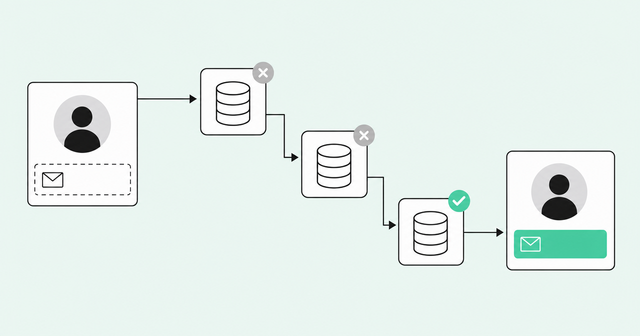
An enrichment tool fills in missing fields on records you already own. If a lead has a name and company but no email, the tool looks up the email and adds it.
A waterfall is enrichment that checks several data providers in order. If the first provider can't find an email, the tool asks the second, then the third, until one finds a match.
Your match rate is the share of records a tool fills correctly, and waterfalls usually win here. Our guide on how to choose an enrichment vendor cites Ascentrik Research, which puts single-source match rates at 50-70% and waterfalls at 80-95%. That's a practitioner benchmark, so test it on your own data.
The catch is overhead. Do-it-yourself waterfalls need someone to connect providers, write rules, and fix breaks. Many also run on credits, which makes monthly costs hard to predict.
Enrichment APIs
An application programming interface (API) lets one piece of software talk to another. A people enrichment API lets your systems send an email or name and get back a profile, with no one clicking buttons.
Product-led growth (PLG) companies, where people try the product before talking to sales, often use APIs to enrich signups instantly. Product and data teams like the flexibility.
The trade-off is ownership. Your team handles matching, deduplication, error handling, and upkeep, and deduplication alone can become a full-time job.
How the Three Options Compare
Here's how the three options look side by side.
| Option | What it does | Who uses it | Strengths | Trade-offs |
|---|---|---|---|---|
Contact database | Finds net-new contacts by search and filter | Sales reps and sales leaders | Fast reach into new accounts | Static once exported, with no buying context |
Enrichment tool or waterfall | Fills missing fields on records you own | RevOps and marketing ops | Higher fill rates across many sources | Setup, upkeep, and credit costs for DIY builds |
Enrichment API | Runs lookups from your own software | Product, data, and engineering teams | Flexible and fits custom workflows | Your team owns matching, dedupe, and upkeep |
Why Contact Data Goes Stale So Fast
Contact data starts aging the day you save it. People change jobs, companies reorganize, and carriers reassign phone numbers.
The US Bureau of Labor Statistics (BLS) tracks job turnover in its Job Openings and Labor Turnover Survey (JOLTS). The latest BLS JOLTS release reports: "In August, the number and rate of total separations were unchanged at 5.1 million and 3.2 percent, respectively."
Total separations count people who left a job that month through quitting, layoffs, retirement, or other reasons. The August 2026 figure is preliminary, seasonally adjusted, and covers all US nonfarm employers.
That's a measure of job turnover, not a contact decay rate. Still, it shows why records drift every single month.
So freshness has to be a process, not a one-time import. Ask every vendor how often it rechecks records you've already bought, and what happens in your CRM when it finds a change.
7 Criteria for Evaluating a B2B Contact Database
Use these seven criteria to find the best B2B contact database for what your reps and CRM actually need.
Most buying guides stop at coverage and accuracy. Deduplication, compliance, and signal context matter just as much, and they're easy to miss.
Coverage and Match Rate
Coverage means how many of your ideal buyers a vendor actually has. Headline database size doesn't tell you that, since a huge database can still be thin in your industry or region.
The fix is a bakeoff, which is a head-to-head test where every vendor gets the same list. Match coverage to your ICP, not to the pitch.
- Regions: Check coverage in every country where you sell.
- Segments: Check coverage at the company sizes and industries you sell to.
- Roles: Check coverage for the job titles your reps contact most.
Accuracy, Verification, and Freshness
Accuracy means the data is correct today. Verification is how the vendor checks it, such as confirming an inbox exists before it sells you the address.
A bounce is an email that fails to deliver because the address is bad. Ask vendors how they verify emails and phones, how often they recheck old records, and whether they refund bounced contacts.
Deduplication and Identity Resolution
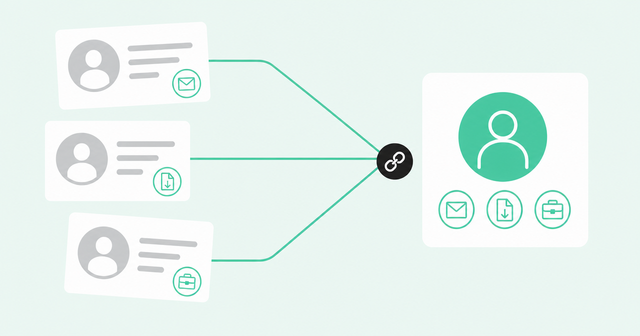
A duplicate happens when one person shows up as several records. Your buyer might start a trial with a personal Gmail, download a guide with a work email, and update LinkedIn with a new title.
Identity resolution is the process of linking those records to one person. Without it, enrichment can make things worse by writing data to the wrong record or creating a fresh duplicate.
Ask each vendor whether it merges identities before it writes back to your CRM. Common Room's identity merging reduces duplicate records by up to 79%.
CRM Sync and Workflow Fit
Data only helps if reps see it where they already work. For most teams, that's Salesforce or HubSpot, plus Slack and email.
Look for native sync, meaning a built-in connection instead of spreadsheet uploads. Check that write-back updates existing records instead of adding new ones, like our native CRM and GTM integrations do.
Compliance
Compliance means following the laws that govern how you collect and use personal data. This section is general information, not legal advice, so check with your legal team before you change how you source or contact people.
In Europe, the General Data Protection Regulation (GDPR) applies to B2B contacts. The EU GDPR scope guidance says: "The rules also apply to all personal data relating to natural persons in the course of a professional activity, such as the employees of a company/organisation, business email addresses [...] or employees' business telephone numbers."
The same page says GDPR doesn't govern data about companies themselves. It also notes that direct-marketing email must follow the ePrivacy Directive.
In the US, the California Consumer Privacy Act (CCPA) once had a temporary carve-out for B2B data. The California attorney general (AG) explains what changed. California AG CCPA guidance states: "The exemptions for employment-related personal information and personal information reflecting business-to-business transactions described in Civil Code Sec. 1798.145(m)-(n) expired on December 31, 2022."
That carve-out is gone. If your business meets the CCPA's thresholds, treat B2B contacts who live in California like any other consumer's personal information.
The CAN-SPAM Act sets US rules for commercial email, and the Federal Trade Commission (FTC) enforces it. The FTC CAN-SPAM compliance guide is clear: "The law makes no exception for business-to-business email."
The same guide says you must honor opt-outs within 10 business days. It also lists penalties of up to $53,088 per violating email, and the FTC adjusts that figure for inflation.
Ask every vendor where its data comes from and how it handles opt-out and deletion requests. Then ask how it passes those requests on to you.
Pricing Model
Per G2's sales intelligence category overview, pricing varies by seats, credit or usage limits, and enrichment volume. G2 adds that most vendors offer tiered annual contracts, and larger teams often move to custom pricing.
Credit models can create a quiet problem. In our experience, when every refresh costs a credit, teams ration refreshes, and records go stale.
Common Room's Enrichment has no additional cost per enrichment. It stays on in the background, so records stay filled and fresh without anyone counting credits.
Signal Context
A signal is an action that hints someone might be ready to buy. Examples include visiting your pricing page, starting a new job, or using your product more often.
Most databases tell you who exists, but fewer tell you who's in-market, meaning actively looking to buy. First-party signals are actions people take on your own website, product, or community.
Ask each vendor whether it connects contact data to those signals. That's the difference between knowing who to contact and knowing who to contact today.
Quick Vendor Scorecard
Bring this scorecard to every vendor call. Each row turns a criterion into one question and one warning sign.
| Criterion | Question to ask | Red flag |
|---|---|---|
Coverage and match rate | How many of our sample records can you fill correctly? | The vendor won't test your own list |
Accuracy and freshness | How often do you recheck records we've already bought? | No clear answer on refresh timing |
Deduplication | Do you merge identities before writing to our CRM? | Each enrichment adds a new record |
CRM sync | Is the sync native, or does it rely on file uploads? | Updates depend on spreadsheets |
Compliance | Where does your data come from, and how do you handle opt-outs? | Vague answers about sourcing |
Pricing | What does it cost to refresh records we already paid for? | Every refresh burns another credit |
Signal context | Can you show which contacts are showing buying interest now? | Only static filters like title and size |
Best B2B Contact Databases and Enrichment Tools Compared
Here's a plain-language view of common options for anyone shopping for the best B2B contact database, sorted by type and fit. Every vendor here does something well, and each has a trade-off worth knowing before you sign.
These are our editorial assessments based on how teams commonly use each tool, so verify current features with each vendor.
| Vendor | Type | Best for | Trade-off to know |
|---|---|---|---|
ZoomInfo | Contact database and data platform | Enterprise teams that want broad coverage, which G2 describes as enterprise-grade | Enterprise contracts can be more than a small team needs |
Apollo.io | Contact database plus outreach sequencing, per G2 | Small teams that want prospecting and sequences in one tool | Broad scope, so test data quality in your own regions and segments |
Cognism | Contact database with verified direct dials, per G2 | EMEA teams that rely on phone outreach | Its G2 listing centers on European data, so check fit if most buyers are elsewhere |
Lusha | Contact database with a Chrome extension, per G2 | Reps who look up contacts from LinkedIn and CRM workflows | Teams often use it for quick lookups, so heavy CRM hygiene work may need more tooling |
LinkedIn Sales Navigator | Prospecting tool built on LinkedIn data, per Gartner Peer Insights | Finding and following buyers on LinkedIn | Centers on profiles and messaging, so teams often pair it with an email and phone source |
Clay | Enrichment builder that aggregates 100+ data providers, per G2 | Teams with technical ops talent who want custom workflows | Someone has to build and maintain it |
UpLead | Contact database that emphasizes real-time email verification, per Gartner Peer Insights | Teams that want simple search, export, and verified emails | Worth comparing its workflow and signal tools against larger platforms |
RocketReach | Contact lookup that aggregates public-source data, per Gartner Peer Insights | Small teams doing one-off lookups, since 66% of its G2 reviewers work at small businesses | Worth testing for CRM hygiene and deduplication at scale |
Common Room | Signal-based enrichment and identity resolution | RevOps and GTM teams that want accurate profiles tied to buyer signals | Built for live profiles over bulk list exports, so it pays off most once you connect first-party sources |
Treat this table as a starting point. Your best B2B contact database depends on your ICP, so run your own bakeoff before you decide.
Where Common Room Fits
Here's a problem that better contact data alone doesn't solve. Your records can be complete and accurate, and reps still won't know who to call today.
That's the gap we built Common Room by Zoom to close. It connects the data you already have to what buyers are doing right now, then ranks who deserves attention first.
- Identity: The Person360 identity resolution engine stitches anonymous and known activity into one deduplicated, person-level profile.
- Enrichment: Common Room's always-on waterfall enrichment fills missing emails, phones, and titles across dozens of providers.
- Pricing: Enrichment has no additional cost per enrichment, so refreshes don't depend on credit budgets.
- Match rates: Person360 and Enrichment deliver 30-50% higher match rates in enrichment bakeoffs.
- Duplicates: Identity merging reduces duplicate records by up to 79%.
- Prospecting: Teams use signal-based prospecting with Prospector to search 400M-plus B2B profiles by fit and buying context.
Pratyusha Ram, GTM Systems at Notion, described the change in terms of daily rep work. "Common Room has consolidated our prospecting stack and streamlined our sales prospecting motion. Our reps have a unified, person-level view at their disposal," Pratyusha said.
Zoom acquired Common Room in a deal the companies agreed in early July and closed in July 2026. Now we pair our buyer intelligence with Zoom's action layer, so reps act on the right buyer from the same context.
The Zoom revenue OS announcement lays out that action layer. Engage builds multichannel sequences across email and phone, and Auto Dialer, available separately, supports Engage calling tasks. Forecast writes commitment and deal updates back to the CRM.
During live calls, Zoom Revenue Accelerator's Sales Assist surfaces objection guidance, discovery prompts, and battlecards. Our Revenue OS vision post describes where we're headed: "Every outcome becomes context for the next decision."
To be fair about fit, a simpler database may be enough if you only need a one-time list export. Common Room earns its keep when you want records that stay accurate and tell reps who's ready.
How to Choose the Right Option for Your Team
Start with your situation, not the vendor list. This table maps common situations to the type of tool that usually fits.
| Situation | What usually fits | Why it fits |
|---|---|---|
Enterprise outbound | Large contact database plus enrichment | Breadth across many accounts and regions |
SMB outbound | All-in-one database with outreach tools | One place for a small team to search and send |
EMEA calling | Database with strong European phone data | Calling depends on accurate mobile numbers |
RevOps CRM hygiene | Always-on enrichment with identity resolution | Keeps existing records complete and free of duplicates |
PLG or inbound | Signal-based enrichment tied to product and web activity | Shows which signups and visitors fit your ICP |
Product or data teams | People enrichment API | Lets engineers enrich records inside your own systems |
Once you've narrowed the list, run a 14-day pilot on your own data. A pilot is a short, real-world test, and it tells you more than any demo.
- Match rate: Measure how many of your sample records each vendor fills correctly.
- Bounce rate: Send a small batch and track how many emails fail to deliver.
- Duplicates created: Count how many new duplicate records land in your CRM after sync.
- Rep adoption: Ask whether reps actually open and use the data during the pilot.
Don't skip the duplicates check. A tool that fills fields but clutters your CRM creates cleanup work for RevOps later.
Frequently Asked Questions About B2B Contact Databases
Here are quick answers to the questions buyers ask most.
What Is the Best B2B Contact Database for Most Teams?
The best B2B contact database covers your ICP, stays accurate and deduplicated, syncs to your CRM, and shows who's ready to buy. Run a pilot on your own list to find it.
How Accurate Is B2B Contact Data?
Accuracy varies by vendor, region, and role, and every record starts aging as people change jobs. Test vendors on your own sample and ask how often they recheck records.
How Do Providers Source and Verify Contact Data?
Sources and verification methods vary by vendor. RocketReach, for example, aggregates data from multiple public sources, per its Gartner Peer Insights profile. Ask each vendor to disclose its data sources, verification method, and refresh cadence in writing.
What Does a B2B Contact Database Cost?
Pricing varies by seats, credit or usage limits, and enrichment volume, according to G2, and larger teams often move to custom pricing. Ask what refreshes cost, since credit limits can leave your records stale.
Which Contact Database Is Best for GDPR and Europe?
Look for strong European coverage and clear answers on sourcing, opt-outs, and deletion, since GDPR treats named people's work emails as personal data. This isn't legal advice, so confirm your approach with your legal team.
What's the Best Email Enrichment Tool?
The best email enrichment tool fills missing work emails, verifies them before writing back, and avoids duplicates in your CRM. Waterfall tools usually find more emails than one source because they check several providers in order.
What Is a People Enrichment API?
A people enrichment API is a service your software calls to look up a person's profile from an email, name, or company. It's flexible, but your team handles matching, deduplication, and upkeep.
Do B2B Contact Data Providers Offer Free Trials?
Some providers, such as Clay, offer free plans, according to their G2 listings. Either way, test the data on your own list and confirm what's included before you start.
The Bottom Line on Choosing a B2B Contact Database
A bigger contact list won't fix pipeline on its own. What helps is accurate, deduplicated records and a clear view of who's ready to talk.
Pick the system that keeps your CRM clean and tells reps who to call today. The best B2B contact database is the one your reps trust enough to use.
Request a demo to see how Common Room ties enrichment to the buyers who are ready now.