
It's the third AI planning meeting this quarter. Someone pastes a prospect's website into a chat window and gets a decent account summary in 30 seconds. Then someone says it: "We can probably build a custom AI research agent ourselves."
The instinct makes sense. Reps lose hours to prep, and in 2024, Salesforce's 2024 sales research found that "Sales reps report spending 70% of their time on non-selling tasks." If a model can write a brief in seconds, why pay for anything?
This guide covers what a build really takes, what a platform agent gives you instead, and how to decide. You'll get a component list, a decision table, and a step-by-step test you can run on your own accounts.
The Short Answer
Yes, you can build a custom AI research agent on a general-purpose model. The honest tradeoff is that the model is the easy part, and the buyer data underneath it is where builds slow down. Identity, freshness, and CRM sync take most of the effort, and they need upkeep forever.
A quick definition first. An AI agent is software that uses a large language model (LLM) to choose steps and tools to finish a task. For more background, read our guide on how AI agents work in GTM, short for go-to-market.
An account research agent is one specific kind of AI agent. It gathers what you know about a company and its buyers, then writes a brief a rep can act on. An out-of-the-box agent is one that ships ready to use inside a product, with the data plumbing already done.
So here's the practical rule. Buy the foundation when your edge isn't in data plumbing. Build the parts only your team knows, like your messaging, personas, and tone.
What It Takes to Build a Custom AI Research Agent
Most guides describe an agent as three parts: a model, tools, and instructions. That's accurate, but an account research agent adds a fourth part that most tutorials skip, and that's GTM data work.
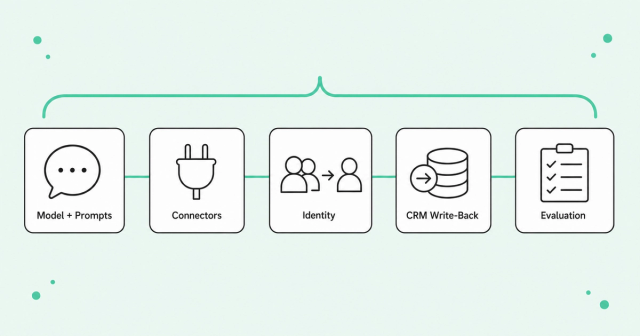
If you build a custom AI research agent, you'll own the five components below. Each one is doable on its own. The hard part is keeping all five healthy at the same time.
The Model and Prompt Maintenance
Picking a model takes an afternoon. Keeping it useful takes much longer. Prompts are the written instructions that tell the model what to do, and they drift as vendors update models and your sales motion changes.
A brief format that worked in March may break after a model update in June. A new product launch means new talking points and new rules. Someone needs to own prompts, output formats, and testing, and that person usually already has a full-time job.
Data Connectors
A useful account brief pulls from many places: your CRM, website visits, product usage, intent data, hiring trends, and news. Each source has its own API, which is the interface software uses to share data. Every API comes with login rules, rate limits, and format changes that can quietly stop data from flowing.
Here's what tutorials leave out about summarizing an account across several sources into one brief. The summary is the last and easiest step. Most of the effort goes into collecting, cleaning, and matching the inputs, which explains why GTM AI stalls before production at so many companies.
Identity Resolution
Identity resolution is the process of figuring out which records belong to the same real person or company. One buyer might be four records: a CRM contact, an anonymous site visitor, a product user, and an event attendee. Your agent has to know they're all one person.
When identity breaks, the agent writes confident briefs about the wrong person. That's the root cause of stale personalization and accounts routed to the wrong rep. Building reliable matching logic yourself is a serious project.
This is the problem we built Person360 to solve. Our identity resolution engine stitches together anonymous and known activity, so each brief starts from one complete picture of the buyer.
CRM Write-Back
Write-back means the agent saves its output into your CRM, like Salesforce or HubSpot. It matters because briefs that live in a separate tab don't get used. Reps work in the CRM, so that's where research needs to land.
Write-back also needs rules. Which fields can the agent update, and what happens when it finds a duplicate? Can it overwrite a value a rep entered by hand?
Without those rules, an agent can make your data worse at machine speed. Common Room continuously identifies duplicates, stale records, and gaps to help you keep CRM records accurate. Whatever you choose, budget for data upkeep as an ongoing job.
Evaluation
Evaluation is how you check that the agent's briefs are correct and useful. Start by writing down what a "good brief" includes, how long it runs, and which decision it supports. Then test the agent on accounts your team already knows well.
After launch, track two things: whether reps open the briefs and whether the facts hold up. Watch closely for hallucinations, which are confident statements the model made up. They show up most on accounts with little public data, where the model fills gaps with guesses.
Data quality drives these results. The Salesforce State of Sales report found that "46% of sales pros with agents say data quality issues hurt their sales." Salesforce surveyed 4,050 sales professionals in 2025 for that edition, and it sells a CRM, so read it as vendor research.
What a Platform Agent Provides
A platform agent is an AI agent built into a GTM platform that already holds your buyer data. Instead of wiring up sources yourself, you start with data that's already connected and matched. Here's what a platform agent typically covers:
- Unified buyer data: CRM, web, product, and third-party signals arrive connected and tied to people and accounts.
- Identity resolution: The platform handles matching, so your agent doesn't guess which record is real.
- CRM sync: Research lands in Salesforce or HubSpot, where reps already work.
- Embedded agents: Answers appear inside the account and contact views reps already use.
- Managed upkeep: The vendor maintains connectors and handles format changes from each source.
At Common Room, RoomieAI's Capture agent runs bespoke account research, so reps don't rebuild prep from scratch for every name on the list. Ask CR Anything returns plain-language answers inside account and contact views, grounded in your buyer intelligence. Common Room also integrates with Salesforce and HubSpot, so research stays where reps work.
You can see how this works in practice in our playbook to automate account research with agentic AI. It walks through the workflow step by step.
The tradeoff is control. You get less say over proprietary logic and output formats, and you depend on the vendor's roadmap. Vet vendors carefully, because plenty of tools call themselves agents without doing much on their own.
Build vs. Buy Decision Criteria
The right answer depends on your data, your team, and how much ongoing work you can own. As Gartner on AI-ready data noted in 2025, "Gartner predicts that through 2026, organizations will abandon 60% of AI projects unsupported by AI-ready data." AI-ready data is data that's accurate, connected, and governed well enough for a model to rely on.
Use this table to compare the two paths on the criteria that matter most for an account research agent.
| Criteria | Build on a general model | Platform agent |
|---|---|---|
Data access | You connect and maintain every source, including CRM, web, product, and third-party data. | The vendor connects, matches, and refreshes buyer data for you. |
Time to value | Slower start, because you build connectors, matching, and evaluation before reps see a brief. | Faster start, because connectors and identity matching already exist. |
Maintenance | Your team owns prompts, connectors, format changes, and model updates. | The vendor owns core upkeep, and you own setup and review. |
Governance | You write every rule for field access, overwrites, and audit trails. | Permissions and sync rules come built in, and you confirm they fit your policies. |
Cost drivers | Engineering time, model usage fees, data contracts, and ongoing ownership. | License fees, setup time, and admin time. |
Accuracy on accounts with little public data | Depends on the first-party signals you connect, and models guess when inputs run thin. | Depends on whether the vendor resolves first-party signals like product usage and site visits. |
Read the table row by row before you decide to build a custom AI research agent. If most rows land in the build column without strain, building may fit your team. If data access and maintenance already stretch your team, that's a clear sign to buy the foundation.
How to Evaluate Your Options Step by Step
A structured test protects you from the most common reasons agent projects stall. Gartner's agentic AI forecast predicted in 2025: "Over 40% of agentic AI projects will be canceled by the end of 2027, due to escalating costs, unclear business value or inadequate risk controls." Notice that weak models aren't on that list.
Cost, value, and controls are all things you can test early. Here's a seven-step process you can run in a few weeks:
- Define the brief and the decision it supports, such as which accounts a rep should work this week.
- Audit your data sources and check how well records match across systems.
- Map where briefs will write back, which fields they can change, and who approves changes.
- Estimate ongoing ownership in people and hours, along with API and model costs.
- Pilot both options on the same 20 accounts, including several with little public data.
- Measure rep usage and factual accuracy for each option over the same period.
- Decide what to build and what to buy based on what you measured.
Step five does the most work. Private companies and young startups expose gaps fastest, because the model can't lean on press coverage. Whichever option gets those accounts right with fewer made-up facts has the stronger data foundation.
Hybrid Options: Buy the Foundation, Build the Context
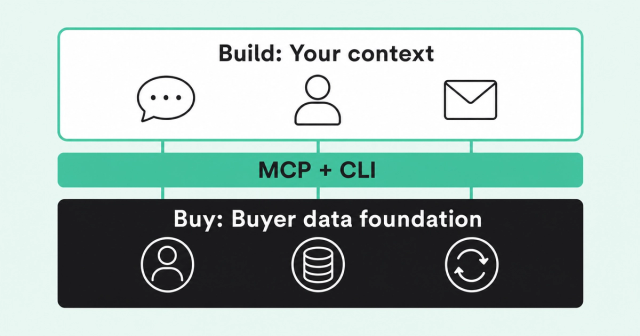
Build or buy doesn't have to be a single choice. You can buy the data foundation and build your own agent on top of it.
Model Context Protocol (MCP) is an open standard that lets AI assistants connect to outside data and tools. A command-line interface (CLI) lets engineers and scripts run commands without a visual interface. Our MCP Server and CLI connect AI assistants to your buyer intelligence, and the CLI supports automation pipelines, scheduled jobs, and custom AI agents.
That means your custom AI agent queries unified, identity-resolved buyer data instead of raw API feeds. You keep control of the logic that's unique to your business.
Atlan is a real example. Jake Biskar, Pipeline Operations at Atlan, bought Common Room as the company's buyer intelligence foundation. Atlan has since grown to 100 users after starting with 50 licenses.
On top of that foundation, Jake built a Chrome extension that pulls Common Room signal data and Spark summaries. He paired it with a GitHub repo of markdown files covering personas, value props, tone, and signal ranking. The extension uses all of it to draft outreach straight into Gmail.
"We would never build a UI for our contact database. We'd never try to summarize everything a contact has done," Jake said.
"But the messaging layer? We know the tone, we know the most up-to-date assets, we know the personas. That part is worth building, because we know it better than any vendor could," he said.
That's the hybrid model in a nutshell. Buy the parts that are costly to maintain and look the same at every company, and build the parts that carry your team's judgment. You can read more about how Atlan built on top of its data foundation.
FAQ
Is it possible to build a custom AI research agent instead of using an out-of-the-box one?
Yes, you can build one on a general-purpose model with your own connectors and prompts. The harder, ongoing work is keeping buyer data unified, matched, and synced to your CRM.
How do AI research agents summarize an account across multiple data sources into one brief?
They pull records from sources like your CRM, website, and product, match them to the right people and account, and ask a model to summarize. The brief's quality depends mostly on how well that matching step worked.
Do I need a framework to build an AI agent?
No, a simple loop of model calls and tool calls can work for a first version. Frameworks help most when you need many tools, handoffs between agents, or complex state.
What are the main costs of running a custom AI agent?
The biggest cost is usually people, meaning the engineers and ops staff who maintain connectors, prompts, data quality, and evaluation. Model usage fees and data contracts add to that.
When does a deterministic workflow beat an agent?
A deterministic workflow, meaning fixed steps that run the same way every time, wins when the task is predictable, like routing a lead. Save agents for tasks that need judgment, like deciding what matters most in an account.
Can I combine a platform agent with my own agent?
Yes, your own agent can query a platform's buyer intelligence through an MCP server or a CLI. That way you build the messaging and logic you know best, and the platform maintains the data foundation.
Quality buyer intelligence in, effective AI out. Want to see what your agent could do with resolved, continuously updated buyer intelligence? Request a demo.