
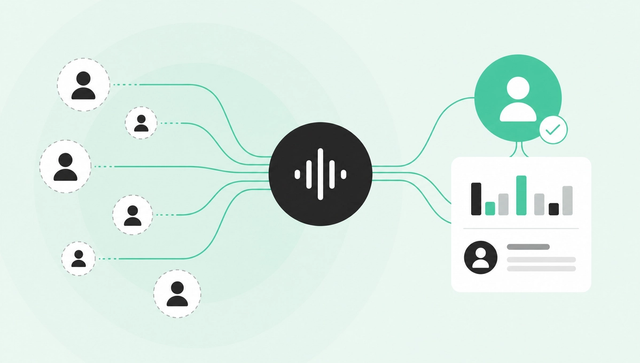
Your website is now your sales floor. It's where buyers research, compare, and form opinions before they ever talk to a rep.
Here's the problem: almost none of that demand is visible. Industry data consistently shows that around 97% of B2B website visitors leave without filling out a form or taking any trackable action. And when they do convert? B2B SaaS landing pages see a median conversion rate of just 1.1%, according to First Page Sage's 2026 analysis.
That's a lot of high-intent traffic disappearing into the void.
Website visitor identification offers a way to reclaim some of it. But the category is crowded with inflated claims and unclear definitions. This guide covers what visitor identification actually is, how it works under the hood, what accuracy to expect in the real world, how to stay compliant under GDPR and CCPA, and how to turn a name into a conversation.
Key Takeaways
- Website visitor identification resolves anonymous traffic into named companies, and, at its best, named people, without a form fill.
- "Tracking" tells you what a visitor did; "identification" tells you who they are. You need both to act.
- Realistic match rates are roughly 30–65% at the company level and 5–20% at the person level, well below the 60–80% often advertised.
- It's legal in the US and EU when done with compliant data sources, a documented lawful basis, and a clear opt-out.
- Identification only creates pipeline when it feeds identity resolution, scoring, and fast, automated follow-up.
What Is Website Visitor Identification?
Website visitor identification is the practice of resolving anonymous website traffic into identifiable companies or people without requiring a form submission.
At the most basic level, tools capture a visit (usually via a pixel or first-party script), then attempt to match that visitor to a known entity using IP data, cookies, device fingerprints, or an identity graph.
The result can be account-level or person-level:
- Account-level identification tells you "someone from Acme Corp visited your pricing page." You see a company name and maybe firmographic data like industry or headcount.
- Person-level identification (sometimes called contact-level) tells you "Leslie Smith, Director of Procurement at Acme Corp, viewed pricing three times this week." You see a real human with a name, title, and email, not just a logo.
The difference matters. A logo on a dashboard gives you something to talk about at a pipeline review. A named decision-maker with context gives your rep something to work with.
For anonymous website visitor identification to drive action, person-level resolution is what separates a report from a signal.
Tracking vs. Identification vs. De-Anonymization
These terms get used interchangeably, but they describe different things.
Website visitor tracking captures what someone did on your site: which pages they visited, how long they stayed, whether they came back. It's behavioral data, the raw material.
Website visitor identification (or de-anonymization) is the process of figuring out who that visitor is: a person, a company, or both.
You need both. Tracking without identification gives you behavior with no name. Identification without tracking gives you a name with no context. Together, they give you an actionable signal: a known buyer displaying real intent.
Why Website Visitor Identification Matters Now
The B2B buying journey has shifted, and your website is at the center of it.
Gartner's 2024 research found that B2B buyers now spend roughly 80% of their purchase journey self-directed, gathering information without ever speaking to a rep. That's up from the 57% baseline that CEB (now Gartner) reported in 2015.
The trend is accelerating. A March 2026 Gartner survey of 646 buyers found that 67% prefer a rep-free buying experience entirely. The same research found that 45% of B2B buyers used AI during a recent purchase — further compressing the window for human engagement.
This means your website isn't a brochure. It's where decisions form.
Yet most of that demand stays invisible. Forms capture almost no one. B2B SaaS landing pages convert at around 1.1%, per First Page Sage. Across all industries, Unbounce's 2024 Conversion Benchmark Report puts the median landing-page conversion at just 6.6%.
Meanwhile, Forrester's 2024 Buyers' Journey Survey found that 92% of B2B buyers start the purchase process with at least one vendor already in mind. Forty-one percent have a single vendor in mind before formal evaluation even begins.
If you're waiting for a form fill to spot demand, you're seeing the very end of a journey that happened mostly without you. B2B website visitor identification gives you a way to observe, and act on, the 97% that never raised a hand.
How Website Visitor Identification Works
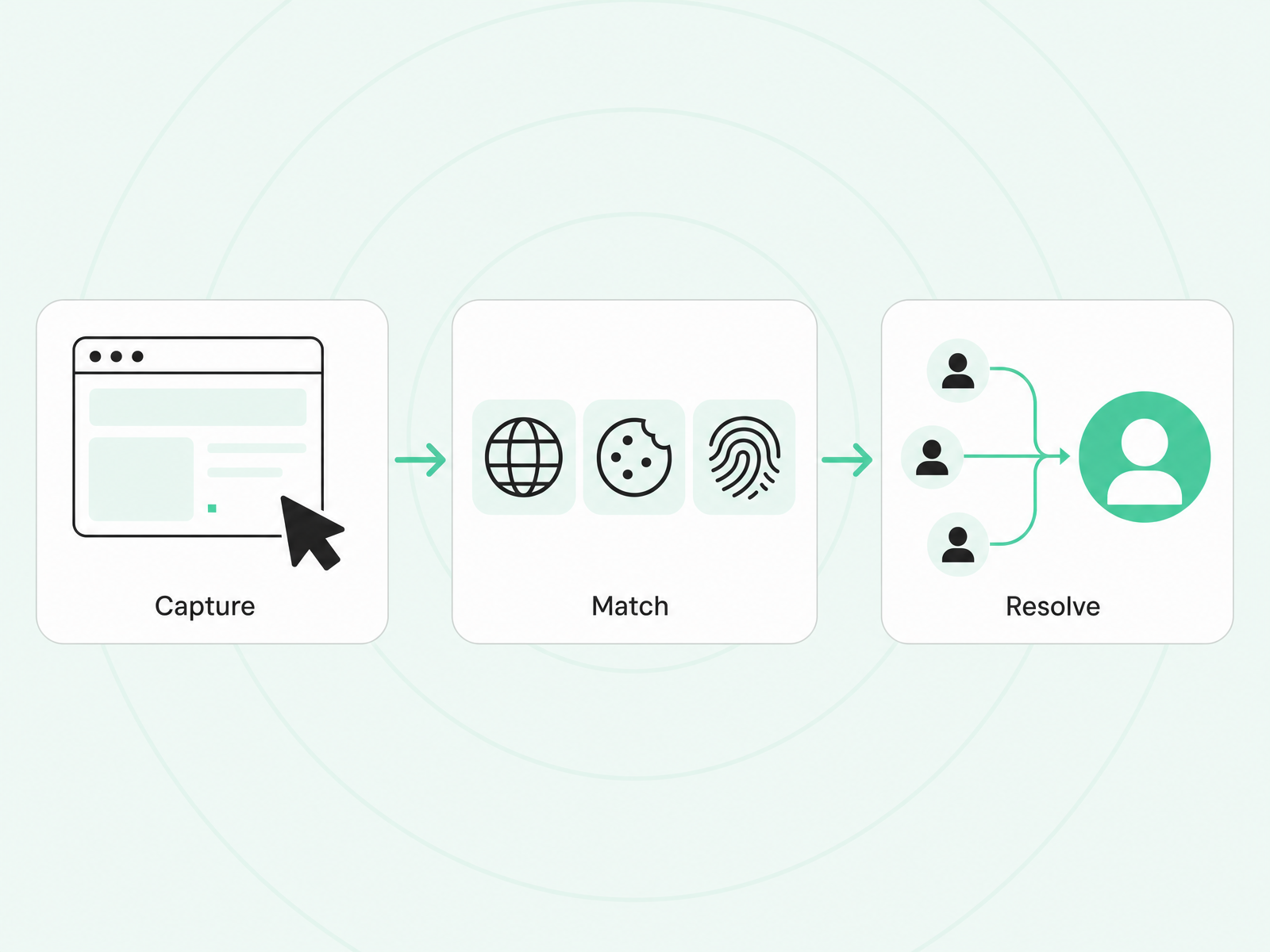
Every visitor identification tool follows the same basic sequence: capture the visit, then resolve it to a known entity. The methods vary in accuracy, coverage, and privacy posture.
IP Lookup and Reverse-IP (Account Level)
The simplest approach maps a visitor's IP address to a company. Reverse-IP databases link IP ranges to corporate networks, giving you an account name and firmographic details.
It's fast and low-friction, no cookies required. But it's limited. You get a company, not a person. And accuracy has dropped as remote work scatters employees across home ISPs, VPNs, and coffee shops. An IP that once mapped cleanly to "Acme Corp HQ" now might map to "Comcast residential."
Reverse-IP is a starting point, not an endpoint.
Cookies, Pixels, and First-Party Scripts
Most tools rely on a JavaScript snippet (a pixel or first-party script) to capture visits and set cookies. When a visitor returns, the tool can recognize them and match to previous sessions.
Cookies also enable partnerships with identity providers. If a visitor logged in elsewhere with a matching email or device fingerprint, the tool can link that identity back to your site.
The catch: this depends on consent in many jurisdictions. In the EU, setting non-essential cookies requires explicit opt-in under GDPR. Third-party cookie deprecation (still rolling out across browsers) has further reduced the reliability of cookie-based matching.
Identity Graphs and Waterfall Enrichment (Person Level)
Person-level identification requires stitching together multiple signals — email hashes, device IDs, LinkedIn profiles, ad network data — into a unified identity graph.
When someone visits your site, the tool attempts to match available identifiers against this graph. If there's a hit, you get a name, title, company, and often contact details. If there's a partial match, the best tools run "waterfall enrichment"—sequentially querying multiple data providers until a match is found.
This is where match rates (and match quality) diverge dramatically between tools. The identity-resolution engine, how signals are stitched, deduped, and enriched, is the difference between a high-confidence contact and a stale, duplicated record.
Common Room's Person360 is an example of a purpose-built identity-resolution and waterfall-enrichment engine. It's designed to maximize match rates while reducing duplicate records because a mismatched or duplicate lead is often worse than no lead.
How Accurate Is Website Visitor Identification, Really?
Vendors love to quote match rates. You'll see claims of 60%, 70%, even 80% identification.
Take those numbers with skepticism.
Independent assessments from 2025–2026 put realistic match rates significantly lower:
- Account-level (company) identification: roughly 30–65% for US B2B traffic.
- Person-level (contact) identification: roughly 5–20%.
Why the gap between claims and reality? A few reasons:
- US vs. international traffic. Identity coverage is strongest in the US. EU match rates are lower due to data-access restrictions and GDPR compliance requirements.
- Corporate vs. home IPs. Remote work has made reverse-IP less reliable. A visitor on a home ISP or VPN often can't be resolved to a company at all.
- Data-source quality. Some vendors rely on stale or poorly sourced data. The match might technically exist, but the email is outdated or the title is wrong.
- Bot and crawler traffic. If a vendor doesn't filter bots well, their "match rate" includes a lot of noise.
How do you verify a vendor's numbers? A few practical checks:
- Spot-check against your CRM. Take a sample of identified visitors and see how many already exist in your database with accurate data.
- Look for confidence scores. The best tools surface match confidence, not just a binary yes/no.
- Ask about bot filtering. If the vendor can't explain how they exclude non-human traffic, be skeptical.
Common Room's enhanced website visitor identification, powered by its Signals layer, reaches up to 50% person-level identification of US website traffic, compared to the 15–20% person-level that many tools achieve. That's a brand benchmark, not a universal claim, but it reflects what a strong identity-resolution engine can do.
Is Website Visitor Identification Legal? (GDPR and CCPA)
Yes. But compliance requires care. Let's clear up the most common myths.
IP Addresses Are Personal Data
Under GDPR, IP addresses are explicitly personal data. You can't treat them as anonymous just because they're "technical."
GDPR: Legitimate Interest Can Work for Company-Level
For account-level identification (mapping an IP to a company), many organizations rely on legitimate interest under GDPR Article 6(1)(f). This requires:
- A clear purpose (e.g., B2B lead generation).
- Necessity (you can't achieve the same result with less data).
- A balancing test (the individual's rights don't override your interest).
You must document this in a Legitimate Interests Assessment (LIA), provide transparency in your privacy notice, and offer an easy opt-out.
EU Person-Level Identification Typically Needs Consent
Person-level identification in the EU, where you're resolving a visitor to a named individual, generally requires explicit consent. The thresholds are higher, and the data involved is more sensitive.
The CCPA B2B Exemption Is Gone
A common misconception: "CCPA doesn't apply to B2B data."
It did until December 31, 2022. The CCPA's B2B exemption expired, and it was never renewed under the CPRA. California residents, even when acting in a business capacity, now have full rights under California privacy law. This includes IP addresses and browsing data.
You need a "Do Not Sell or Share" mechanism, clear notice, and the ability to honor opt-out requests.
How to Turn Identified Visitors Into Pipeline
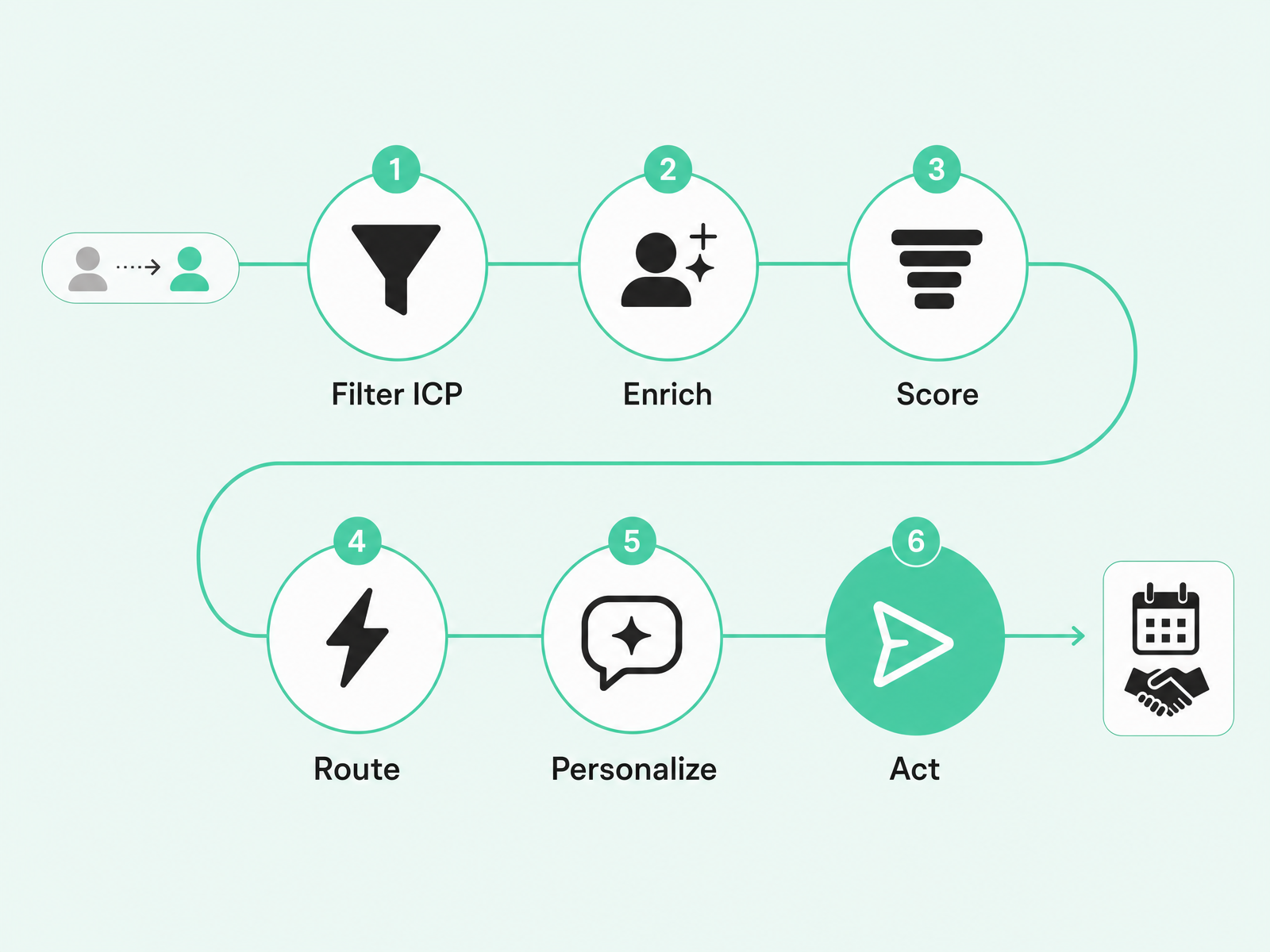
Identifying a visitor is step one. The value comes from what happens next.
Here's the workflow that separates a dashboard nobody checks from a signal that books meetings:
1. Filter to Your ICP
Not every visitor matters. Exclude current customers, competitors, job seekers, and accounts that don't fit your ideal customer profile. Set firmographic and behavioral thresholds (industry, company size, job title, page depth) so only qualified signals flow downstream.
2. Enrich and Resolve to the Decision-Maker
A company name isn't enough. Enrich the record to find the right buyer: the economic decision-maker or the champion most likely to engage. If your tool only gives you "someone from Acme," you still have work to do.
3. Score by Fit + Intent
Not all visits are equal. A pricing-page view from a VP at a target account is worth more than a blog bounce from an intern. Layer fit (firmographic match) with intent (behavior on-site and off) to prioritize.
4. Route in Real Time
Speed matters a lot. The 2007 MIT/InsideSales.com study by James Oldroyd found that the odds of qualifying a lead are roughly 21 times higher when contacted within 5 minutes versus 30 minutes. The odds of even reaching the contact were about 100 times higher.
Yet a 2024 audit by RevenueHero found that 63.5% of B2B SaaS companies never responded to a demo request at all.
Build routing that gets high-intent signals to the right rep immediately — not in the next morning's digest.
5. Personalize With Context, Not Just a Merge Field
"Hi {{first_name}}" isn't personalization. Reference the signal: the page they viewed, the problem it solves, the context that makes your outreach relevant. The best tools surface this context alongside the contact.
6. Act Within Minutes
This is where automation pays off. Manual follow-up on anonymous visitor data doesn't scale. The teams turning identification into pipeline are the ones feeding signals into scoring engines and automated plays—so a high-fit, high-intent visit triggers a personalized sequence before the buyer closes the tab.
Common Room's architecture is built for this: Signals (including website visitor identification) feed into lead scoring and into Actions and RoomieAI, the platform's automation and AI layer. The result is a scored, automated play. Not a CSV export someone forgets to check.
How to Choose a Website Visitor Identification Tool
Not all tools are created equal. Here's a vendor-neutral checklist for evaluating your options:
Person-level vs. company-only: Does the tool resolve to individuals, or just accounts? Person-level is harder but far more actionable.
Honest, verifiable match rates: Ask for realistic numbers, not marketing claims. Request a pilot or spot-check against your own data.
Identity resolution and enrichment quality: How does the tool stitch identities and fill gaps? Poor identity resolution means duplicates, stale data, and wasted outreach.
Real-time alerts and routing speed: Can you act in minutes, or are you waiting for a daily batch? Speed-to-lead data is clear: faster wins.
Native CRM and sales-engagement integration: Does the tool write clean data back to Salesforce or HubSpot? Or does it create a silo you have to manually sync?
Off-site and dark-funnel coverage: Does the tool only see your website, or can it capture signals from social, community, G2, job changes, and other sources? On-site traffic is a fraction of the buyer journey.
Compliance posture and documented data sourcing: Can the vendor explain where their data comes from and how they handle GDPR/CCPA? If they can't, that's your liability.
Consolidation vs. another point tool: Does this tool reduce your stack, or add another dashboard to ignore? The best fit is a system that turns identification into action, not a standalone report.
Frequently Asked Questions
What Is the Difference Between Account-Level and Contact-Level Identification?
Account-level tells you "someone from this company visited." Contact-level (person-level) tells you who: a specific individual with a name, title, and email. Person-level is what makes a visit actionable.
Can I Identify Website Visitors Who Don't Fill Out a Form?
Yes. Identity-graph matching can resolve a portion of anonymous traffic to known individuals without a form fill though realistic person-level match rates are 5–20%, not the 60–80% some vendors advertise.
Is Website Visitor Identification Legal Under GDPR and CCPA?
Yes, with a lawful basis, transparency, and an opt-out. Under GDPR, company-level identification can rely on legitimate interest (with a documented LIA); EU person-level identification typically requires consent. The CCPA B2B exemption expired at the end of 2022, so California residents now have full rights.
What Is a Good Website Visitor Identification Rate?
Expect roughly 30–65% at the company level and 5–20% at the person level for US traffic. Treat significantly higher advertised numbers with skepticism, they often reflect ideal conditions, not real-world performance.
What's the Difference Between Website Visitor Tracking and Identification?
Tracking captures behavior: which pages someone visited, how long they stayed. Identification resolves who they are: a company, a person, or both. You need both to act.
What's Next
Your anonymous website traffic isn't a mystery to solve later, it's your largest source of in-market demand right now.
The challenge isn't installing a pixel. It's what comes after: resolving a visit to a real person, enriching and deduping that record, scoring intent, and routing the signal to someone who can act on it in minutes, not days.
That's the difference between a dashboard and a pipeline.
If you're evaluating how to turn website signals into action—alongside job changes, product usage, community activity, and other buying signals—Common Room can help.
Request a demo at https://commonroom.io/demo/.