
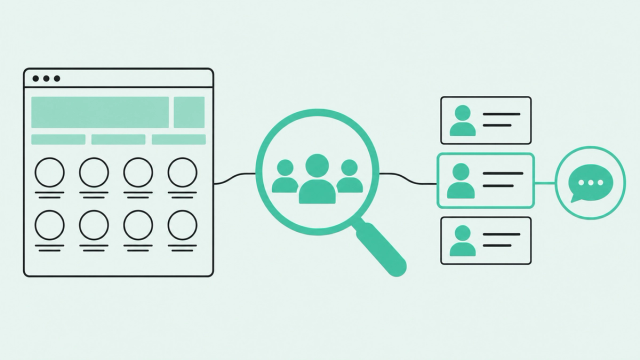
Someone from a high-fit account views your pricing page three times this week. Your team sees a company logo in a dashboard. Or nothing at all.
That's the gap most teams live with. A Gartner survey of B2B buyers found that 61% of B2B buyers prefer an overall rep-free buying experience. So buyers do their homework quietly, and your website is where that research shows up.
Most tools answer "which company?" and stop there. This guide covers what visitor identification tools do, how they differ, how 10 popular options compare, and how to pick one for your team.
What Is the Best Website Visitor Identification Tool?
The best website visitor identification tool resolves anonymous visitors to real people, not just companies. It stitches each identity into one clean profile and routes it to someone who can act within minutes.
Website visitor identification is the process of matching anonymous site traffic to the companies and people behind it. Website visitor identification software does this with a tracking script, outside data sources, and your own first-party data (information your visitors share with you directly).
Most teams judge tools that identify anonymous website visitors by match rate alone. Match rate is the share of your traffic a tool can tie to a company or person. But a match nobody works is just a nicer-looking anonymous visit.
So this guide defines "best" as person-level identity plus activation, meaning the match actually turns into a next step. For the deeper mechanics, read our complete guide to visitor identification.
How Website Visitor Identification Works
A small script, or pixel, records each site visit and tries to match it to a company or person. Tracking tells you what visitors did, while identification tells you who they are.
Known visitors have shared an identity through a form fill, login, or tracked email link; anonymous visitors haven't. Common Room keeps anonymous visits on file, then adds that history to the profile once a visitor becomes known.
Company-Level Identification (Reverse IP)
Reverse IP lookup matches a visitor's IP address (the numeric address of their internet connection) to the company that owns it. You get firmographics, meaning company details like name, industry, size, and location. You don't get a person.
Accuracy has slipped as work moved home. Remote employees, VPNs, and home internet providers all hide the company behind the connection. Common Room's own visitor identification guide puts realistic company-level match rates at roughly 30-65% of US B2B traffic.
That's useful for account-level prioritization. But reps can't email a logo, so someone still has to figure out who visited and why.
Person-Level Identification (Identity Graphs and First-Party Signals)
Person-level tools go a step further. They use identity graphs, which are large databases that link devices, browsers, and email addresses to real people. Match a visit to a graph entry, and you get a name, a title, and often a work email.
Stronger tools also use first-party identity events. These are moments when a visitor tells you who they are, like a form fill, product login, or tracked email click.
Expect person-level match rates of roughly 5-20% of US B2B traffic, according to the same Common Room guide. Coverage is strongest in the US and thinner in other regions.
Two setup steps make a real difference here. An identity call is a line of code that tells your tracking tool who a visitor is when they log in or submit a form. Link tracking adds small tags, called UTM parameters, to your email links so a click ties the visit to a known contact.
Common Room's website visitor tracking docs report that identity calls and link tracking each lift deanonymization rates by over 50%. Deanonymization simply means turning anonymous visits into known ones. Most comparison guides skip this step, which is odd, since it's setup work you already control.
Company-Level vs. Person-Level at a Glance
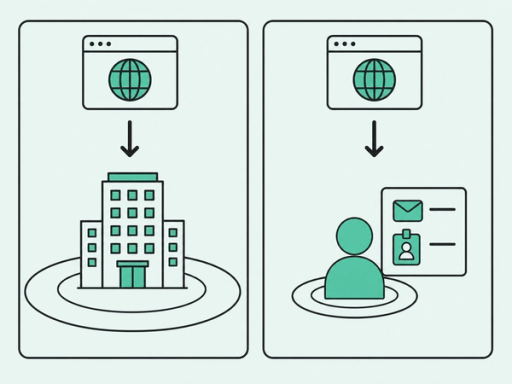
Here's how the two approaches compare side by side.
| Factor | Company-level identification | Person-level identification |
|---|---|---|
What you get | Company name and firmographics | Name, title, work email, and company |
Method | Reverse IP lookup | Identity graphs plus first-party identity events |
Coverage | Often global | Strongest in the US |
Typical match rate (US B2B traffic) | Roughly 30-65% | Roughly 5-20% |
Privacy posture | Often relies on legitimate interest under GDPR | Generally requires consent for EU visitors |
Best for | Account-based marketing, account scoring, and ad audiences | SDR outreach, real-time alerts, and personalized follow-up |
7 Criteria for Choosing a Website Visitor Identification Tool
Match rate is the number vendors lead with. On its own, it's also the least useful one.
A high match rate on messy, duplicate records just hands your team a cleanup project. Here's what to evaluate instead.
- Person-level resolution: The tool should name the person, not just the company. Reps work with people, and a logo gives them nowhere to start.
- Honest, verifiable match rates: Run a pilot against your own CRM and traffic. Vendor averages rarely reflect your mix of regions, devices, and remote workers.
- Identity resolution and deduplication: Identity resolution links identifiers, like a personal email signup, to one business profile. Good tools merge matches instead of creating duplicates.
- Real-time alerts and routing: Alert the right owner in Slack or your CRM within minutes. Pricing-page visits get colder the longer they sit.
- Native integrations: Look for built-in connections to your CRM, Slack, and sales engagement tools. Every manual CSV export is a workflow waiting to break.
- Signals beyond the website: A web visit means more next to a job change or product usage. Site-only tools see one slice of the buyer.
- Compliance posture and data sourcing: Ask how the vendor sources identity data and handles consent. Get it in writing before legal asks.
Identity resolution is the criterion most comparisons skip, and it's where RevOps feels the pain first. Duplicate records break routing, skew reporting, and send two reps to the same buyer.
In bakeoffs (head-to-head tests against other vendors), Common Room's Person360 identity resolution engine delivers 30-50% higher match rates. It also cuts duplicate records by up to 79%, so each buyer lives in one profile instead of three.
Best Website Visitor Identification Tools Compared
There's no single best website visitor identification tool for every team, so the tools below are grouped by approach, not ranked by hype. Descriptions reflect each vendor's own positioning, so verify match rates and coverage in a pilot before you buy.
| Tool | Identification level | Primary approach | Best for |
|---|---|---|---|
Common Room | Person and company | Person-level identity resolution plus buying signals from many sources | RevOps and GTM teams that want web visits tied to prioritized next steps |
RB2B | Person (US focus) | Contact-level identification of US traffic | SDR teams that want person-level alerts on US visitors |
Warmly | Person (US focus) | Contact-level identification with real-time alerts | SDR teams working US inbound traffic |
Leadfeeder (Dealfront) | Company | Reverse IP lookup with firmographic data | Teams that want account visibility, including outside the US |
6sense | Company | Account identification plus intent data | Enterprise account-based marketing programs |
Demandbase | Company | Account identification inside an account-based marketing platform | Enterprise account-based marketing and advertising |
Factors.ai | Company | Account identification with journey analytics | Teams tying account visits to marketing performance |
Lead Forensics | Company | Reverse IP lookup | Teams that want a list of companies visiting their site |
Albacross | Company | Reverse IP lookup with firmographics | European teams focused on account-level visibility |
HubSpot Breeze Intelligence | Company | Company identification inside HubSpot | Teams that run marketing and sales in HubSpot |
Common Room: Person-Level Identity Plus Signal-Based Action
Common Room's enhanced website visitor identification gives you up to 50% person-level visibility of US web traffic. It's available on all plans at no extra cost.
The bigger difference is what happens after the match. Web visits merge in Person360 with job changes, product usage, community activity, and social signals, so each visit arrives with context attached.
That profile then feeds scoring, alerts, and AI-driven workflows. The result is a clear next step for the right rep, instead of another row in another dashboard.
The honest limitation: person-level coverage is strongest in the US. If most of your traffic comes from outside the US, expect a larger share of your matches at the company level.
Person-Level Specialists (RB2B, Warmly)
RB2B and Warmly focus on contact-level identification of US traffic. They're a strong fit for SDR teams that want an alert when a specific person visits a high-intent page.
The trade-off is scope. The website visit is their core signal, so reps still pull context from LinkedIn, the CRM, and other tools before they reach out.
Company-Level and ABM Platforms (Leadfeeder, 6sense, Demandbase, Factors.ai, Lead Forensics, Albacross)
These tools identify accounts, not people. Many offer global coverage, and several position themselves as GDPR-friendly.
Account-based marketing (ABM) means focusing sales and marketing on a defined list of high-fit accounts. These platforms help with ABM programs, account scoring, and building ad audiences. The catch is that you get company names, and someone still has to find the right person.
CRM-Native Options (HubSpot Breeze Intelligence)
If your team lives in HubSpot, Breeze Intelligence adds company-level identification inside the CRM you already use. There's no new tool to connect or train reps on.
The downside is reach. It works inside one ecosystem and identifies companies rather than people.
A Note on Behavioral Analytics Tools
Google Analytics 4 (GA4), Microsoft Clarity, and Hotjar answer "what did visitors do?" They don't answer "who were they?"
These tools show page views, clicks, scroll depth, and session recordings. If you searched for a website visitor tracking tool or a simple visitor counter, this category may be what you want.
Many teams run one alongside an identification tool. The two answer different questions, so they rarely compete for the same budget line.
How to Match a Tool to Your Use Case
The best tool to identify website visitors depends on two things: who will act on the data and where your traffic comes from. Answer those, and your shortlist gets short fast.
- SDR team working US inbound traffic: Choose a person-level tool. Reps need a name and a reason to reach out.
- ABM program across regions: Choose a company-level tool or ABM platform. Global account coverage matters more than contact names.
- SMB team running on HubSpot: Choose a CRM-native option. Setup stays simple inside the system you already use.
- RevOps team consolidating signals and cleaning up duplicates: Choose person-level identity paired with a signal platform. You need one clean profile per buyer.
That last scenario is the one teams tend to underestimate. If you've ever explained a broken workflow with "it's across multiple tools," you know the cost.
When web visits live in one tool, job changes in another, and product usage in a third, reps rebuild context by hand. Common Room's signal capture layer brings those signals into one place. Your scoring and routing rules then run on a single profile instead of three partial ones.
How to Turn Identified Visitors Into Pipeline
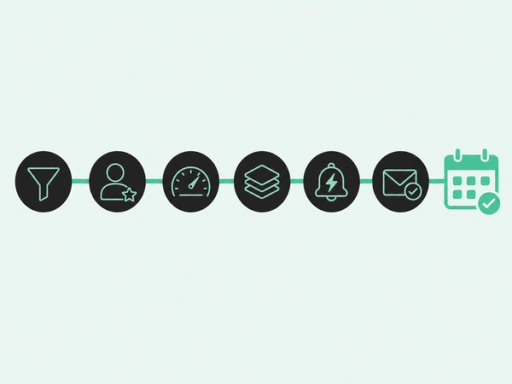
Identification is step one. The value comes from what happens in the minutes after the match.
Start with your ideal customer profile (ICP), which describes the accounts most likely to buy. Then work through these steps in order.
- Filter to your ICP: Exclude customers, competitors, and job seekers first. Nobody needs an alert about a candidate reading your careers page.
- Resolve to the decision-maker: If the visitor isn't the buyer, find who is. An intern's visit can still point you toward the right VP.
- Score by fit and intent: Fit is how closely the account matches your ICP. Intent reflects buying behavior, like repeat pricing visits.
- Stack signals: A pricing visit plus a new VP hire tells a clearer story than either alone. Read more about stacking buying signals.
- Route in real time: Alert the account owner in Slack or the CRM within minutes. Unclear ownership is how warm visits go cold.
- Personalize with the signal: Let the signal shape your message without announcing you saw their visit. A first-name merge field isn't personalization.
This sequence works when teams run it consistently. Florin Tatulea, head of sales development at Common Room, reported our SDR team's web visit plays see 17%+ reply rates and 10% booked-meeting rates.
You can see the plays our SDR team runs and borrow the structure. Florin's team pairs each visit with context before anyone writes a word.
Skip the context, and identification backfires. The same Gartner survey found that 73% of B2B buyers actively avoid suppliers who send irrelevant outreach.
For RevOps, the final step is measurement. Track reply and meeting rates on web visit plays separately from other outbound, so you can prove whether identification is paying off.
If you're setting this up for the first time, this step-by-step playbook shows how to make anonymous web visits actionable. It walks through setup, filtering, and the first plays to run.
Is Website Visitor Identification Legal? GDPR and CCPA Basics
Short answer: It can be, if you set it up carefully. The rules depend on where your visitors are and whether you identify companies or people.
In the EU, GDPR's definition of personal data includes "an identifier such as a name, an identification number, location data, an online identifier." IP addresses count as online identifiers, so IP-based identification falls within GDPR's scope.
Company-level tools typically rely on legitimate interest. That's a legal basis for processing data for a reasonable business purpose, backed by a documented assessment that weighs your interest against the visitor's rights.
Person-level identification of EU visitors generally requires consent. In practice, that means a clear cookie banner and no identification until the visitor agrees.
In the US, the California Consumer Privacy Act (CCPA), as amended by the California Privacy Rights Act (CPRA), protects California residents. That includes people acting in a business capacity, so B2B traffic isn't exempt.
California's CCPA regulations, effective January 1, 2026, list the right to know, the right to delete, and the right to correct personal information. If a business sells or shares personal information, consumers also have the right to opt out of that sale or sharing.
Ask every vendor to document where its identity data comes from and how it handles consent and opt-outs. This section is general information, not legal advice, so check with your counsel before you roll out any tool.
Frequently Asked Questions
Here are quick answers to the questions buyers ask most often.
Which Website Visitor Identification Tool Is the Best?
For most B2B teams, the best website visitor identification tool names real people, merges them into clean profiles, and alerts a rep fast. If you only need account visibility, a company-level tool may be enough.
Can I See Who Visited My Website?
Yes, partly. A visitor identification tool can show the company behind many visits and the person behind a smaller share, mostly for US traffic.
What's the Difference Between Website Visitor Tracking and Identification?
Tracking records what visitors do, like pages viewed and clicks. Identification tells you who they are, at the company or person level.
What's the Difference Between Person-Level and Company-Level Visitor Identification?
Company-level identification shows which organization visited, usually through reverse IP lookup. Person-level identification names the individual, using identity graphs and first-party data.
What Match Rate Should I Expect?
For US B2B traffic, expect roughly 30-65% at the company level and 5-20% at the person level. Your results depend on your traffic mix, so test in a pilot.
Do Visitor Identification Tools Cover All My Prospects?
No, some visitors will always stay anonymous. Pair identification with other signals, like job changes, product usage, and community activity, to fill the gaps.
How Can I Monitor Website Visitors in Real Time?
Connect your identification tool to Slack or your CRM and set alerts for high-intent pages, like pricing. Filter those alerts to ICP accounts so reps only see visits worth acting on.
Turn Your Website Traffic Into Your Next Conversation
The pixel is the easy part. What matters is the next five minutes: who gets the alert, what context they see, and whether the outreach earns a reply.
So when you compare options for the best website visitor identification tool, judge each one by that five-minute window. Common Room turns the traffic you already have into prioritized next steps for specific people and accounts.