
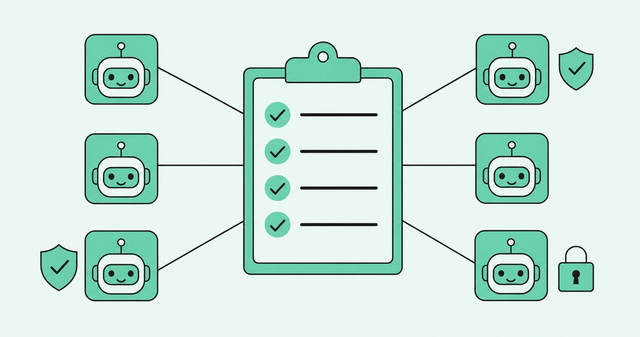
Picture 50 AI agents running across your sales team. There are five versions of the same play, and nobody's sure which one is live. One agent writes to the CRM, another emails buyers, and only ops knows how either one works.
That's GTM automation without an AI agent governance checklist. And it's already happening. The Salesforce State of Sales report found "54% of sellers say they've used agents, and nearly 9 in 10 plan to by 2027."
Salesforce ran that self-reported survey of 4,050 sellers, and it sells agents itself, so treat the numbers as directional. Either way, agents are spreading faster than the rules around them.
This checklist has five parts: ownership and approvals, permissions, consistency, rollback, and vendor evaluation. Each part includes steps your RevOps team can use this quarter.
What Is AI Agent Governance (and Why Does It Break at Scale)?
AI agent governance is the set of rules, owners, permissions, and recovery steps that control what AI agents and automated plays can do. It also defines who approves them and how you undo them.
An AI agent is software that uses AI to take actions on its own, such as researching an account or drafting an email. A play is a repeatable set of steps your team runs when a buyer shows interest.
Governance gets harder as headcount grows. At 500+ reps, one small inconsistency in a play can turn into hundreds of different buyer experiences. That's why RevOps teams running GTM systems usually end up owning governance, whether or not anyone assigned it.
Autonomy is also growing faster than accountability. The Deloitte State of AI report says "40% allow AI to execute decisions or actions without human approval to at least a moderate degree." For 23% of respondents, accountability for a negative outcome remains unclear.
Deloitte surveyed 3,500 senior leaders across industries. These are enterprise-wide numbers for all AI, not sales-specific ones.
Mistakes are common, too. In the McKinsey State of AI survey, 51% of respondents from organizations using AI said they'd seen at least one negative consequence. That 2025 survey covers all AI use across business functions, not agents or sales alone.
There's one more governance input most teams skip: data. AI built on a partial view is ineffective, so a duplicate or stale record becomes a governance problem the moment an agent acts on it. That's why automated CRM data hygiene belongs on the list: Common Room's DataAgent continuously identifies duplicates, stale records, and gaps.
Checklist Part 1: Ownership and Approvals
Every agent needs a name next to it. When a play sends the wrong email at 9 p.m., "the AI did it" isn't an answer your sales leaders will accept.
The first part of any AI agent governance checklist is a clear AI play approval process. It gives each play an owner, a risk level, and a known path to production.
Who Approves a New AI-Driven Play?
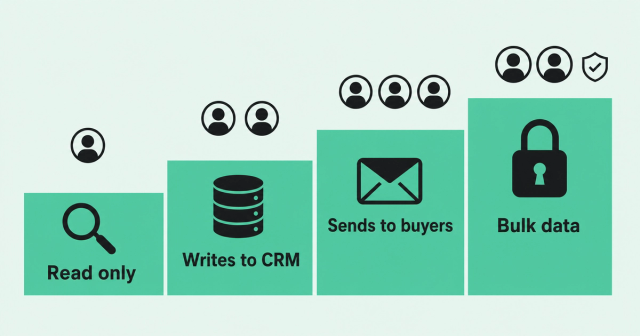
Start with an inventory, then decide who signs off on what. Human in the loop means a person reviews an action before it happens. Bounded autonomy means an agent acts alone only inside limits you set.
- Name one owner per play: Every agent and play gets a single person who answers for its behavior and its results.
- Keep a live inventory: List every agent, what it can touch, who owns it, and which version is running.
- Tier approvals by risk: Match the approval path to what the play can do, since a research brief and a buyer email carry different risks.
- Require human approval for high-impact actions: A person signs off before an agent changes many records or sends anything to buyers.
- Offer a sanctioned path: Make the approved route faster than the workaround, so reps don't build their own agents.
Use this risk-tiered approval matrix to set the path for each play.
| Risk tier | What the play can do | Example | Who approves | Human checkpoint |
|---|---|---|---|---|
Tier 1: Read only | Researches accounts and summarizes signals | Account research brief for an AE | Play owner | Spot-check outputs weekly |
Tier 2: Writes to CRM | Creates or updates records and fields | Updating lead status or account scores | Play owner and RevOps systems lead | Review a sample before full rollout |
Tier 3: Sends to buyers | Emails, messages, or enrolls contacts in sequences | Enrolling contacts in an outbound sequence | Play owner, RevOps, and sales leadership | Reps approve each message during the pilot |
Tier 4: Changes access or bulk data | Edits permissions, merges, or deletes records | Merging duplicate accounts in bulk | RevOps and security or IT | A named person approves every run |
The sanctioned path matters because people find workarounds. Shadow AI means employees using AI tools the company hasn't approved. A Gartner shadow AI survey of 302 cybersecurity leaders found "69% of organizations suspect or have evidence that employees are using prohibited public GenAI."
That's enterprise-wide data about generative AI, not a sales number. The lesson still carries over: if approval feels slow, reps will route around it.
How Fast Should an Approved Play Ship?
Approval should be the slow, careful step. Once a play clears review, shipping it shouldn't take another quarter.
Roll out in three stages. Start with a pilot pod, expand to one segment or region, and then release to all reps. Set a quality bar for each stage before you move on.
In most teams, the real bottleneck is engineering time and integration work. A centralized control layer lets RevOps configure and ship automated pipeline plays without waiting on an engineering ticket.
Revenue architects are the people who design GTM systems. Common Room's Revenue Control Plane gives them one place to define scores, build plays, deploy agents, and automate workflows. It's built so you can deploy new plays in hours, not weeks, without engineering resources.
Checklist Part 2: Permissions and Least Access
An agent that can do more than its job requires is a risk waiting for a bad day. The OWASP Excessive Agency guidance (LLM06:2025) says the root cause is "typically one or more of: excessive functionality; excessive permissions; excessive autonomy."
Least privilege means giving an agent the minimum access it needs and nothing more. Make it the default for every set of AI agent permissions you grant.
Set Permissions Before the Agent Goes Live
Scope access before launch. Fixing permissions after an incident is slower, and you'll clean up records at the same time.
- Scope by object, field, and action: Decide which records and fields the agent can read, write, or send, and block everything else.
- Separate agent identity from admin identity: Give each agent its own account so it never inherits an admin's full access.
- Enforce authorization in your systems: Let your CRM and other tools decide what's allowed, because a prompt instruction is easy to get around.
- Log every action: Keep an audit trail, a time-stamped record of what each agent did, to which record, and when.
- Manage access centrally: Use SSO and SCIM so you add, change, and remove access in one place.
Single sign-on (SSO) lets people use one login across tools, and Security Assertion Markup Language (SAML) is a common standard behind it. System for Cross-domain Identity Management (SCIM) adds and removes user access automatically.
Common Room supports SSO, SAML, and SCIM. It also offers granular enterprise permissions to manage who can see, configure, and act on data and workflows.
What to Do When an Agent Gets Too Much Permission
Mistakes happen, even with good controls. If an agent has more access than it should, work through these steps in order.
- Pause the agent: Stop new actions first, then investigate, so the problem doesn't grow while you look.
- Revoke or narrow the scope: Remove the extra permission, or drop the agent to read-only until you're done.
- Pull the action log: Find every record, field, and contact the agent touched while it had extra access.
- Reverse or quarantine affected records: Restore changed fields where you can, and flag anything you can't fix yet for review.
- Notify owners: Tell the play owner, affected reps, and security what happened and what changed.
- Fix the template: Correct the permission setting at the source so every copy of the play inherits the fix.
- Document the incident: Record the cause, impact, and fix, then review it at your next governance meeting.
Step three only works if you logged everything in advance. That's why logging sits on the prelaunch checklist above.
Checklist Part 3: Consistency Across Teams
Ask five reps how a play works, and you might get five answers. More enablement docs rarely fix that, because docs drift the moment someone edits a play.
Consistency comes from one source of truth for every play. These two practices keep AI agents consistent across a sales team of any size.
Build From Shared Templates, Not One-Off Copies
When every rep copies a play and tweaks it, nobody can say which version is working. Instead, build every play from shared workflow templates that RevOps owns.
Then decide which local variables teams can change, such as region or segment. Everything else stays locked, including permissions, approval tier, and the core steps.
Common Room is built for standardized execution with the flexibility to customize where needed. That balance keeps a play recognizable across regions while letting each team speak to its own buyers.
Version Every Play and Prompt
Prompt versioning means tracking every change to the instructions an agent follows, the way engineers track code. Workflow versioning does the same for the steps, rules, and permissions in a play.
- Number every version: Give each change a version number so everyone can say exactly what's live.
- Keep a change log: Record who changed what, when, and why.
- Compare before publishing: Review a side-by-side comparison of the old and new versions before the change goes live.
- Run one live version per play: Retire old versions so no rep runs last month's logic by accident.
- Schedule reviews: Check each play on a regular cadence, and retire the ones that no longer perform.
- Sample outputs for quality assurance: Read a sample of real agent outputs each week to catch drift early.
This discipline matters more as you grow. Common Room scales across teams of 50-1,000+ reps, so one versioned play can serve a single pod or your whole org. When a play proves itself, you can replicate winning plays teamwide from one source.
Checklist Part 4: Rollback and Incident Recovery
Plan the off switch before you need it. A rollback means returning a play to its last known good version, the most recent version that worked as intended.
The NIST AI Risk Management Framework (AI RMF) is a voluntary US framework, not a checklist. Still, Manage 2.4 in the NIST AI RMF Core functions describes mechanisms "to supersede, disengage, or deactivate AI systems" whose outcomes don't match intended use. It also pairs those mechanisms with owners who understand their role.
How to Roll Back a Misconfigured Workflow Across a Team
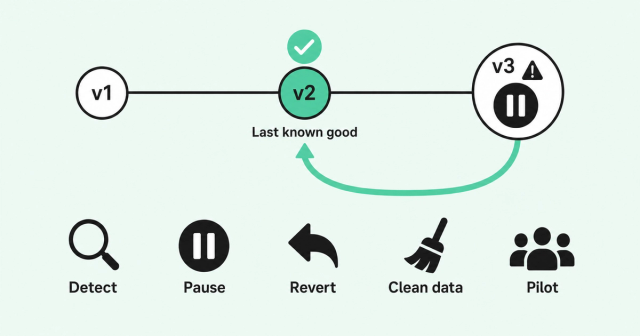
When a play misbehaves across hundreds of reps, speed and order both matter. Use this runbook to roll back an AI workflow cleanly.
- Detect the problem: Use alerts and weekly output sampling to spot bad messages, wrong records, or unusual sending volume.
- Pause centrally: Stop the play for every rep from one place instead of asking each rep to turn it off.
- Stop in-flight sequences: Halt any emails or steps already in the queue so buyers don't get more bad messages.
- Revert to the last known good version: Republish the version that worked, and use your change log to confirm which one.
- Assess the impact from logs: Use action logs to see which accounts, records, and buyers the bad version reached.
- Clean the data: Fix or restore records the workflow changed, and remove bad entries from sequences.
- Tell reps and managers: Explain what happened, what you fixed, and whether any buyer needs a personal follow-up.
- Relaunch to a pilot first: Ship the corrected play to one pod before you return it to every rep.
- Run a post-incident review: Document the cause, then update templates, tests, or approvals so it doesn't happen again.
We don't know of a reliable benchmark for how long this should take, so be wary of anyone who quotes one. Instead, measure your own time from detection to pause, and work to shorten it each quarter.
Checklist Part 5: How to Evaluate Enterprise-Grade Governance
Every vendor says its governance is enterprise-grade. The label costs nothing, and proof is harder to fake.
The stakes are real. The Gartner agentic AI cancellation forecast predicts companies will cancel over 40% of agentic AI projects by the end of 2027. Gartner names three causes: escalating costs, unclear business value, and inadequate risk controls.
That's a forecast for all industries, not a measured result. Use this table to judge whether a GTM platform's governance holds up.
| Criterion | What to ask | What good looks like |
|---|---|---|
Centralized workflow control | Where do we build, change, and pause plays? | One place to manage plays, agents, and workflows for every team |
Granular permissioning | Can we scope access by role, object, and action? | Separate controls for who can see, configure, and act |
Version history and rollback | Can you show us a rollback of a live play? | A live demo of reverting a play, with history intact |
Action logs and audit trails | What does the log record for each agent action? | Who, what, which record, and when for every action |
Staged rollout | Can we release a play to one pod first? | Pilot, segment, and full-team release controls |
SSO, SAML, and SCIM | How do you provision and remove access? | Central login and automatic user provisioning |
Compliance | Which certifications and regulations do you support? | SOC2, GDPR, and CCPA, with documentation on request |
Zero data retention for AI | Do AI models keep our data after processing? | Written zero data retention terms for AI |
Managed integrations | Who maintains connections to our CRM and other tools? | Vendor-managed integrations that don't need engineering tickets |
Data quality controls | How do you find duplicates and stale records? | Ongoing checks for duplicates, stale records, and gaps |
Ask for a demo of rollback, not a slide about it. If a vendor can't pause, revert, and show the log live, the AI agent governance checklist on its website doesn't count for much.
Common Room's Revenue Control Plane is one example of centralized control, with enterprise-grade permissioning, managed integrations, and governed plays in one layer. For details on SOC2, GDPR, CCPA, and zero data retention for AI, review Common Room security practices.
FAQ
These answers cover the questions RevOps leaders ask most about scaling AI agents. Each one points back to a part of the checklist above.
How Does a RevOps Leader Keep AI Agents Consistent Across a 500-Person Sales Team?
Build every play from shared templates that RevOps owns, lock everything except approved local variables, and run one live version per play. Then sample agent outputs weekly to catch drift early.
How Does an Admin Recover From an AI Agent That Was Accidentally Given Too Much Permission?
Pause the agent, narrow its permissions, and pull the action log to see what it touched. Then reverse affected records, notify owners, fix the template, and document the incident.
How Quickly Can a New AI-Driven Play Be Deployed Once It's Approved?
With Common Room's Revenue Control Plane, you can deploy new plays in hours, not weeks, without engineering resources. Release each approved play to a pilot pod first, then one segment, then every rep.
How Does a Company Roll Back a Misconfigured AI-Driven Workflow Across an Entire Team?
Pause the workflow centrally, stop in-flight sequences, and revert to the last known good version. Then use action logs to assess impact, clean the data, tell reps, and relaunch to a pilot first.
How Do Large Enterprises Evaluate Whether a GTM Platform's Governance Is Enterprise-Grade?
Ask vendors to demo centralized control, granular permissions, rollback, audit logs, and staged rollout instead of just describing them. Then confirm SSO, SAML, SCIM, SOC2, GDPR, CCPA, and zero data retention for AI.
How Do Companies With 1,000+ Reps Keep GTM Automation From Becoming Inconsistent?
They run every play from one control layer with versioned templates, risk-tiered approvals, and least-privilege permissions. Common Room scales across teams of 50-1,000+ reps, so the same governed play works for one pod or the whole org.
Use This AI Agent Governance Checklist to Say Yes to More Agents
Governance can sound like a brake. In practice, it's what lets you say yes to the next agent without wondering what the last one did.
Start with one part of this checklist this quarter. Inventory your agents, tier your approvals, and write down your rollback steps before you need them.
Want to see how the Revenue Control Plane handles plays, permissions, and agents across your whole team? Request a demo.