
Your CRM says the deal is stalled. Your call recordings show the buyer asked about pricing yesterday. Every system is right, and none of them talk to each other.
That gap is why RevOps teams keep hearing about the unified revenue graph. This guide covers what one is, how it compares to a CRM, and how to build one.
What Is a Unified Revenue Graph?
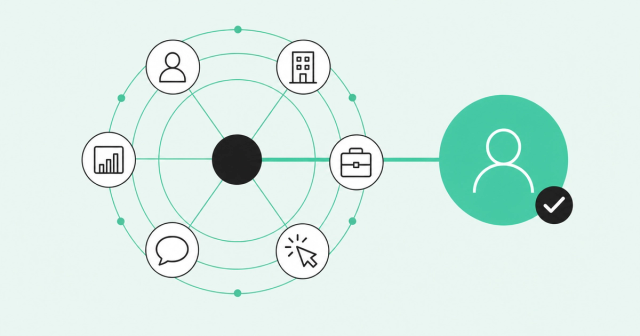
A unified revenue graph is a connected data model that links people, accounts, opportunities, activity signals, conversations, product usage, and outcomes at the person level. It gives every system and AI tool on your team the same picture of each buyer and deal.
Quick note: this has nothing to do with revenue charts. Here, "graph" means a network of connected records, like a map of who's involved in a deal.
Most definitions stop at the account. A useful unified revenue graph goes one level deeper and knows which person at each account is active.
Why Fragmented Revenue Data Breaks GTM Teams
Revenue data rarely lives in one place. The CRM knows the opportunity, the call recorder knows what the buyer said, and the product knows who logged in. Nothing links them.
Here's what that looks like day to day:
- Conflicting numbers: Sales, marketing, and finance pull pipeline from different tools and get different answers.
- Mistimed outreach: Reps email a contact who left last month and miss the champion who just viewed pricing.
- Stuck AI: AI tools see one system at a time, so they can't reason across the full deal.
According to the Salesforce State of Sales 2026, "Over half of sales leaders with AI (51%) say disconnected systems are slowing down their AI initiatives."
Copying every record into one database won't fix it. Unification means tying each record to the same real person and account. For the numbers behind that difference, read about the real cost of fragmented data.
What Data a Revenue Graph Connects
A revenue graph connects seven kinds of records, which fall into three families. It also stores how those records relate, because the link between a person, a signal, and a deal is where the insight lives.
Some of this data is unstructured data, meaning free text like call transcripts and emails that don't fit neat database fields. For a closer look at the identity and signal layers underneath, see what buyer intelligence includes.
People and Accounts
People are the individual buyers you sell to. Accounts are the companies they work for, and a buying group is everyone who influences the purchase decision.
That group is bigger than most CRMs reflect. The Forrester State of Business Buying report puts it plainly: "On average, 13 internal stakeholders and nine external participants influence buying decisions."
- Person-level data: Each buyer gets one profile with role, company, and activity history.
- Account hierarchies: Parent and child accounts stay linked, so subsidiary activity rolls up to the right parent.
Opportunities and Outcomes
Opportunities hold deal stage, amount, and close date. Outcomes hold contract terms, renewal dates, and closed-won or closed-lost history.
This history drives forecast accuracy, which is how closely your forecast matches actual results. When the graph compares today's deal to similar past deals, your forecast relies less on gut feel.
Activity Signals, Conversations, and Product Usage
A buying signal is any action that shows interest, like a website visit, a job change, a review, or community activity. Conversations add call transcripts and emails, and product usage shows who's logging in.
Most of this happens without a rep in the room. Here's the headline from the Gartner rep-free buying survey: "61% of B2B buyers prefer an overall rep-free buying experience, according to a survey by Gartner, Inc." If buyers research on their own, your graph has to collect their signals automatically.
Revenue Graph vs. CRM vs. Data Warehouse
Is a revenue graph just a fancier CRM or a renamed data warehouse? It's neither, and the table below shows where each one fits.
| Factor | Revenue graph | CRM | Data warehouse |
|---|---|---|---|
Primary job | Connect people, signals, and outcomes in one live view | Track deals and contacts | Store data for reporting |
Data sources | CRM, calls, product, web, and external signals | Rep entries and sales tools | Any system the data team connects |
Who enters the data | Connected systems, automatically | Reps, mostly by hand | Data engineers, through pipelines |
Identity handling | Matches people and accounts across systems | Relies on manual cleanup and matching rules | Leaves matching to custom models |
Relationship depth | Person to account to deal to signal | Contact to account to opportunity | Tables joined by queries |
Freshness | Updates continuously | Updates when reps log activity | Updates on a batch schedule |
Who acts on it | Reps, marketers, CS teams, and AI agents | Sales reps and managers | Analysts and data teams |
A unified revenue graph wraps around your CRM and keeps it in place. The CRM stays your system of record for deals, and the graph adds the context reps and AI need around each one.
Many teams want that graph to become their single source of truth, meaning the one place everyone trusts for the same answer. Trust is the hard part. The Salesforce 2024 sales data survey found, "Only 35% of sales professionals completely trust the accuracy of their organization's data."
How Identity Resolution Links Records
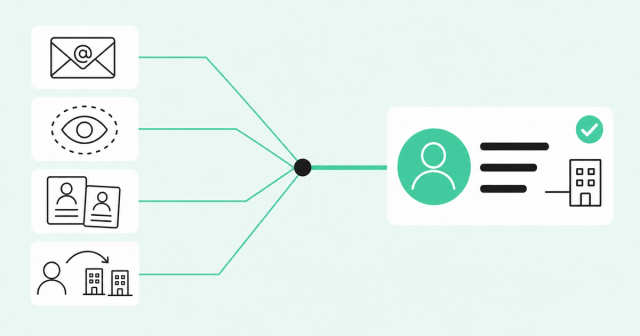
Identity resolution is the process of matching scattered records to the real person or account behind them. It turns a pile of connected tables into a unified revenue graph you can trust.
Here's what it handles:
- Personal emails: A trial signup from a personal address links to the buyer's work profile and company.
- Anonymous visits: Website sessions connect to a known account, and to a person when there's a confident match.
- Duplicate contacts: Two CRM records for the same person merge into one clean profile.
- Job changes: When a champion moves companies, the profile updates instead of going stale.
The payoff is measurable. As we shared in our fragmented data analysis, duplicate accounts in incident.io's CRM dropped from about 3% to roughly 0.3% after it fixed identity.
Match quality varies between tools, so test before you commit. In bakeoffs, Common Room's Person360 identity resolution engine delivers 30-50% higher match rates and cuts duplicate records by up to 79%.
Example: One Account Viewed Through the Graph
Let's make this concrete with Acme Corp, a hypothetical account. In the CRM, the opportunity reads "Stage 3, no activity in two weeks."
Here's the same account through a unified revenue graph:
| What you see | CRM view (before) | Revenue graph view (after) |
|---|---|---|
Deal status | Stage 3, no activity in two weeks | Stage 3, with fresh activity from several people |
Leadership | No change logged | A new VP of sales just joined from one of your customers |
Web activity | Not tied to the opportunity | The RevOps director keeps visiting the pricing page |
Product usage | Not linked to the account | Three Acme employees are active in the product |
Conversations | Last call logged two weeks ago | The transcript shows the buyer went quiet when price came up |
What it means | The deal is going cold | The deal is alive, and pricing is the blocker |
Each signal looks minor on its own. Together, they tell the rep exactly where to go next.
- Who to contact: Reach out to the new VP of sales, who already knows your product from a past role.
- What to say: Send the RevOps director a pricing breakdown tied to the usage Acme already has.
It's the idea behind a customer journey graph: internal and external data in one record.
Use Cases for Sales, Marketing, and Customer Success
A unified revenue graph pays off when every team works from the same view. Here's how each one uses it:
- Sales: Reps prioritize accounts by real activity and see gaps in buying committee coverage.
- Marketing: Marketers build person-level audiences instead of broad account lists.
- Customer success: CS teams spot renewal risk early and find expansion paths inside the account.
- RevOps: Ops teams report consistent pipeline numbers and give AI tools ready-to-use context.
The difference often comes down to account-level guesses compared with person-level signals. Our guide on intent data vs. buyer intelligence breaks it down.
Why AI Needs a Revenue Graph
AI can only reason over the context it can see. Give an agent a stale CRM record, and you'll get confident output built on half the story.
AI without context is just noise. The Gartner AI-ready data prediction makes the stakes clear: "Gartner predicts that through 2026, organizations will abandon 60% of AI projects unsupported by AI-ready data."
That's why connected, trusted context comes before agents. Fix identity and connect your signals first, and every AI tool you add starts with better context.
How to Start Building a Unified Revenue Graph
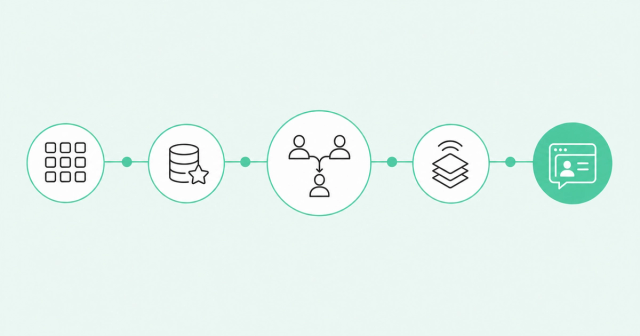
You don't need to rip and replace your stack to build a unified revenue graph. You need a clear order of operations, and identity comes before integrations.
- Map your systems: List every tool that holds revenue data and note what each one knows.
- Pick the authoritative source: Choose one system of record for each field, like deal stage or renewal date.
- Resolve identity first: Match and deduplicate people and accounts before you connect more sources.
- Add signals and unstructured data: Layer in web activity, job changes, product usage, and call transcripts.
- Put it where reps work: Surface the view in the CRM and Slack, then monitor match rates and data health.
RevOps should own the graph, with sponsorship from sales leadership. Ops keeps the rules consistent, and sales leaders drive rep adoption.
Then decide whether to build or buy. Building takes engineering time and ongoing matching work, while buying gets you a tested identity layer faster.
Common Room by Zoom calls that foundation buyer intelligence. Person360 and Context360 resolve identity and unify signals, and Revenue OS with Zoom adds CRM and conversation data to the same unified buyer intelligence layer.
Frequently Asked Questions About Revenue Graphs
For more definitions, browse our GTM data glossary.
How Is a Revenue Graph Different From a CRM?
A CRM tracks deals and the contacts reps enter by hand. A revenue graph connects those deals to every person, signal, and outcome around them, automatically.
Who Should Own the Revenue Graph?
RevOps should own it, with sales leadership as the sponsor who drives rep adoption.
Does Building One Require Replacing Existing Tools?
No, a revenue graph connects the tools you already use and keeps your CRM as the system of record.
What Unstructured Data Belongs in a Revenue Graph?
Call transcripts, emails, meeting notes, and support tickets all belong, because they hold intent that structured fields miss.
How Does Unified Revenue Data Differ From a Single Source of Truth?
Unified revenue data ties every record to the same real people and accounts. A single source of truth is the trusted view that results, and it only works once the data is unified.
How Does a Revenue Graph Improve Forecast Accuracy?
It adds real buyer activity and past deal patterns to each opportunity. Forecasts then rest on evidence instead of rep-entered stages alone.
See the Identity Layer Behind Your Revenue Graph
A unified revenue graph is only as good as the identity and signals underneath it. Want to see how person-level buyer intelligence fits the stack you already run? Request a demo.