
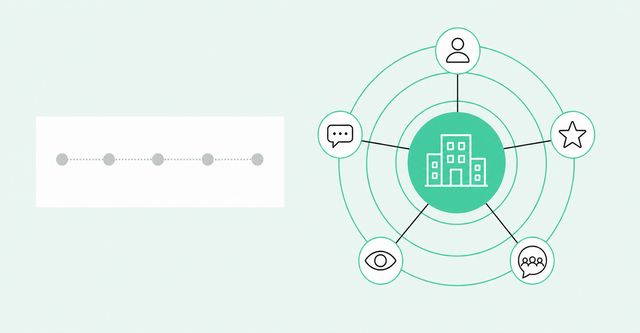
Your team probably has a journey map already. It took two workshops to build, it lives in a slide deck, and nobody has opened it since the offsite.
Meanwhile, in our experience, buyer research also happens in places like AI chatbots, Slack communities, and review sites, and none of that shows up on the map. So what's the best customer journey mapping tool? It's the one that helps your team see and act on what buyers actually do.
This guide breaks down the main tool categories and compares popular options side by side. Then it shows how to map a B2B journey with real buyer signals.
What Is the Best Customer Journey Mapping Tool?
The best customer journey mapping tool depends on the job: workshops, persona maps, behavior analytics, campaign triggers, or tracking real B2B account journeys. Miro and Lucidchart suit workshops; Smaply, UXPressia, and TheyDo suit structured persona maps; Adobe Customer Journey Analytics and Amplitude analyze connected journey data. Salesforce Marketing Cloud and HubSpot trigger campaigns, while signal-based platforms like Common Room show B2B teams the real account journey.
A customer journey mapping tool is software that helps you visualize, measure, or act on the steps people take from research to purchase and beyond. We call those steps touchpoints, meaning any moment a buyer interacts with your brand.
For B2B teams, it comes down to one question: Do you need a picture of the journey or a live view of who's in it now? You may end up pairing two tools, one for team alignment and one for daily action.
Why B2B Customer Journeys Are Hard to Map
Most journey mapping advice comes from customer experience (CX) work at consumer brands. There, one shopper often moves along a fairly predictable path from discovery to checkout.
Classic tools reflect that with a persona map, which is a diagram built around one imagined buyer moving in a straight line. B2B buying has neither one buyer nor a straight line, and that's where B2B customer journey mapping gets tricky.
The Buyer Is a Group, Not a Persona
A buying group is the set of people at one company who weigh in on a purchase. According to Gartner buying group research, "Buying groups are more diverse than ever, ranging from five to 16 people across as many as four functions."
A persona diagram can't show which of those people are active right now. It can't tell you that a director of engineering read your docs on Tuesday while a finance lead checked your G2 reviews.
For marketing leaders, this gap hurts. If your map can't show who at an account is engaged, your campaigns stay broad, and sales keeps asking which accounts deserve attention. An account-level view fixes three things a persona map can't:
- Who's active: You see which people at the account are researching and what roles they hold.
- What they care about: You see the pages, topics, and questions each person keeps coming back to.
- How far along they are: You see whether the account is just browsing or pulling in finance and security.
Most of the Journey Happens Where You Can't See It
Many B2B buyers say they'd rather research on their own before they talk to you. The Gartner rep-free buying survey polled 645 B2B buyers in August-September 2025. It found that "Sixty-seven percent of buyers prefer a sales rep-free experience, while 70% prefer a completely digital, self-service buying experience."
That doesn't mean buyers want to skip sales entirely. The same Gartner survey found 69% of buyers prefer to validate AI-generated insights with sales reps, so the handoff to a rep still matters.
Buyers also move across a lot of places. The McKinsey 2026 B2B Pulse reports that "Buyers now use an average of ten channels across the purchasing journey and expect seamless movement among them."
Some of those channels are new. Per G2 AI search research, "Half (51%) of B2B software buyers now begin their software research with an AI chatbot more often than with Google, up from 29% in April 2025." G2 also found that "Nearly half (45%) of buyers say citations from software review sites are the most confidence-inspiring signal in an AI-generated response."
Both findings cover B2B software buyers, but they show how early research is moving away from your website.
In our experience, research also happens in places like Slack communities, LinkedIn threads, Reddit, and review sites. Marketers call this the dark funnel: buyer research that your web analytics and CRM never record. Spotting activity in the dark funnel is what makes buyer journey tracking possible before anyone fills out a form.
Static Maps Go Stale Fast
Even a good journey map starts aging the day you finish it. A workshop map reflects what your team believed in one room, on one afternoon.
Then your product ships new features, a competitor changes its messaging, and buyers start asking ChatGPT instead of Google. By next quarter, the map describes a journey that no longer exists.
This is the artifact versus decision problem. An artifact is something you make and file away, while a decision is something someone acts on. Too many journey maps end up as artifacts.
A useful map should update itself from real buyer signals. A buyer signal is any action that shows interest, like a pricing page visit, a product sign-up, or a question in your community.
Journey Mapping vs. Journey Analytics vs. Signal-Based Journey Tracking
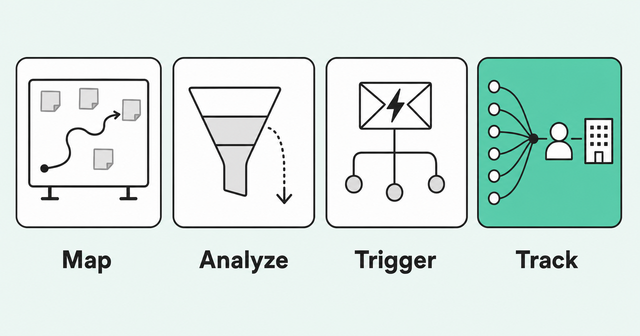
People use these terms as if they mean the same thing, but they describe different jobs. Each one answers a different question, and knowing your question keeps you from buying the wrong tool.
Journey mapping visualizes the stages, personas, and touchpoints you expect buyers to move through. It answers one question: What do we think the journey looks like?
Journey analytics measures how people actually move through your website or app. It answers: Where do users go, and where do they drop off?
Journey orchestration typically sends emails, ads, or tasks when a contact reaches a step you've defined. It answers: What should we send next?
Signal-based journey tracking pulls buyer signals from many sources and ties them to real people and accounts. It answers: Who's in market right now, and what should we do about it?
| Category | What it does | Example tools | Best for | Limitation |
|---|---|---|---|---|
Diagramming and whiteboards | Gives you a visual canvas with journey templates | Miro, Lucidchart | Workshops and team alignment | Built for visual collaboration rather than live journey data |
Dedicated journey mapping | Structures personas, stages, and steps | Smaply, UXPressia, TheyDo | CX and product teams documenting journeys | Oriented to CX and service design, with persona-level journeys rather than B2B account and buying-group signals |
Journey analytics | Measures paths and drop-off across web and app | Adobe Customer Journey Analytics, Amplitude | Digital and product teams improving flows | Depends on the data you instrument and connect |
Journey orchestration | Triggers campaigns along defined paths | Salesforce Marketing Cloud, HubSpot | Lifecycle marketing to known contacts | Primarily acts on contacts and paths you've defined |
Signal-based journey tracking | Ties buyer signals to people and accounts | Common Room | B2B teams tracking real account journeys | Not built for drawing workshop diagrams |
These categories often stack rather than compete. A CX team might sketch in Miro, measure in Amplitude, and send campaigns from HubSpot, while marketing and sales prioritize accounts from live signals.
Best Customer Journey Mapping Tools Compared
Here's a side-by-side look at popular customer journey mapping tools through a B2B lens. We've left out pricing because plans change often, so check each vendor's site for current details.
| Tool | Category | Best for | Watch out for |
|---|---|---|---|
Miro | Diagramming | Collaborative journey workshops | Built for visual collaboration rather than live journey data |
Lucidchart | Diagramming | Polished journey diagrams and flowcharts | Built for visual collaboration rather than live journey data |
Smaply | Dedicated journey mapping | Personas and journey maps with stages and steps | Oriented to CX and service design, with persona-level journeys |
UXPressia | Dedicated journey mapping | Personas and journey maps for CX teams | Oriented to CX and service design, with persona-level journeys |
TheyDo | Journey management | Organizing many journeys across teams | Oriented to CX and service design, with persona-level journeys |
Adobe Customer Journey Analytics | Journey analytics | Analyzing cross-channel journeys from connected data | Can require setup and data work |
Amplitude | Journey analytics | Product paths, funnels, and drop-off | Depends on the data you instrument and connect |
Salesforce Marketing Cloud | Journey orchestration | Multistep campaigns for known contacts | Primarily acts on contacts and paths you've defined |
HubSpot | Journey orchestration | Workflows and lifecycle campaigns tied to its CRM | Primarily acts on contacts and paths you've defined |
Common Room | Signal-based journey tracking | Person- and account-level B2B buyer journeys | Not a whiteboard for workshop diagrams |
Each tool on this list is built for a different core job. The question is which job matters most for your team right now, so here's a closer look at each group.
Miro and Lucidchart
Miro and Lucidchart are visual collaboration tools, and both offer journey map templates. The Miro journey map templates page calls a customer journey map "a visual representation of your customer's experience." The Lucidchart journey map templates page says: "Use a template from our gallery to get a head start on your customer journey map."
They're great for workshops and for getting marketing, sales, and customer success to agree on the basics. The catch is that they're built for visual collaboration rather than live journey data. Typically, the map changes when someone edits it.
If you're searching for free journey mapping tools to start a conversation, a whiteboard template is often the easiest first step. Check each vendor's current plans to see what's included.
Smaply, UXPressia, and TheyDo
Smaply, UXPressia, and TheyDo are journey mapping software built for this specific job. Instead of a blank canvas, they give you structure for personas, stages, and steps.
The Smaply journey mapping platform puts it plainly: "Build reusable personas from flexible cards: goals, needs, quotes, even live metrics." The UXPressia journey mapping platform makes a similar promise: "Keep all your customer journey maps and personas in one place." TheyDo leans toward journey management, and the TheyDo journey management platform says "Customer journey phases and steps create a shared customer context."
These tools fit teams that need a shared, documented view of the customer, and they can connect metrics and research evidence to the map. Our take: They're oriented to CX and service design with persona-level journeys, rather than built around B2B account and buying-group signals.
Adobe Customer Journey Analytics and Amplitude
Adobe Customer Journey Analytics and Amplitude analyze how people move through the channels and products you connect. They typically show paths, funnels, and the steps where users drop off.
The Adobe Customer Journey Analytics docs describe pulling sources like websites, apps, call centers, and CRM "into a single person-centric view." For account-level work, the Adobe CJA B2B edition addresses the need to "track all these interactions in a unified journey view." The Amplitude Journeys chart docs promise analysis of "how your users convert (or fail to convert) between key transitions in your product."
For B2B teams, a few tradeoffs are worth knowing before you commit:
- Owned-channel strength: In our view, they shine on journeys through your website, app, and other systems you control.
- Data dependency: They depend on the data you instrument and connect, so setup can require data work.
- Off-site gaps: In our view, in most setups, research in places like communities and review sites falls outside that data.
Salesforce Marketing Cloud and HubSpot
Salesforce Marketing Cloud and HubSpot handle journey orchestration. You define a path, like a guide download followed by a pricing page visit. Then the platform typically sends the next email or creates a task.
The Salesforce Journey Builder docs describe a tool to "design and automate campaigns that guide customers through their journey with a brand." On the HubSpot side, the HubSpot workflows documentation explains how to "send marketing emails, follow up on sales tasks, and manage ticket status, and more."
That's useful for lifecycle marketing at scale. The limit is that they primarily act on contacts and paths you've defined. In our view, buyers who aren't in your database yet are generally harder to reach.
Common Room
Common Room takes a different approach to B2B customer journey mapping. The Common Room signals overview explains how the platform brings together "social, business, product, CRM, customer data, and more." Those unified buying signals come from dozens of out-of-the-box signals and "50+ native signal integrations."
Its identity resolution engine, Person360, ties that activity to real people and accounts. Identity resolution means matching scattered activity, like an anonymous web visit and a LinkedIn comment, to the same person.
Common Room website visitor identification adds another layer, letting you "see and score the people and organizations behind web visits." That makes buying-group activity visible: You can see which people at an account are engaged and what they're looking at.
From there, Common Room RoomieAI agents flag the highest-priority buyer activity and show your team who to engage, what changed, and what to do next. We've written about using a customer journey graph to follow each person's path and personalize outreach at scale.
The goal is to turn the activity you already have into clear next steps for a specific person or account. Here's the honest limit: Common Room isn't a whiteboard for workshop diagrams. Pair it with Miro or Lucidchart when you need a visual map for a stakeholder session.
How to Choose the Right Customer Journey Tool
The right tool depends less on its feature list and more on the decision you need it to support. Use this checklist to compare options before you sign anything.
- Define the decision: Write down what the map should help someone decide, such as which accounts sales calls this week.
- Check person and account level: Confirm the tool shows which people at which accounts are active, beyond anonymous sessions.
- Look for off-site coverage: Ask whether it sees community, social, review site, and product signals in addition to your website.
- Confirm it stays current: Make sure the journey updates automatically as buyers act, without waiting for a quarterly workshop.
- Connect stages to owners: Give each stage an owner and a clear next step the tool can trigger or suggest.
- Verify CRM integration: Check that it syncs with Salesforce or HubSpot so reps see insights where they already work.
- Pilot one journey: Test the tool on a single journey, such as new-customer evaluation, before you roll it out widely.
If a tool checks the first three boxes but not the rest, it can still help with analysis. It just won't change what your team does on Monday morning.
How to Map a B2B Customer Journey With Real Signals
You don't need a perfect map to start. Emily Kramer of MKT1 shared practical customer journey mapping basics on the Common Room blog.
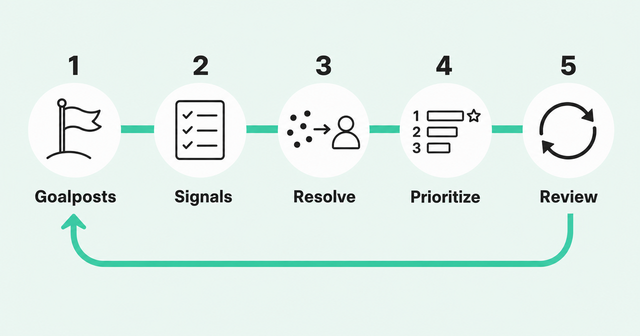
"Just start by knowing what the goalposts are, what's happening at each of them, who's owning them [...]," Emily said. Here's a five-step method that builds on that advice and keeps the map tied to what buyers actually do.
- Set goalposts and owners: Define each stage, what moves an account into it, and which team owns it.
- List signals per stage: Write down the buyer signals that show an account has reached each stage.
- Resolve signals to people and accounts: Match activity to real people, then roll it up to accounts so you see whole buying groups.
- Score and prioritize: Rank accounts by fit and stage signals so each team knows where to focus first.
- Review and update: Check the map monthly against won and lost deals, and drop signals that don't predict progress.
Step two is where most teams get stuck. It helps to start with a short list of signals for each stage of an account-level journey, then refine it as you learn:
- Anonymous research: Repeat visits to pricing or docs pages, AI chatbot referrals, and G2 review activity
- Evaluation: Free trial sign-ups, community questions, and demo page visits from several people at one account
- Buying group expansion: New people from the account joining the research, such as a finance or security lead
- Onboarding: Product activation milestones, support questions, and new users your champion invites (your champion is the internal advocate for your product)
- Expansion and renewal: Usage growth, new teams adopting, champion job changes, and hiring for related roles
None of these signals takes a workshop to spot. They take a system that collects them, ties them to the right account, and keeps the journey current without someone redrawing it.
Turn the Journey Into Action
A journey map earns its keep when it tells a rep or marketer what to do next. Otherwise, it's a nicely formatted guess.
The practical move is signal-based account prioritization, which ranks accounts by fit and by the journey-stage signals they show right now. That gives marketing and sales one shared list in place of another debate about lead quality.
Here's what that looks like for each team:
- For marketing: Shift spend toward accounts with active buying-group signals, and tailor campaigns to their current stage.
- For sales: Reach out when several people at an account show evaluation signals, with context on what they researched.
- For customer success: Flag expansion signals, like new teams adopting, and risk signals, like a champion leaving.
CelerData, a Common Room customer, is one example of a team acting on buyer signals. Year over year, CelerData's signal-sourced pipeline has increased 75%.
If your map lives in a slide deck and your buyers live everywhere else, see what a signal-based journey looks like for your accounts. Request a demo to see how Common Room turns buyer signals into prioritized next steps.
FAQs About Customer Journey Mapping Tools
What Is the Best Tool for Customer Journey Mapping?
The best customer journey mapping tool depends on the job, since whiteboards like Miro suit workshops and analytics tools like Amplitude measure digital behavior. B2B teams that need real account journeys should look at signal-based platforms like Common Room.
Journey Mapping Tool vs. Diagramming Tool: What's the Difference?
A diagramming tool gives you a blank canvas and templates for drawing any visual, including journey maps. A journey mapping tool comes with built-in structure for personas, stages, and touchpoints.
What Are Examples of CX Tools for Journey Mapping?
Common examples include Smaply, UXPressia, and TheyDo for journey mapping, plus Adobe Customer Journey Analytics and Amplitude for journey analytics. You can also use Miro or Lucidchart for early workshops.
What Is an AI Customer Journey Map?
An AI customer journey map uses AI to build and update the journey from real data, like web visits and product usage. Stronger versions also suggest next steps for specific people or accounts.
Are There Free Journey Mapping Tools?
Yes. Some whiteboard and journey mapping tools offer free plans or templates. Check each vendor's current plans, since what's included can change.
How Often Should You Update a Journey Map?
Review a static map at least once a quarter, since buyer behavior and channels shift quickly. Signal-based journeys update as buyers act, so your reviews can focus on whether the signals still predict progress.
Why Do Most Journey Maps Fail to Drive Change?
Most journey maps become artifacts because teams build them once, never connect them to live data, and don't assign owners or next steps. A map drives change when it updates from real signals and tells someone what to do.