
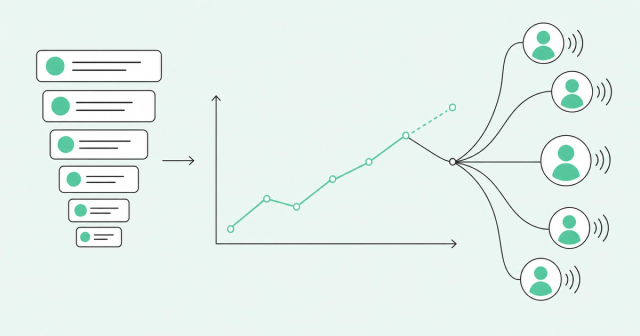
Your dashboards make great historians. They can tell you exactly how last quarter went, while this quarter's deals drift toward next quarter without anyone noticing.
If you're comparing the best sales analytics tools, you probably have plenty of reports and not enough answers. You need to know which accounts deserve your team's time this week, and whether you can trust the number you'll give your board.
This guide explains the five types of sales analytics software and compares eight tools by the job each one does best. It also shows you how to test them with your own deals before you sign anything.
What Are Sales Analytics Tools?
The best sales analytics tools in 2026 are Common Room by Zoom, HubSpot, Salesforce Revenue Intelligence, Gong, Clari Forecast, Salesloft, Avoma, and Revenue Grid. Sales analytics tools collect pipeline, activity, conversation, and buyer data so your team can see what's happening and decide what to do next. Each tool leads at a different job, so the right pick depends on the decision you need to make.
Most sales analytics reports on lagging indicators, which are results that already happened, like closed deals and stage history. Leading indicators are early signs of what's coming, like buyer signals and account engagement that show up before a deal exists. To understand the leading side, start with what buyer intelligence is.
Why Sales Analytics Matters More in 2026
Sellers don't have much time to spare. According to Salesforce's 2026 State of Sales research, the average seller spends 40% of their time selling. Newer reps have it worse: "Gen Z reps are trapped at just 35%, losing approximately two full hours each week to manual data entry."
That changes what a good tool has to do. Sales analytics software should remove work from a rep's week, because every new dashboard competes for the same few selling hours.
There's a second problem. AI and modern sales tools have given teams more data, more activity, and more alerts, and in our view, more data is creating less clarity. Revenue intelligence only helps when it tells a specific person what to do next.
The 5 Types of Sales Analytics Tools
Sales analytics tools fall into five types, and each type answers a different question. Most products span several types, so it helps to sort each one by its design center, meaning the job it does first and best.
You'll also hear the term revenue intelligence. It's the umbrella name for any revenue intelligence platform that connects several of these types to show pipeline, deal health, and forecast in one place.
Pipeline and CRM Analytics
Pipeline analytics is the reporting inside your customer relationship management (CRM) system. It shows how many deals sit in each stage, how old they are, how often they convert, and your win rate.
This is the baseline every team needs. It's also lagging by nature, because it can only report on deals someone already entered and updated. If reps update records late, your reports run late too.
Activity Analytics
Activity analytics automatically logs the emails, meetings, and calls your sellers have with buyers. Reps skip the manual data entry, and your CRM hygiene, meaning how clean and complete your records are, improves.
The hard part is identity matching. A tool has to know which contact and account each email or meeting belongs to. When it guesses wrong, that mistake shows up in every report built on top of it.
Conversation Intelligence
Conversation intelligence records and analyzes sales calls. It flags deal risk, supports coaching, and shows the exact words buyers use to describe their problems.
Its blind spot is anything nobody recorded. Deals also move through texts, internal buyer meetings, and quick chats that no call recorder will hear.
Forecasting Analytics
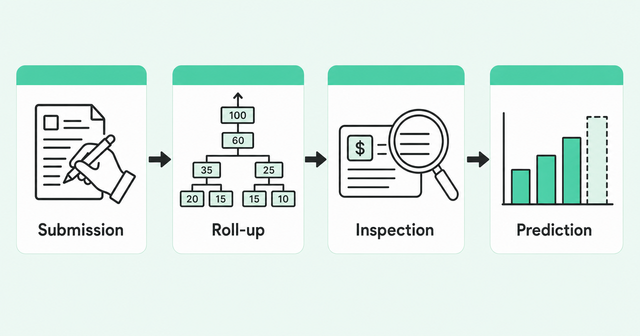
Forecasting analytics predicts how much revenue your team will close in a period. It helps to separate the four jobs a forecasting tool can do:
- Submission: Reps and managers enter their call, meaning the number they commit to.
- Roll-up: The tool adds those calls up the org chart, from rep to manager to chief revenue officer (CRO).
- Inspection: Leaders review the deals behind each number to check the evidence.
- Prediction: A model estimates the likely outcome from deal history and buyer activity.
Forecasting is hard for almost everyone. According to Gartner's AI in sales research, only 7% of teams achieve a forecast accuracy of 90% or more. The same research says "the median accuracy is 70% to 79%."
That's why forecast accuracy starts upstream. A forecast is only as trustworthy as the deal and buyer signals feeding it. A rep's confident tone in a Monday meeting doesn't count as a signal.
Signal and Engagement Analytics
Signal and engagement analytics tracks what buyers do before and during a deal. That includes website visits, product usage, job changes, and community and social activity. Much of it happens in the dark funnel, the research buyers do before they ever fill out a form.
The tool resolves those actions to real people and accounts, then ranks who deserves attention first. This is the leading-indicator layer, and it's where transparent AI scoring matters. Reps should see why a score rose or fell, not just a number.
How to Choose a Sales Analytics Tool: 6 Evaluation Criteria
Start with the decision you can't make today, then look at features. Maybe you can't tell which accounts to work first, or you don't trust the commit number on Monday morning.
Once you've named that decision, use these six criteria to compare sales analytics software. The right column gives you a question to ask every vendor on your list.
| Criterion | What it means | Question to ask each vendor |
|---|---|---|
Evidence coverage | The data sources the tool can read | Which of our deals, calls, and buyer signals will this tool actually see? |
Identity resolution | Matching each action to the right person and account | How do you match an email, web visit, or product user to the right contact? |
Explainability | Showing why a score or forecast changed | Can a rep see exactly why this score or forecast moved? |
CRM write-back and control | Sending updates to your CRM under clear rules | What do you write back to our CRM, and who controls those rules? |
Workflow fit | Showing up where reps and managers already work | Where will my reps and managers see this during a normal week? |
Total cost | Everything you pay beyond seats | What will this cost at our real pilot volume, including add-ons and admin time? |
Data readiness sits under every row in that table. If your CRM records are stale, every tool will give you stale answers, so learn why CRM data decays before you sign a contract.
Explainability and identity resolution deserve extra weight. A score your reps can't explain won't change their behavior, and a signal tied to the wrong account sends them to the wrong conversation.
Best Sales Analytics Tools Compared at a Glance
Use this table as a job map, not a ranking. Each of these sales analytics tools leads at a different job, and many teams pair two of them.
| Tool | Primary category | Strongest job | Best fit |
|---|---|---|---|
Common Room by Zoom | Signal and engagement analytics, forecasting | Showing who's in-market and why, then grounding the forecast in that signal | Sales and RevOps leaders who need account focus and forecast confidence |
HubSpot | Pipeline and CRM analytics | Forecast categories, forecast models, and rep-level performance views | Smaller teams that want a CRM-native baseline |
Salesforce Revenue Intelligence | Pipeline and CRM analytics, forecasting | CRM Analytics, Pipeline Inspection, Einstein Forecasting, and Einstein Activity Capture | Teams that run on Salesforce |
Gong | Forecasting analytics | AI-guided forecasting from revenue signals | Teams that want forecasts informed by revenue signals plus account and pipeline visibility |
Clari Forecast (Salesloft) | Forecasting analytics | Forecasting that keeps the Clari name within Salesloft | Teams with a mature forecast process |
Salesloft | Activity analytics, engagement | Automation, conversations, deals, and forecasting in one seller workflow | Engagement-led teams that want seller workflow and Clari Forecast from one company |
Avoma | Conversation intelligence | Pipeline review, deal risk, and win-loss insight | Meeting-centric small and mid-market teams |
Revenue Grid | Forecasting analytics | Forecast process, deal health, and risk on Salesforce data | Salesforce teams that want a guided forecast process |
We built Common Room by Zoom around the leading-indicator layer. In our view, the others start from CRM records, calls, or forecast submissions.
Top Sales Analytics Tools Reviewed
Each profile of these best sales analytics tools covers what the tool does, who it fits best, and one watch-out to check during your evaluation. We based every profile on the vendor's official product documentation, so confirm current packaging and pricing with each vendor.
Common Room by Zoom is our product. We've kept its profile to the same format as the rest, so you can compare them side by side.
1. Common Room by Zoom: Best for Leading-Indicator Signal Analytics and Grounded Forecasting
Common Room by Zoom starts with the question most CRM reports can't answer: who's in-market right now, and why? It resolves buyer signals from website visits, product usage, job changes, community activity, and your CRM into person-level profiles with Person360 identity resolution.
AI Scoring rolls those signals into one score per person, then up to the account. Reps can hover over any score to see the behaviors behind it, and buying committee views show which roles you've reached in each account.
On the forecast side, Common Room by Zoom offers forecasting grounded in deal signal instead of rep self-reporting. Leaders get one grid they can drill down from CRO to rep to deal, and inline edits write straight back to the CRM record.
RevOps teams set up boards and metrics without code, so every leader works from the same number. Four analytics lenses then explain the forecast:
- Trends: Shows whether the team is on plan for the period.
- Changes: Shows what specifically moved the number.
- Accuracy: Shows how accurate the last call was.
- Pacing: Shows what the team needs to close the gap.
Forecast runs standalone on your existing CRM data or as part of Zoom Revenue Accelerator. Semgrep, a Common Room customer, saw 74% more pipeline in one quarter.
Jason Klumpp, Director of Sales Development at Semgrep, said reps "sourced pipeline right away running plays from product usage, web visits, GitHub activity."
Watch-out: Common Room by Zoom sits on top of your CRM rather than replacing it. You'll still need a CRM as your system of record.
2. HubSpot: Best CRM-Native Baseline for Smaller Teams
HubSpot offers forecasting alongside its CRM. HubSpot's forecasting tools offer customizable forecast categories, forecast models, and rep-level performance views.
Watch-out: Check which reports and forecasting features each tier includes. Map the reports you need to a specific tier before you commit.
3. Salesforce Revenue Intelligence: Best for Salesforce-Native Analytics
Salesforce's Revenue Intelligence features bring together CRM Analytics, Pipeline Inspection, Einstein Forecasting, and Einstein Activity Capture. Teams that already run on Salesforce can add these features to the platform they manage today.
Watch-out: Ask what configuration and licensing each feature needs. Plan admin time for setup alongside the license cost.
4. Gong: Best for AI-Guided Forecasting From Revenue Signals
Gong's revenue forecasting software offers AI-guided forecasting built on revenue signals. It also gives managers visibility into accounts and pipeline.
Watch-out: Ask which channels feed the forecast. If a deal moves through channels the tool can't see, your evidence will have gaps.
5. Clari Forecast (Salesloft): Best for Structured Forecast Governance
Clari and Salesloft completed their merger on December 3, 2025. On September 2, 2026, Salesloft became the go-forward brand, while Clari Forecast keeps the Clari name, according to Salesloft's unified brand announcement. In our view, Clari Forecast suits teams that want a structured, repeatable forecast process.
Watch-out: Ask how much process setup the tool expects and how it connects to the rest of Salesloft. If you haven't defined your stages and commit rules yet, do that first.
6. Salesloft: Best for Engagement-Led Teams
Salesloft's revenue intelligence platform combines automation, deal work, conversation intelligence, forecasting, and CRM integration. Its Rhythm feature prioritizes the actions sellers should take next. Since the merger, Salesloft also offers Clari Forecast, so evaluate the two together.
Watch-out: Check how CRM sync and record ownership rules work. Mismatched ownership can assign activity to the wrong rep or account.
7. Avoma: Best for Meeting-Centric SMB and Mid-Market Teams
Avoma's revenue intelligence features cover pipeline review, deal risk, methodology tracking, and win-loss analysis. It also handles CRM updates and forecasting. In our view, it fits small and midsize business (SMB) and mid-market teams that sell mostly through meetings.
Watch-out: Check which features require add-ons or a connected CRM. Factor both into your cost and setup plan.
8. Revenue Grid: Best for Salesforce Forecast Process
Revenue Grid's sales forecasting product supports the forecast process with deal health and risk views. Teams can also ask natural-language questions about their Salesforce data.
Watch-out: Test the vendor's performance claims against your own data. That advice applies to every tool on this list, including ours.
Why Leading Indicators Belong in Your Sales Analytics Stack
CRM reports, the core of most sales analytics tools, tell you what happened. Buyer signals tell you who's moving now, before anyone creates an opportunity.
Buying groups make this matter more. Forrester's State of Business Buying 2024 found that, on average, 13 people within an organization take part in the buying decision. It also found that 89% of purchases involve two or more departments.
A single-contact view misses much of that group. In our view, most of the buying group may never appear in your CRM. When your champion goes quiet, you need to see who else is still engaged.
That's why we treat two leading indicators as pipeline-health metrics:
- Signal trends: Rising or falling activity across an account shows momentum before the deal stage changes.
- Buying-committee coverage: The share of key roles you've engaged in each open deal shows whether the deal has real support.
You can track signal trends over time to time your outreach. You can also map the full buying committee so reps see which roles are missing before a deal stalls.
Speed matters too. Some teams send real-time purchase intent alerts to reps, so they reach out while a signal is still fresh.
To be clear, this is our point of view, and it's one you can test. Run the pilot below with and without signal data, then compare which version helped your team make better calls.
Best Sales Analytics Tools by Team Size
Your team size changes which of the best sales analytics tools you need first. Start with the smallest setup that answers your hardest question, then add layers as your process matures.
| Team size | Main question | Recommended starting point | What to add next |
|---|---|---|---|
Small sales teams | Which inbound leads should we call first? | CRM-native analytics, such as HubSpot | Signal analytics, such as Common Room by Zoom, once inbound outgrows manual triage |
Mid-market teams with RevOps | Why do some deals stall while others close? | CRM analytics plus activity or conversation intelligence, such as Salesloft or Avoma | Transparent scoring and buying-committee views to focus reps on the right accounts |
Enterprise teams | Can we trust the forecast and see the whole buying group? | Forecast governance on your CRM, such as Salesforce Revenue Intelligence, Gong, Clari Forecast, or Common Room by Zoom | Buying-committee coverage and signal trends across large accounts |
Smaller teams usually need speed to signal and more output per rep without more headcount. Enterprise teams usually need buying-committee visibility and steady deal progression, because more research and more activity won't fix a deal missing half its buying group.
What Sales Analytics Software Really Costs
The license is only the first line on the bill. Plan for costs beyond the license, because making a tool useful for your team takes setup, upkeep, and training.
- CRM tier: Check whether the analytics you need require a higher CRM edition.
- Add-ons: Ask whether forecasting, conversation, or AI features cost extra.
- AI and usage credits: Check whether pricing depends on usage and how costs change as adoption grows.
- Implementation: Setup, field mapping, and data cleanup take time from RevOps or a partner.
- Integrations: Each connected source can need its own connector and upkeep.
- Admin: Someone has to own fields, rules, and permissions after launch.
- Training: Reps and managers need time to learn new reviews and habits.
Ask every vendor to price your pilot volume instead of a list-price seat count. That number sits much closer to what you'll actually pay.
How to Run a 30-Day Pilot
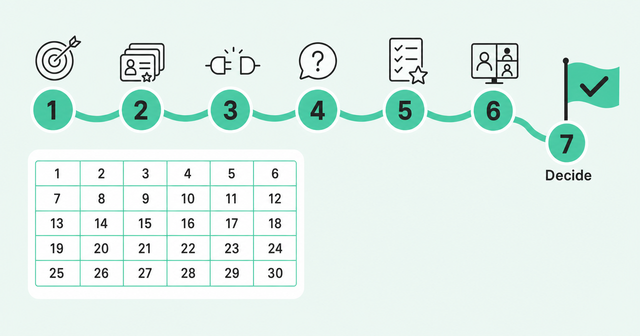
A pilot is a short, real-world test that uses your own deals. Thirty days gives you enough time to see whether a tool changes a decision.
- Pick one decision: Choose the call you struggle with most, like which accounts to work first.
- Use 20-30 real opportunities: Choose open deals your managers know well, so they can judge the output.
- Connect the minimum sources: Link only the CRM, calendar, call, and signal data that decision needs.
- Ask the same questions: Give every vendor the same questions about the same deals.
- Score accuracy and explainability: Rate whether each answer was right and whether you could see why.
- Use the output in a real pipeline review: Run one live review with the tool's answers on screen.
- Decide: Keep the tool only if it changed a decision your team made.
The last step matters most. If nobody did anything differently after 30 days, the tool added a report and nothing else.
Is Sales Analytics Still Worth It in 2026?
Yes, the best sales analytics tools are still worth it if they change a decision. A tool that adds dashboards without changing who reps call or what you commit isn't worth the seats.
Broader AI research points the same way. In McKinsey's 2026 State of AI survey, revenue gains "are most often attributed to the use of AI in marketing and sales." Product and service development and software engineering came next.
That survey covers AI in general, not sales analytics alone. McKinsey also reports that 37% of respondents say AI has contributed positively to their organization's earnings before interest and taxes. Financial impact isn't universal yet.
Connected data decides the value. The same Salesforce research found that "Over half of sales leaders with AI (51%) say disconnected systems are slowing down their AI initiatives."
FAQ
Here are short answers to the questions sales leaders ask most when they compare tools.
What Are the Best Sales Analytics Software Tools?
The best sales analytics software tools in 2026 include HubSpot, Salesforce Revenue Intelligence, Gong, Clari Forecast, Salesloft, Avoma, Revenue Grid, and Common Room by Zoom. Pick based on the decision you need to make, since each tool leads at a different job.
What Are the Top 5 Analytics Tools?
Try HubSpot for CRM analytics, Salesloft and Clari Forecast for engagement and forecasting, and Gong for signal-based forecasting. Round out the five with Avoma for meetings and Common Room by Zoom for buyer signals.
Is Revenue Intelligence the Same as CRM?
No. A CRM stores your records, while a revenue intelligence platform analyzes those records alongside activity, conversations, and forecasts to show deal health.
What's the Difference Between Sales Analytics and Sales Intelligence?
Sales analytics measures your own pipeline and performance, while sales intelligence tells you about the buyers and accounts you could sell to. If you need the second, compare sales intelligence platforms before you buy.
Do Small Teams Need Sales Analytics Software?
Yes, but start with the reports already in your CRM and add tools only when a specific decision stays hard. Small teams usually gain the most from acting on signals quickly, so reps spend time on the buyers most likely to engage.
Which Features Matter Most?
Look for broad evidence coverage, accurate identity resolution, explainable scores and forecasts, CRM write-back, and a fit with how your team already works.
What Does Sales Analytics Software Cost Beyond the License?
Check whether you'll need CRM tier upgrades, add-ons, or usage credits, and plan for implementation, integrations, admin time, and training. Ask each vendor to price your actual pilot volume.
Turn Sales Analytics Into Next Steps
Start with the decision, not the vendor. Name the call you can't make with confidence today, then pick the sales analytics tools that answer it with evidence.
At Common Room by Zoom, we think about it in three steps:
- Know: Common Room's identity and signal layer shows who's in-market, who's in the buying group, and why.
- Act: Zoom's native calling, sequencing, coaching, and forecasting turn that intelligence into coordinated action.
- Learn: Every closed deal, coached call, and buyer signal writes back to the shared context, so prioritization and forecasts get sharper over time.
Together, that's Revenue OS: buyer intelligence you can trust, plus an action layer mature enough to use it. Want to see it on your own pipeline? Request a demo.