
Salesforce can tell you a deal is stuck in discovery. It can't tell you your champion just changed jobs, or that three people from the account read your pricing page this morning.
That gap is why teams go shopping for Salesforce CRM integrations. "According to IDC, in 2025, Salesforce led all CRM vendors with a 20.0% market share," Salesforce reported in its IDC CRM market share ranking announcement. That makes it the system of record for a lot of sales teams.
Here's the catch: Most teams already run plenty of tools and still miss who's in-market. So this guide skips the flat app list. It sorts the best Salesforce integrations by sales workflow and by which direction the data flows.
What Integrates Best With Salesforce CRM?
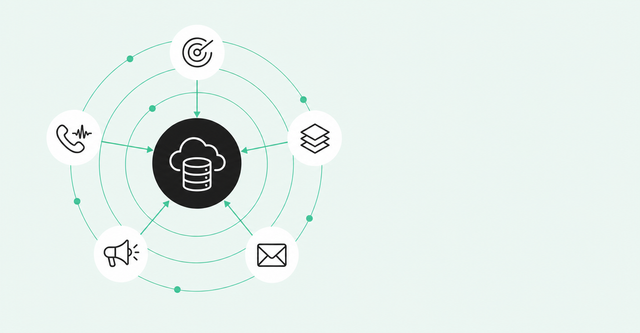
The best Salesforce integrations fill a specific gap in your sales workflow and sync clean data in the right direction. For most B2B teams, that means five categories: buyer signals and intelligence, data enrichment, sales engagement, marketing automation, and conversation intelligence.
A Salesforce integration is a connection that moves records and activity between Salesforce and another tool automatically. You'll also see them called SFDC integrations, since SFDC is shorthand for Salesforce.
Here's what each of the five categories does:
- Buyer signals and intelligence: It flags who's showing buying intent and ties that activity to real people and accounts.
- Data enrichment: It fills in missing company and contact fields.
- Sales engagement: It runs sequences, email, and calls, then logs the activity in Salesforce.
- Marketing automation: It syncs leads, campaign membership, and attribution.
- Conversation intelligence: It records calls and meetings and writes insights back to Salesforce.
You won't run short of options. Salesforce's AppExchange marketplace scale update says "AppExchange connects customers with more than 9,000 partner apps and expert listings from more than 9,600 ISV and SI partners." ISVs are independent software vendors, and SIs are systems integrators, the consulting firms that set these tools up.
That February 2026 count includes consultant listings, not only apps. Still, the choice problem is real, which is why it helps to sort by job instead of by brand.
How to Evaluate a Salesforce Integration
Start with the workflow problem, then pick the tool. More connections aren't automatically better, so judge any Salesforce integration software on the four criteria below.
In a 2024 Gartner B2B seller survey of 1,026 sellers, "50% are overwhelmed by the amount of technology needed. Overwhelmed sellers are 45% less likely to attain quota." Gartner's "overwhelmed" group covers skills and technology together, and the link to quota is a correlation.
Sync Direction
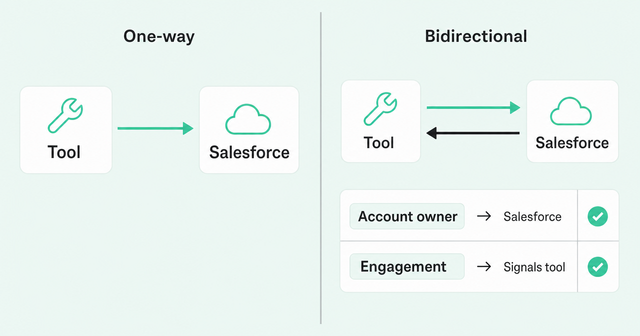
Sync direction is which way data moves. A one-way sync sends data from one tool into the other, while a bidirectional sync moves updates both ways.
Bidirectional sounds better, but it raises a harder question: Who owns the source of truth for each field? The source of truth is the system whose value wins when two tools disagree.
Decide that field by field before launch. For example, Salesforce might own account owner and lifecycle stage, while your signals tool owns engagement context. Salesforce CRM integrations that skip this step tend to overwrite each other quietly.
Field Mapping
Field mapping decides which field in one tool lines up with which field in the other. For example, job title in your enrichment tool maps to the Title field in Salesforce.
Ask two questions before you sign: Can you map custom fields, and can you control when the integration overwrites a value? If the answer to either is no, plan for cleanup work.
Here's our recommendation: Write new context into new Salesforce fields instead of overwriting fields your reps entered. Rep notes stay intact, and you can still report on the incoming data.
Setup Effort
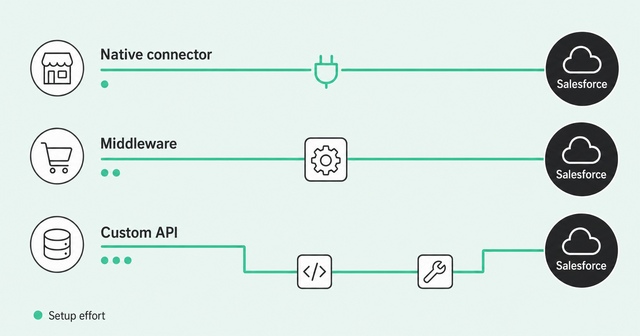
Most integration tools for Salesforce connect in one of three ways. We cover native connectors, middleware, or custom APIs in more depth in our guide to turning a connected CRM into pipeline.
- Native connector: The vendor or an AppExchange app connects straight to Salesforce. Setup is mostly point-and-click.
- Middleware: An integration platform as a service (iPaaS) such as MuleSoft, Workato, or Zapier passes data between tools. It adds another system to maintain.
- Custom API: Your engineers write code against Salesforce's API, the interface that lets software talk to Salesforce. It fits any need but takes the most work to build.
If you're figuring out how to integrate Salesforce CRM with a new tool, also ask who maintains it after launch. If only ops understands how it works, you've built a single point of failure.
Data Freshness
Data freshness is how quickly a change in one tool shows up in the other. Syncs can run in real time, every 15 minutes, or once a day.
For signal-based selling, timing matters most. A signal that lands a week late is just history.
Connection gaps make timing worse. In the MuleSoft 2026 Connectivity Benchmark survey of IT leaders, organizations averaged 957 apps: "On average, only 27% of these applications are currently connected." That survey covers company-wide IT, not just sales, so ask how often every SFDC data integration syncs in each direction.
Best Salesforce Integrations by Category
Each category below covers the job a tool does in your sales workflow and the data it moves. Vendor names are neutral examples, not rankings.
Buyer Signals and Intelligence
Buyer signals are actions that suggest someone may be ready to buy. Think job changes, website visits, and product usage, plus community and social activity that Salesforce can't see on its own.
A buyer signals and intelligence integration ties those signals to real people and accounts. Then it pushes that context into Salesforce, so reps see why an account matters today.
Here's how Common Room's Salesforce integration handles the data flow:
- Sync direction: It's bidirectional and included on all plans.
- Inbound data: It pulls lead status, lifecycle stage, and account ownership from Salesforce.
- Outbound data: It pushes signal activity, qualification status, and engagement context to Leads, Contacts, and Accounts.
- Sync timing: You can set inbound sync from every 15 minutes to daily, and outbound sync runs daily.
For field-by-field setup steps, see the Salesforce CRM integration guide.
Data Enrichment
Data enrichment fills in missing fields like company size, industry, tech stack, and contact details. Firmographic data describes the company, and technographic data describes the technology it uses.
Contact databases fill fields, but they don't tell a rep why to call today. That's why we treat enrichment as one input to buyer intelligence, alongside signals and identity resolution. Identity resolution matches activity from different sources to the same person.
Waterfall enrichment queries several data providers in sequence. If the first provider comes up empty, the next one gets a try.
Watch for duplicates on write-back. If an enrichment tool creates a new contact instead of updating the existing one, you now have two records for one person. Before you sign, read up on how to choose an enrichment vendor.
Sales Engagement
Sales engagement tools run sequences, email, and calls. Tools in this category include Outreach, Salesloft, Apollo, and Zoom Engage. They typically log activity back to Salesforce so reps don't have to.
Slack notifications fit here too. A Slack alert can tell a rep when a deal moves or a new signal shows up on an account they own.
The key question: Does the tool log activity automatically and respect your ownership rules? If it logs calls to the wrong owner, your reports drift fast.
An engagement tool sends the message, but it doesn't decide who should get it. That's the job of buyer intelligence, which tells reps who to contact and why.
Marketing Automation (Including Marketo)
Marketing automation platforms run email campaigns and nurture programs. Tools in this category include Marketo and HubSpot, and they typically sync leads, campaign membership, and attribution into Salesforce. Attribution shows which campaigns get credit for a deal.
With Marketo, the common pattern is a Marketo-to-Salesforce sync. Other tools then read Marketo data through Salesforce fields instead of connecting to Marketo separately.
That's how Common Room handles it. It imports Marketo data through your existing Marketo-to-CRM sync and sends segments to Marketo through exports and webhook workflows. A webhook is an automatic message one app sends another when something happens.
The Marketo integration is included on all plans, and the docs show how to connect Common Room to Marketo. If you're looking for the best tool for Salesforce Marketo integration, start with Marketo's own sync, then add tools that build on it.
Conversation Intelligence
Conversation intelligence tools record and analyze calls and meetings. Tools in this category include Gong, and they typically write call insights and activity back to Salesforce.
Some vendors call this category revenue intelligence. Either way, calls tell you what was said, and signals tell you who to talk to next.
Put the two side by side, and reps walk into the next conversation knowing both.
Salesforce Integration Comparison Table
Use this table as a quick reference for what each type of Salesforce integration software moves and what setup involves.
| Category | What it syncs | Setup effort | Best for |
|---|---|---|---|
Buyer signals and intelligence | Signal activity, qualification status, and engagement context out; lead status, lifecycle stage, and account ownership in | Native connector; Common Room's is included on all plans | Knowing who's in-market and why |
Data enrichment | Firmographic, technographic, and contact fields | Varies by vendor; set duplicate and overwrite rules first | Filling gaps in lead, contact, and account records |
Sales engagement | Email, call, and sequence activity | Varies by vendor | Logging rep activity automatically |
Marketing automation | Leads, campaign membership, and attribution | Varies by vendor; Marketo uses its own Salesforce sync | Handoffs between marketing and sales |
Conversation intelligence | Call insights and activity | Native connector; Zoom Revenue Accelerator's is included on all plans | Learning from calls and meetings |
If two rows write to the same field, settle the source-of-truth question before you turn either one on.
How to Avoid Duplicate and Conflicting Data
Every integration that writes to Salesforce is another chance for duplicates and overwrites. A duplicate is two records for the same person or account, and an overwrite is one tool replacing a value another tool set.
In the 2025 Validity CRM data report, "76% said less than half of their organization's CRM data is accurate and complete." Validity surveyed 602 CRM users and sells data-quality software, so read it as a vendor survey.
These seven practices keep a growing stack clean:
- Audit before you connect: Run duplicate and field-usage reports so you know your starting point.
- Set matching rules: Use email for contacts and domain for accounts. Common Room's Salesforce sync follows the same logic.
- Decide which system wins each field: Write down the source of truth for every shared field.
- Write new context to new fields: Create new Salesforce fields for incoming data so rep-entered values stay put.
- Prefix incoming fields by source: Running Salesforce and HubSpot? For data coming into Common Room, we recommend prefixing custom field names by source, such as "SF Lead Status."
- Pick one outbound destination: For data going out, choose one destination tool for outbound sync to avoid sync conflicts.
- Monitor continuously: Don't wait for quarterly cleanups. DataAgent's Salesforce health checks flag duplicate contacts, outdated contacts, and duplicate accounts in synced Salesforce data.
DataAgent's results refresh overnight. You review the flags, then run cleanup workflows or export a report to fix the records.
Build an Integration Stack That Turns Signals Into Pipeline
Piling more data into Salesforce won't fix a disconnected stack. What helps is a trusted, person-level context layer that tells reps who to talk to and why.
That matters even more once AI enters the picture, based on a 2026 Salesforce survey of 4,050 sales pros. "Over half of sales leaders with AI (51%) say disconnected systems are slowing down their AI initiatives," according to the Salesforce State of Sales report.
That's the idea behind Revenue OS. Common Room by Zoom is part of it, pairing a person-level view of every buyer with Zoom's calling, sequencing, coaching, and forecasting.
Want to see how that works with your Salesforce setup? Request a demo.
Frequently Asked Questions
What Integrates Best With Salesforce CRM?
It depends on the gap you need to fill. For most B2B sales teams, the best Salesforce integrations cover buyer signals, data enrichment, sales engagement, marketing automation, and conversation intelligence.
What Is the Best Salesforce CRM Integration?
There's no single best Salesforce CRM integration. The best one fills your biggest workflow gap with clean, bidirectional, and fresh data.
Which Systems Can Be Integrated With Salesforce?
Most go-to-market tools can connect to Salesforce, including marketing automation, sales engagement, enrichment, signals, call recording, and data warehouses. They connect through native connectors, middleware, or APIs.
How Long Does a Salesforce Integration Take?
Native connectors are usually the fastest to set up, and middleware takes longer. Custom API projects depend on scope and developer time.