
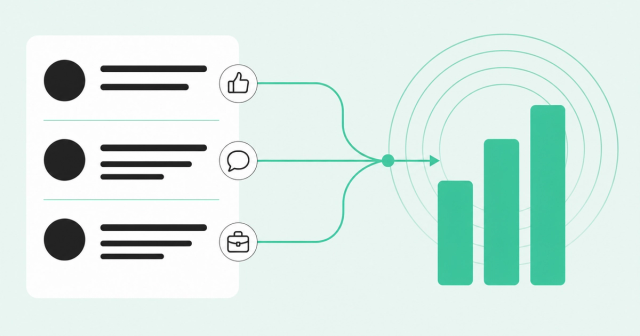
A VP of operations at a 400-person software company comments on your CEO's LinkedIn post. Two days later, her company posts three new SDR manager roles. Your rep doesn't see either one.
LinkedIn is full of moments like this. The hard part is spotting them in time and knowing which ones matter. That's why so many sales teams go looking for the best tool for LinkedIn insights.
This guide is for SDR leaders and the reps they coach. You'll learn which LinkedIn signals point to buying interest, how native and third-party tools differ, and what to check before you buy.
What Is the Best Tool for LinkedIn Insights?
The best tool for LinkedIn insights depends on the job you need done. For content performance, LinkedIn's free analytics or a creator analytics tool works well. For sales, the best tool tells reps who's engaging, whether they fit your ideal customer profile, and what to do next.
Your ideal customer profile (ICP) describes the companies and people most likely to buy from you. LinkedIn insights are the data points that LinkedIn activity reveals, such as who's engaging, changing jobs, hiring, or clicking your ads. The strongest LinkedIn sales tools combine those insights with website visits, product usage, and CRM data.
Scale is the reason you need help. LinkedIn calls itself the world's largest professional network, with more than 1 billion members in more than 200 countries and territories. Nobody can watch that much activity by hand.
Here's the short answer by use case:
- Tracking your own post performance: Start with LinkedIn's free page and post analytics.
- Growing a personal brand: Try a creator analytics tool such as AuthoredUp.
- Benchmarking your page against competitors: Use a social benchmarking tool such as Socialinsider.
- Building and following lead lists: Use Sales Navigator for saved leads, saved accounts, and job-change alerts.
- Turning LinkedIn activity into pipeline: Use a buyer intelligence platform such as Common Room by Zoom. It ties LinkedIn signals to real people and other buyer data.
Why LinkedIn Insights Matter for Sales Teams
In the Gartner 2026 B2B buyer survey, 67% of buyers said they prefer a sales rep-free experience. Gartner also found that 70% prefer a completely digital, self-service buying experience. Gartner surveyed 645 B2B buyers in August and September 2025.
That's a preference, and it doesn't shut reps out. The same survey found that 69% of B2B buyers prefer to validate AI-generated insights with sales reps. Buyers still want a seller at the right moment, so reps need to read signals instead of waiting for a demo request.
LinkedIn is where many of those signals show up first. In its LinkedIn social selling research, LinkedIn reports that social selling leaders create 45% more sales opportunities than those with a low social selling index.
Social selling means building relationships and finding prospects through social networks. The social selling index is LinkedIn's score for how well a rep does it.
Keep that number in perspective. It's a correlation from LinkedIn's own internal study, the page is undated, and LinkedIn doesn't share its method.
Here's the catch for SDR leaders. More LinkedIn activity doesn't mean more pipeline. If you run an SDR team, you've probably heard "We react to everything" or "We cannot keep up" in a pipeline review.
Signal volume has gone up, but clarity hasn't. One rep chases every like, another ignores LinkedIn entirely, and results vary by rep. A good LinkedIn insights tool fixes that by showing every rep the same short list of people worth contacting today.
4 Types of LinkedIn Insight That Signal Buying Interest
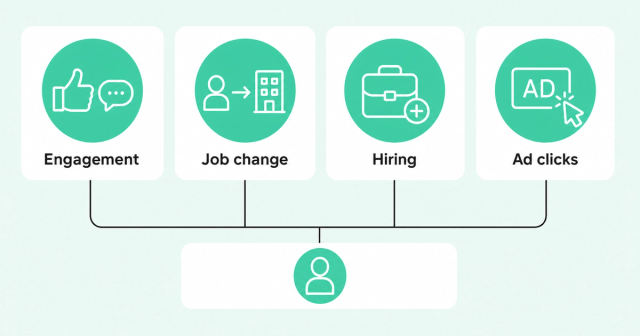
A buying signal is an action that suggests someone may be interested in doing business with you. Some are loud, like a demo request. Most LinkedIn buying signals are quiet, and they only make sense when you read them together.
Here are four types of LinkedIn insight worth tracking, along with what each one tells you and what it doesn't.
1. Engagement With Your Content (and Your Competitors')
Reactions and comments on your company page and your executives' posts are the easiest LinkedIn signal to spot. A director at an ICP-fit account who comments on three posts in a month is worth a closer look. A single like from a student isn't.
Engagement on competitor or thought-leader posts tells you something too. A prospect who comments on a rival's product launch is likely thinking about the problem you solve. Use what they wrote to shape your message, and wait for a stronger signal before you pitch.
Don't reach out on a like alone. Tie it to an account-level reason, such as a recent pricing page visit, a new leader, or an open opportunity. That context is what makes the message feel relevant instead of creepy.
This approach works. Our own SDR team's LinkedIn plays see reply rates of 21.3% or higher and booked meeting rates of 9.5%. You can read exactly how our reps turn LinkedIn signals into pipeline.
2. Job Changes
A new role often brings a new budget, new priorities, and a mandate to fix things. Former champions are the best version of this signal. A champion is someone who used and backed your product at a past company.
Job movement is common. BLS employee tenure data shows that 20.6% of wage and salary workers had been with their current employer a year or less in January 2026. That's down from 22.2% in January 2024.
That's a tenure figure, so don't read it as a job-change rate. It covers all US wage and salary workers, including new hires. Still, it means any contact list includes plenty of people who are new to their seat.
A job change gives you timing, but it doesn't give you a reason. Layer on context before you reach out. Did this person use your product before, does the new company fit your ICP, and is there already an open deal?
That's why we recommend job-change tracking with context. A former power user who joins an ICP-fit account deserves a call this week. A stranger with a new title at a poor-fit company can wait.
3. Hiring and Company Activity
Job postings are one of the most honest signals a company shares. They reveal new initiatives, new regions, the tools a team uses, and who reports to whom. A company hiring its first RevOps manager is telling you what it plans to fix next.
Use the prospect's own language in your outreach. If the posting says "build a scalable outbound motion," echo that phrase. It shows you did your homework, and it ties your message to a problem the company already named.
Speed matters for every signal type. Our team has seen 20%-plus reply rates across sequences when reps reach prospects within 24 hours of a social signal. Hiring is one of the three signals every rep should use, along with social engagement.
4. LinkedIn Ad Engagement
Marketing often runs LinkedIn ads that SDRs never hear about. Someone clicks an ad or fills out a Lead Gen Form, and the data sits in a campaign report. A Lead Gen Form is LinkedIn's built-in form that pre-fills a member's profile details when they sign up.
The fix is to map ad impressions, clicks, and form fills to the right account and contact. Then SDRs can follow up with people who already know your brand. You also want paid audiences that stay current instead of living in last week's CSV.
Common Room's signal-based LinkedIn ad audiences do this. Matched audiences are lists of people or companies you send to LinkedIn so your ads reach them. Common Room builds them from your signals and filters, then adds and removes members as fit changes.
It also ingests LinkedIn ad impressions and clicks and matches Lead Gen Form fills to the contact, along with the source campaign. Our social ad plays drive 40% higher open rates, three times higher reply rates, and two times higher booked meeting rates.
Native vs. Third-Party LinkedIn Insight Tools
LinkedIn insight tools fall into two groups. Native tools are built by LinkedIn and only see what happens on LinkedIn. Third-party tools are built by other companies and connect to LinkedIn through official integrations, your own data, or methods LinkedIn doesn't allow.
Which group holds the best tool for LinkedIn insights depends on what you need to see. Content teams need post metrics. Sales teams need to know which people are showing interest and what else they're doing.
LinkedIn's Native Options: Page Analytics and Sales Navigator
LinkedIn's free page and post analytics show impressions, engagement, follower growth, and audience demographics. An impression is one time your post appeared on someone's screen. These numbers show how your content performs, but they don't tell you which viewers are ready to buy.
Sales Navigator is LinkedIn's paid prospecting tool. It lets reps search for leads and save leads and accounts. Reps also get Sales Navigator lead alerts when saved leads have important updates, like a job or role change.
Its Buyer Intent feature shows which companies are showing interest, but only on Advanced and Advanced Plus plans. Sales Navigator also offers alerts when decision-makers engage with your own content or ads. LinkedIn limits content alerts to Advanced Plus and ad alerts to Advanced and Advanced Plus.
Those alerts are useful, but the view is narrow. They cover your own content and ads, so they won't show a prospect's activity everywhere on LinkedIn.
Pricing is public for two plans. According to Sales Navigator plans and pricing, Core starts at US$119.99 per month/license or US$1,079.88 per year/license. Advanced starts at US$159.99 per month/license or US$1,799.88 per year/license, and Advanced Plus pricing is custom.
Those are US list prices as of October 2026, so confirm them before you budget. Sales Navigator is strong for search and list building. Its main limit is that the insight stays inside LinkedIn, with no website, product, or CRM context attached.
Third-Party Tools: Analytics, Automation, and Buyer Intelligence
Third-party LinkedIn analytics tools and LinkedIn sales tools sort into three buckets. Each one answers a different question, so it helps to know which question you're asking.
- Content analytics tools: These help creators and marketers report on posts, followers, and competitor pages.
- Automation and scraping tools: These copy data from LinkedIn pages or automate actions, which creates compliance risk.
- Buyer intelligence platforms: These combine LinkedIn signals with other sources and resolve activity to real people and accounts.
Scraping means using software to copy data from web pages automatically. Buyer intelligence platforms take a different path. They connect to your company page, your ads account, your website, your product, and your CRM, then show reps who to contact and why.
Compliance: What to Know Before You Pick a Tool
Many LinkedIn sales tools quietly depend on browser extensions or bots, and LinkedIn's rules address that directly. Under the LinkedIn prohibited software policy, LinkedIn doesn't permit third-party crawlers, bots, plug-ins, or extensions that scrape or automate activity on its site.
The risk is practical. Reps can lose access to their accounts, and workflows built on a scraper can break overnight. This is about LinkedIn's terms, and whether a specific use is legal is a separate question for your legal team.
Ask every vendor exactly how it gets LinkedIn data. Favor tools that use official integrations, such as a connected company page or ads account, plus your own first-party data. Policies change, so check LinkedIn's current terms before you sign.
We hold ourselves to the same standard. Common Room's LinkedIn page integration connects your company page to track posts, comments, and reactions. As of December 6, 2024, our Chrome extension no longer collects engagement from LinkedIn posts.
How to Evaluate LinkedIn Insight Tools: 6 Criteria
A demo can make any tool look smart. These six criteria help you find the best tool for LinkedIn insights for an SDR team. Use them as a checklist when you talk to vendors.
- Person-level identity: The tool should name the person who engaged, along with their role and company.
- Signal coverage beyond LinkedIn: Look for website visits, product usage, community activity, and CRM data alongside LinkedIn activity.
- Compliance posture: Ask how the tool gets LinkedIn data, and favor official integrations and first-party data.
- Prioritization and scoring: The tool should rank people and accounts so every rep knows who to contact first.
- Workflow fit: Insights should show up where reps already work, such as your CRM, Slack, or sequencer.
- Contact data quality: A strong signal is useless without a working email or phone number. Ask about match rates and duplicate records.
Scoring means assigning points to people or accounts based on fit and activity, so the best ones rise to the top. Scoring is the most direct fix for "It varies by rep." When every rep works from the same ranked list, coaching gets easier and ramp gets shorter.
Contact data is where many tools fall short. Waterfall enrichment checks several data providers in order until one returns a match. Common Room's always-on waterfall enrichment fills missing emails, phones, and titles across dozens of providers and keeps them fresh in the background.
LinkedIn Insight Tools Compared
The table below compares the main options side by side, so you can match the best tool for LinkedIn insights to your use case. We've left out third-party pricing we couldn't verify, so check each vendor's site for current rates.
| Tool or category | Best for | Insight type | Who it identifies | Signals beyond LinkedIn | Compliance note | Pricing model |
|---|---|---|---|---|---|---|
LinkedIn native analytics | Page admins and creators | Post and page performance | Mostly aggregate audience data | None | Built by LinkedIn | Free |
Sales Navigator | Reps building lead lists | Saved leads, job-change alerts, account-level Buyer Intent | Saved leads and accounts | None | Built by LinkedIn | Per license; Core from US$119.99 per month (US list) |
Content analytics tools, such as AuthoredUp and Socialinsider | Creators, marketers, and agencies | Post metrics and benchmarking | Mostly aggregate audience data | Varies by tool | Check how each tool connects | Subscription; varies by vendor |
Automation and scraping extensions | Bulk data pulls and automated actions | Scraped profiles and activity | Varies | Varies | Conflicts with LinkedIn's prohibited software policy | Varies by vendor |
Common Room | SDR and sales teams turning signals into pipeline | Engagement, job changes, ad engagement, and other buyer signals | Individual people and accounts | Website, product usage, community, CRM, and more | Official company page and ads integrations | Custom; request a demo |
Native and content tools tell you how your posts perform. A buyer intelligence platform tells your reps who's showing interest, whether they fit, and what to do about it. For SDR teams, that's the difference that matters.
Why LinkedIn Signals Work Better With Context
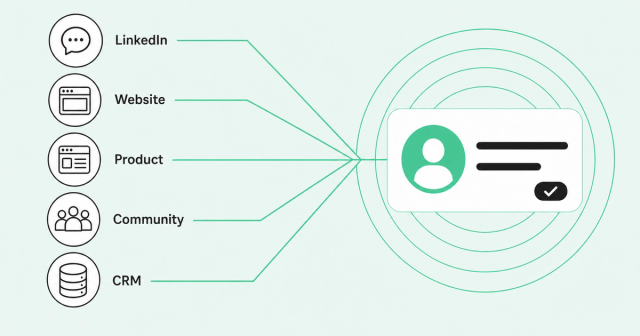
A like is noise until you know who liked it. Is this person at an ICP-fit company, and did they visit your pricing page yesterday? Did they just change jobs, or did their team start a free trial?
Answering those questions takes identity resolution. Identity resolution matches activity from different sources to the same real person. Common Room's Person360 identity resolution engine stitches LinkedIn engagement, website visits, product usage, community activity, and CRM records into one profile.
Match quality decides whether that works. Person360 delivers 30-50% higher match rates in bakeoffs, which are side-by-side vendor tests on the same data. It also cuts duplicate records by up to 79%.
Here's what that looks like in practice. A director comments on your CEO's post, her company posts a RevOps role, and two teammates read your docs. Common Room ties those signals to one account, so your rep sees one clear reason to reach out.
RoomieAI, the platform's AI layer, then surfaces the highest-priority signals and suggests next steps. Your reps already have plenty of LinkedIn activity. What they need is a short, ranked list of people worth contacting today and a reason for each one.
FAQ
What Is the Best Tool for LinkedIn Insights for Sales Teams?
For sales teams, the best tool for LinkedIn insights ties engagement, job changes, hiring, and ad activity to real people. It also combines those signals with website, product, and CRM data so reps know who to contact first.
Is LinkedIn Analytics Free?
Yes, LinkedIn includes basic analytics for company pages and posts at no extra cost. They show content performance, such as impressions and engagement, but they don't show which viewers are ready to buy.
Is Sales Navigator Worth It for SDRs?
It's worth it if your reps search for and save leads on LinkedIn every day. Its insight stays inside LinkedIn, so many teams pair it with a tool that adds website, product, and CRM context.
Can I See Who Engaged With My Competitors' LinkedIn Posts?
You can manually view public reactions and comments on any post you can see on LinkedIn. Tools that scrape that data at scale conflict with LinkedIn's prohibited software policy, so weigh the risk first.
Is It Allowed to Scrape LinkedIn Data?
LinkedIn's terms don't permit third-party software that scrapes or automates activity on its site, and breaking them can lead to account restrictions. Legality is a separate question, so check with your legal team and favor official integrations.
What LinkedIn Metrics Should Sales Teams Track?
Track engagement from ICP-fit people, job changes among champions, hiring at fit accounts, and ad engagement by account. Then measure reply rates and booked meetings from LinkedIn-sourced outreach.
What Happened to Shield Analytics?
Shield Analytics announced its wind-down in May 2026, and its app no longer loads. If you relied on it, compare current content analytics tools against the metrics you used to track.
Want your reps to see which LinkedIn signals matter, tied to real people and ranked by priority? Request a demo