
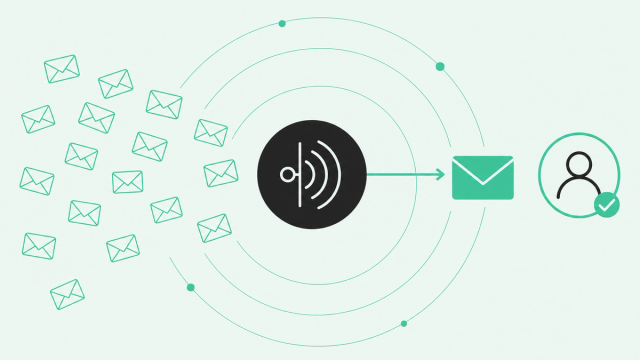
AI made writing a sales email almost effortless. So everyone started sending more of them, and inboxes noticed.
Now your SDRs compete with a flood of polished, forgettable messages, and spam filters are stricter than ever. This guide shows you how to pick the best AI email tool for B2B outbound without adding to the noise.
What Is the Best AI Email Tool for Sales Outreach?
The best AI email tool for B2B sales outreach decides who to email and when, based on real buying signals. Then it writes and sequences a personalized message for that person. A nicer template alone won't book meetings, because the trigger matters more than the copy.
A buying signal is an action that shows someone might be ready to buy. Think of a new VP joining a customer account, a visit to your pricing page, or a spike in product usage.
Timing matters because buyers are tired of noise. Gartner's 2025 B2B buyer survey of 632 buyers found "73% of B2B buyers actively avoid suppliers who send irrelevant outreach." More activity doesn't equal more pipeline, and more email usually means more ignored email.
Different tools solve different parts of the problem. Here's the short list by category:
- Cold email infrastructure: Instantly and Smartlead fit teams that send high volume across many mailboxes.
- All-in-one database and sequencer: Apollo fits small teams that want contacts, AI drafts, and sequences in one place.
- Sales engagement platforms: Outreach, Salesloft, and HubSpot Sales Hub run shared, multistep outreach for full sales teams.
- Writing coaches: Lavender fits reps who want real-time feedback on every draft.
- AI SDRs: 11x and Artisan offer AI agents that aim to prospect and send outbound on their own.
- Signal-triggered outreach: Common Room by Zoom fits teams that want every send to start from a real buying signal.
AI Email Assistants vs. Cold Email Software: Know Which One You Need
Search for the best AI email tool, and most lists rank inbox helpers. Those tools are useful, but they won't help an SDR book meetings.
An AI email assistant helps you manage your own inbox. It summarizes threads, drafts replies, and sorts messages. Gemini in Gmail, Copilot in Outlook, Superhuman, and Shortwave all fit here.
Cold email software sends and automates one-to-many outbound sequences. A sequence is a series of timed emails and tasks that runs until the prospect replies. The software also tracks results and adds controls that protect your sending domain.
| Category | What it does | Who it's for |
|---|---|---|
AI email assistant | Summarizes, drafts, and sorts messages in your own inbox | Any professional with a busy inbox |
Cold email software | Sends automated one-to-many sequences with tracking and sending controls | Agencies, founders, and high-volume outbound teams |
Sales engagement platform | Runs multichannel sequences and logs activity to the CRM | SDR and AE teams that need shared playbooks |
AI SDR | Uses AI agents to research, write, and send outbound with little human input | Teams testing autonomous outbound |
Signal-triggered outreach | Starts outreach from buying signals, then personalizes and sequences it | SDR leaders who want relevance over volume |
Here's the quick rule. If your problem is your own inbox, get an assistant. If your problem is pipeline, keep reading.
How AI Sales Email Tools Work
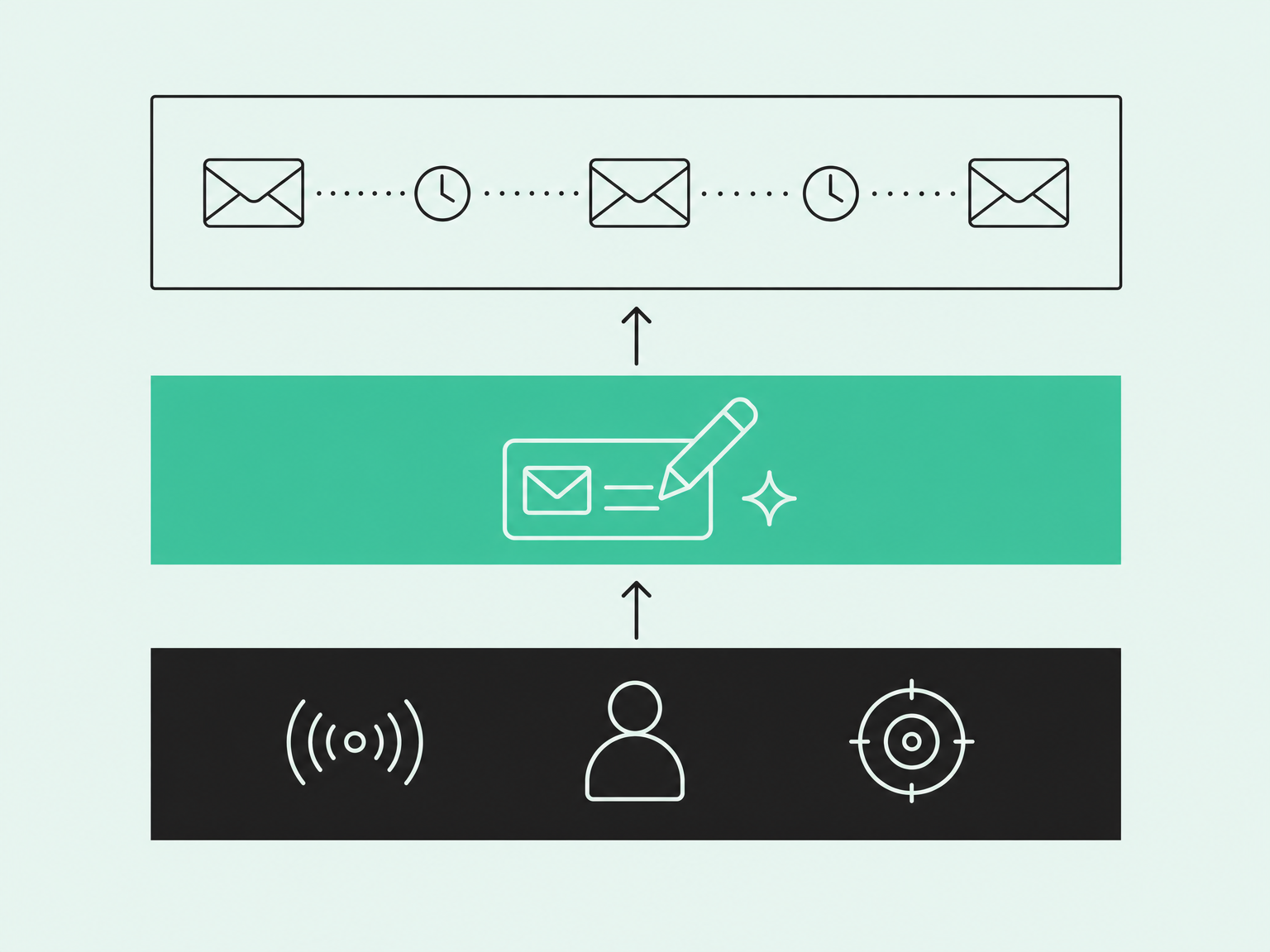
Most AI sales email tools do three jobs. Each job is a layer, and most tools are strong in one layer and thin in the others.
- Data and signals: This layer decides who to contact and why now.
- AI writing: This layer drafts personalized copy for each person.
- Sequencing and sending: This layer schedules each step, spreads sends across mailboxes, and tracks replies.
The writing layer used to set tools apart. Now nearly every sales team has it. Salesforce's State of Sales report found "87% of sales organizations currently use some form of AI for tasks like prospecting, forecasting, lead scoring, or drafting emails."
That number comes from Salesforce's own survey of 4,050 sales professionals. HubSpot's data points the same way. In HubSpot's 2025 sales survey, the company said: "Only 8% of the sales reps we surveyed reported not using AI at all."
So AI drafting is table stakes. When every team can write a decent email in seconds, results split on the data layer: who gets the email, and why today.
What to Look for in Cold Email Software
Every vendor now claims AI personalization. That makes the claim useless for comparing tools.
Use these five criteria instead. They separate tools that book meetings from tools that just send email.
Signal Triggers and Timing
A signal trigger starts outreach when a buyer does something. Common buying signals include job changes, website visits, product usage, and community or social activity.
Most tools use a list trigger instead. A rep uploads a spreadsheet of names, and the sequence starts. A signal-triggered send reaches the buyer while they're already thinking about the problem, which is exactly when a reply is most likely.
Common Room pulls buying signals across 50+ sources into one ranked view, so reps know who deserves attention first. If you're new to the idea, start with what signal-based selling is and how it changes outbound.
Ask every vendor one question: What starts a sequence? If the answer is "a CSV upload," you're buying a faster way to send the same email.
Personalization Depth and Data Quality
Personalization only works when the details are true and relevant. Buyers can tell the difference in about one line.
Merge fields drop a stored value into a template, like {{firstName}} or {{company}}. Person-level context goes deeper: the buyer's role, recent activity, and account research.
One says "Hi Sam." The other says why Sam's team probably needs help this quarter.
AI copy is only as good as the data behind it. AI without context is just noise that arrives faster.
So check two things. Enrichment fills in missing details, like job title, company size, and verified email. Identity resolution matches activity from different places to the same real person.
Common Room's Person360 handles person-level identity resolution, so a website visit, a community post, and a CRM record all map to one buyer. Whatever tool you pick, keep a human in the loop. A rep should review AI drafts before they reach real buyers.
Deliverability and Sender Reputation
Deliverability is whether your email lands in the inbox or the spam folder. Sender reputation is how much inbox providers trust your domain, and it drives deliverability.
Your spam rate is the share of your emails that people mark as spam. Google tracks it in Postmaster Tools, its free dashboard for senders. Google's email sender guidelines say: "Keep spam rates reported in Postmaster Tools below 0.10% and avoid ever reaching a spam rate of 0.30% or higher."
Google treats anyone who sends 5,000 or more emails per day to Gmail as a bulk sender. Bulk senders must set up three kinds of email authentication:
- SPF (Sender Policy Framework): This public record lists the servers allowed to send email from your domain.
- DKIM (DomainKeys Identified Mail): This digital signature proves nobody changed your email after you sent it.
- DMARC (Domain-based Message Authentication, Reporting, and Conformance): This policy tells inboxes what to do when SPF or DKIM checks fail.
Yahoo agrees. Yahoo's sender best practices set the same ceiling: "Keep your spam rate below 0.3%."
In your tool, look for warm-up, which slowly raises send volume on a new mailbox so inboxes learn to trust it. Also look for mailbox rotation, bounce checks that verify addresses before sending, and daily send limits.
Those controls help, but they can't fix irrelevant email. Sending less, more relevantly, is the most reliable deliverability strategy, because fewer unwanted emails means fewer spam complaints.
CRM Sync and Workflow Fit
The best tool is the one your reps actually use every day. For most teams, that means it has to live comfortably next to the CRM, the system that stores your contacts, accounts, and deals.
Look for two-way sync with Salesforce or HubSpot. Replies, calls, and meetings should log automatically, and reps should only see records they have permission to see.
Also check for multichannel steps. Good outbound mixes email, phone calls, and LinkedIn tasks in one sequence.
Then ask where the rep spends the day. If the answer involves five tabs, a spreadsheet, and a lot of copy-paste, adoption will fade by week three.
Compliance
CAN-SPAM is the US law that sets rules for commercial email. It covers B2B cold email too.
Per the FTC's CAN-SPAM compliance guide, "The law makes no exception for business-to-business email," and penalties reach "up to $53,088" per violating email. The guide notes the penalty applies to each separate email, so one bad campaign can get expensive fast.
Every message needs honest headers and subject lines, a valid physical address, and a clear way to opt out. Your tool should process unsubscribes and suppression lists automatically. A suppression list is a do-not-email list that every sequence checks before it sends.
Emailing prospects in the EU? GDPR, the EU's data privacy law, adds its own rules, so loop in your legal team.
Best AI Email Tools for Sales Outreach Compared
Here's how the leading tools stack up for B2B outbound. Each one is strong at a different layer.
Pricing changes often, so check each vendor's pricing page for current plans before you decide.
| Tool | Category | Best for | Where it's strongest | Watch out for |
|---|---|---|---|---|
Common Room by Zoom | Signal-triggered outreach | SDR teams that want relevance over volume | Buying signals, person-level context, and AI-personalized sequences | More platform than a team needs for pure bulk sending |
Instantly | Cold email infrastructure | Agencies and high-volume senders | Mailbox management, warm-up, and inbox rotation | Doesn't decide who to email |
Smartlead | Cold email infrastructure | Agencies and high-volume senders | Multi-mailbox sending, warm-up, and campaign analytics | Doesn't decide who to email |
Apollo | Database and sequencer | Small teams starting outbound | Contact data, AI drafts, and sequences in one tool | Shared data and uneven record freshness |
Outreach | Sales engagement platform | Enterprise SDR orgs | Multichannel sequencing, governance, and analytics | Needs a strong upstream source of who to enroll |
Salesloft | Sales engagement platform | Enterprise SDR orgs | Multichannel cadences, analytics, and AI assistance | Needs a strong upstream source of who to enroll |
HubSpot Sales Hub | Sales engagement platform | Teams on HubSpot CRM | CRM-native AI drafting, templates, and sequences | Works best inside the HubSpot ecosystem |
Lavender | AI writing coach | Individual reps | Real-time draft scoring and coaching | Works alongside a sequencer, so you'll still need one |
Lemlist | Cold email and multichannel | Founders and smaller teams | Email plus LinkedIn steps and personalization tools | Personalization depends on your inputs |
Common Room by Zoom: Best for Signal-Triggered, Personalized Outreach
Most SDR teams can already write a decent email. Their real gap is who to email and when, plus the rep-to-rep variance that comes with it.
Common Room by Zoom starts from buying signals and person-level buyer intelligence. It ranks the people showing real intent, with context attached, so reps don't start the day sorting a longer queue.
RoomieAI uses AI agents grounded in buyer intelligence to write 1:1 outbound from each person's intent and account context. Human review stays in the loop, so reps approve what goes out.
Teams that want Common Room to run the sequence can use signal-triggered sequencing with Engage. RevOps builds multistep sequences across email, phone, and tasks once, and every rep inherits the same proven playbook.
Each step shows up as a prioritized daily action item. Contacts pull straight from your CRM using each rep's own credentials and visibility.
Already happy with your sequencer? Common Room also works upstream of Outreach, Salesloft, HubSpot, Apollo, and Smartlead. It sends better-qualified people, with context, into the tool you already run.
Grammarly used Common Room to increase reply rates by 50% and decrease lead-to-opportunity time by 35%. Here's how Grammarly lifted reply rates by acting on buyer signals.
The honest limitation: Common Room is a buyer intelligence platform. If you only want a low-cost bulk sender, you're overbuying.
Instantly and Smartlead: Best for Cold Email Infrastructure at Volume
Instantly and Smartlead focus on the sending layer. Both help teams connect many mailboxes, warm them up, rotate sends, and track campaign results in one place.
They're a strong fit for agencies and high-volume senders who need organized infrastructure. They handle the plumbing well.
Watch out: they solve how to send, and they leave who to send to up to you. Volume without signals raises spam-complaint risk, and inbox providers don't grade on effort.
Apollo: Best All-in-One Database and Sequencer for Small Teams
Apollo combines a large B2B contact database, AI email drafting, and sequences in one tool. For a small team starting outbound, that's a practical entry point.
Watch out: the database is shared, so many other teams can reach the same contacts. Personalization also depends on how fresh each record is.
Outreach and Salesloft: Best Sales Engagement Platforms for Enterprise Teams
Outreach and Salesloft are mature sales engagement platforms for large SDR orgs. They offer multichannel sequencing, governance controls, analytics, and AI assistance.
Watch out: they're very good at running sequences, but they need a good upstream source of who to enroll. Put a stale list in, and you'll get a well-governed stale sequence out.
HubSpot Sales Hub: Best for Teams Already on HubSpot CRM
HubSpot Sales Hub puts AI email drafting, templates, and sequences inside HubSpot CRM. If your team already lives in HubSpot, setup is simple and email activity stays in one record.
Watch out: it works best inside the HubSpot ecosystem. Teams that run Salesforce as their main CRM may get less out of it.
Lavender: Best AI Email Coach for Individual Reps
Lavender is an AI email coach. It scores drafts in real time and suggests fixes for readability, tone, and mobile formatting.
It works alongside your sequencer and helps individual reps write clearer emails. It improves the message, but it doesn't choose who receives it.
Lemlist: Best for Multichannel Personalization on a Budget
Lemlist combines email and LinkedIn steps in one sequence, plus personalization tools and warm-up. It's popular with founders and smaller teams.
Watch out: personalization is only as good as the inputs. A custom image built around the wrong pain point is still the wrong pain point.
AI SDRs vs. Sales Engagement Platforms: What's the Difference?
An AI SDR tries to run outbound for you. A sales engagement platform helps your reps run it themselves.
AI SDRs like 11x and Artisan aim to research prospects, write emails, and send them with little human input. Engagement platforms like Outreach and Salesloft keep reps in control of each step.
A signal layer can feed both. It's the data layer that decides who's worth contacting before any agent or rep writes a word.
- AI SDR: Best when you want to test autonomous outbound on a narrow, low-risk segment.
- Sales engagement platform: Best when reps own relationships and need shared, repeatable sequences.
- Signal layer: Best as the input to either one, so every send starts from real intent.
Our view: AI should give your reps leverage, and your reps should keep the judgment calls. Autonomy without context just scales generic outreach faster.
If an agent doesn't know why this buyer matters today, it sends the same irrelevant email at machine speed. Keep humans on judgment and relationships: which accounts matter, what to tell a champion, and when to pick up the phone.
How to Choose the Right Tool for Your Team
Start with your team's biggest bottleneck. The right tool fixes that first and plays nicely with the rest of your stack.
| If your team is... | Then start with... | Why |
|---|---|---|
A high-volume agency | Instantly or Smartlead | You need mailbox management and warm-up at scale |
A small team starting outbound | Apollo or Lemlist | You get data, drafts, and sequences without a heavy setup |
An enterprise SDR org on Outreach or Salesloft | A signal layer upstream of your sequencer | Your sequencer works, but enrollment needs better inputs |
Drowning in signals, with uneven rep performance | A signal-triggered platform like Common Room | Shared targeting and prioritized action items give every rep the same starting point |
An individual rep who wants better copy | Lavender | Real-time coaching improves each draft |
If you hear "it varies by rep" in every pipeline review, look at targeting before copy. When every rep works the same ranked list with the same context, new reps have a clearer path to ramp.
Before you sign, ask every vendor these five questions:
- What starts a sequence: a list upload or a buying signal?
- Where does the data behind each AI draft come from?
- How does the tool protect our spam rate and sender reputation?
- Does it sync both ways with our CRM and respect rep permissions?
- How does it handle unsubscribes and suppression lists?
How to Set Up a Signal-Triggered Email Workflow
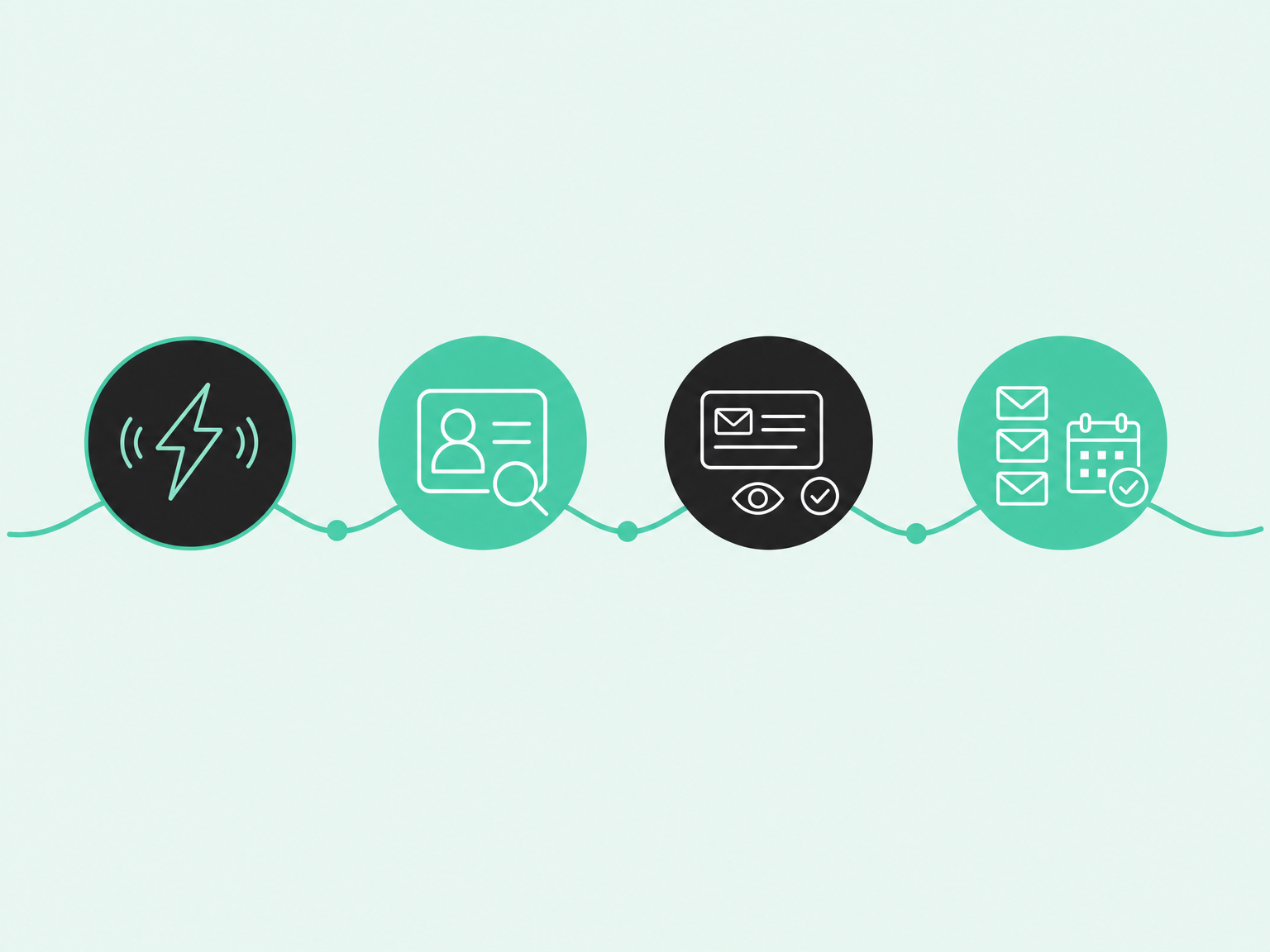
You don't need a six-month project to start. Four steps will get your first signal-triggered play live.
- Pick two or three signals that matter: Try a job change at a customer account or a pricing page visit from a good-fit buyer.
- Enrich and qualify the person: Confirm the role, company, and contact details before anyone writes. Drop people who don't fit your ideal customer profile.
- Generate a personalized snippet and review it: Let AI draft an opening line from the signal itself. A rep checks it for accuracy and tone.
- Enroll in a short sequence and measure outcomes: Keep it to a few steps. Track replies and meetings booked, and ignore raw send counts.
This workflow works with most stacks. In Common Room, signals and enrichment feed RoomieAI, which drafts the snippet, and Engage or your current sequencer runs the steps.
Follow our playbook for personalized AI outbound to map AI message snippets to your sequencer step by step.
FAQ
Here are quick answers to the questions SDR leaders ask most. Each one fits in a breath.
What Is the Best AI Email Tool for Cold Outreach?
The best AI email tool for cold outreach starts each send from a real buying signal, then personalizes the message. Common Room by Zoom works this way, while Instantly and Smartlead fit pure high-volume sending.
Can ChatGPT Write Sales Emails?
Yes, ChatGPT can draft a solid sales email when you give it good context. It doesn't know who's in-market or when to send, so you still need signals, a sequencer, and human review.
Will AI-Generated Emails Hurt My Deliverability?
The bigger risk is volume, because more irrelevant email means more spam complaints, whoever wrote it. Tie sends to real signals and keep SPF, DKIM, and DMARC in place.
What Makes AI Email Personalization Different from Mail Merge?
Mail merge swaps a name or company into a fixed template. AI personalization writes from person-level context, like a recent job change or product activity, so the message explains why you're reaching out now.
Is There a Free AI Tool for Sales Emails?
ChatGPT and several sales platforms offer free plans or trials, but their limits change often. Check each vendor's pricing page for current terms.
What's the Difference Between an AI SDR and a Sales Engagement Platform?
An AI SDR tries to run outbound on its own, while a sales engagement platform helps human reps run sequences. Both work better when a signal layer decides who to contact first.
Is Cold Email Legal for B2B in the US?
Yes, B2B cold email is legal in the US when it follows CAN-SPAM. That means honest headers and subject lines, a valid physical address, and an opt-out you honor within 10 business days, per the CAN-SPAM statute text.
Better Outbound Starts with Knowing Who's In-Market
The right AI email tool helps every rep reach the right buyer at the right moment, with a message worth answering. That starts with knowing who's in-market. Request a demo to see signal-triggered outreach in action.