
Your cadence thinks Tuesday is a buying signal. It emails the VP who priced your product an hour ago with the same step-three template it sends someone who downloaded an ebook last year.
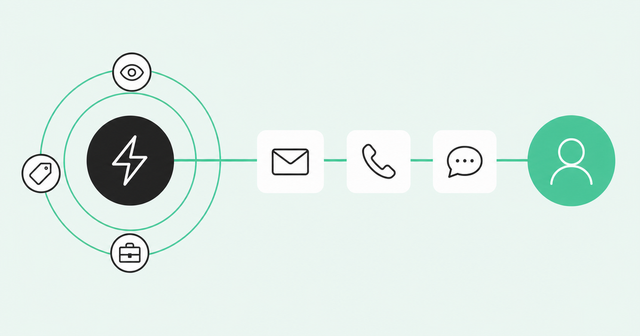
Signal-triggered outbound sequences fix the timing problem. They start outreach when a buyer does something meaningful, instead of when the calendar says it's time. This guide walks through which signals to use, how the workflow runs, and how to keep it from going sideways.
Fixed Cadence vs. Signal-Triggered Outbound Sequences
Yes, outbound sequences can enroll prospects automatically from intent and account signals instead of a fixed cadence. A sequence is a planned series of outreach steps, like emails, calls, and LinkedIn touches. When a signal appears and the person fits your rules, automation adds them to the right sequence with no rep pulling a list.
A fixed cadence runs the same steps on the same days for a static list of names. A signal-triggered sequence starts from an observed buyer action, such as a pricing page visit or a job change, and its messaging references that action. One reacts to the calendar, and the other reacts to the buyer.
The calendar version is struggling. Across Common Room's GTM conversations, email reply rates hover around 1% and call connect rates sit around 2.5%. That's a lot of effort for very few conversations.
Buyers aren't waiting around for your step four, either. A Gartner sales survey published in June 2025 found 73% of B2B buyers actively avoid suppliers who send irrelevant outreach. The same survey found buyers still want seller input on context-heavy questions, like whether a product fits their needs.
Gartner's March 2026 survey found 67% of B2B buyers state that they prefer a rep-free experience. Buyers are doing their own research, so the moment they show interest matters more than ever. The goal is more relevance per touch, with the same or fewer touches.
Choosing Signals That Should Start a Sequence
A buying signal is any action that suggests someone might be ready to talk, like visiting your pricing page or changing jobs. Intent signals are the subset that point to active research. Not every signal deserves a sequence, and treating them all the same is how SDR teams end up reacting to everything.
Start with a handful of signals in the "golden zone." That's where volume and conversion are both high enough to justify a rep's time.
Our guide on how to select the right buying signals walks through that tradeoff. If you need a menu to pick from, start with these 30+ examples of buying signals.
Person-level signals beat account-level ones. "Someone at Acme is researching" gives a rep nothing to act on, but "Acme's VP of sales viewed pricing twice" gives them a reason to call.
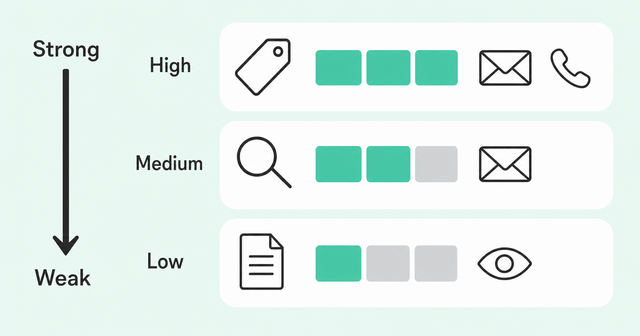
Match how hard the sequence pushes to how strong the signal is. In the table below, ICP stands for ideal customer profile, the company and role traits of buyers who usually close.
| Signal | Strength | Recommended Sequence Intensity |
|---|---|---|
Pricing page visit by an ICP-fit buyer | High | Fast and multichannel, with a call and email right away |
Champion job change | High | Personal and relationship-led, starting with LinkedIn or email |
Product usage spike on a self-serve account | Medium to high | Helpful and product-led, starting with an offer to help |
Competitor research | Medium | Educational and slower-paced, starting with a comparison resource |
Account-level surge with no known person | Low to medium | Research first, then enroll the people you identify |
Single blog post view | Low | No sequence, just a watch list |
Single signals can be noisy, so the strongest rules often combine two. Learn more about stacking buying signals to build rules like "pricing visit plus recent job change."
The Workflow: Signal, Enrichment, Routing, Enrollment
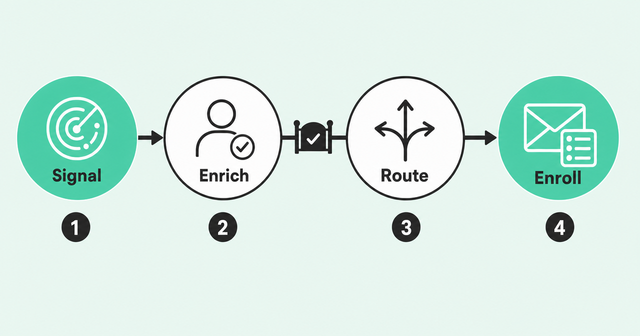
Signal-triggered outbound sequences run through four stages. You detect the signal, enrich and qualify the person, route them to the right owner, and enroll them in the matching sequence.
Doing these steps by hand is where rep time disappears. In Salesforce's State of Sales data for 2026, sales reps report spending 60% of their time on non-selling tasks. Research, list-building, and routing are the parts worth automating first.
Step 1: Detect the Signal
First, bring all buyer activity into one place. That includes first-party data from your website and product, second-party data from partners and review sites, and third-party data like job changes and research activity.
Next, connect that activity to a real person. Person360, Common Room's identity resolution engine, stitches anonymous and known activity together so a pricing page visit becomes a named buyer. RoomieAI, Common Room's AI layer, then surfaces the highest-priority signals so reps aren't sorting alerts by hand.
Finally, write the trigger condition down in plain terms. "ICP-fit director or above visits pricing twice in a week" is a rule. "High intent" is a vibe.
Step 2: Enrich and Qualify
Enrichment means filling in the missing details on a person, like their title, role, company, and contact data. Do it before anything enrolls, and dedupe while you're there. Deduplication means merging duplicate records so one buyer doesn't show up as three people.
Treat this step as a gate that every record has to pass. In a 2025 vendor survey, Validity's CRM data research found 76% said less than half of their organization's CRM data is accurate and complete. Validity sells data-quality tools, but the point stands: automation built on bad records just sends wrong messages faster.
Check ICP fit last. If the person isn't a buyer you'd want a rep to call, they shouldn't enter a sequence, no matter how strong the signal looks.
Step 3: Route to the Right Owner
Routing sends the qualified person to the rep who owns the account in your CRM. Set an SLA, or service-level agreement, for how fast that owner responds. At Common Room, we try to follow up with a call and an email within 15 minutes of a high-intent web visit.
Speed matters because intent fades. A 2011 Harvard Business Review analysis found firms contacting inbound leads within an hour were nearly seven times as likely to qualify the lead. That study covered inbound web leads, not outbound signals, but we think the principle carries over.
Then multi-thread, which means reaching more than one person on the buying team. Forrester's State of Business Buying report for 2026 says the typical buying decision now includes 13 internal stakeholders and nine external influencers. One signal from one person should prompt a look at who else at that account is active.
Step 4: Enroll in the Matching Sequence
Map each trigger to exactly one sequence, and personalize the first touch from the signal itself. If someone viewed pricing, the opener should acknowledge that they're evaluating, without sounding like you watched them do it.
| IF (Signal + Fit) | THEN (Sequence) | First Step | SLA |
|---|---|---|---|
Pricing page visit + economic buyer + owned account | High-intent pricing sequence | Call plus email from the account owner | 15 minutes |
Champion job change + new company fits ICP | Champion reconnect sequence | Personal LinkedIn note or email | Same week |
Product usage spike + ICP fit + no open deal | Product-led sequence | Email offering a walkthrough | Same business day |
Competitor research + ICP fit + two or more active people | Buying-group sequence | Email to the most senior active person | Next business day |
Any signal + current customer or open deal | No enrollment | Alert the owner instead | Not applicable |
Here's how we run the first row ourselves. We pipe pricing page activity into Common Room, filter to economic buyers with Person360, and cross-reference account ownership. Then workflows add qualified people to personalized sequences without human intervention.
You can build this kind of rule with signal-triggered sequences in Engage. Enablement or RevOps builds each sequence once, and every rep inherits the same proven playbook. That's how you get consistency without relying on your top performer's personal spreadsheet.
Coordinating Email, Phone, and LinkedIn Steps
A multichannel sequence mixes channels on purpose. Each step has its own channel, timing, and instructions. Email carries context, phone adds urgency, and LinkedIn builds the relationship.
The best sequences also react to what happens after enrollment. Miguel Moreno, product lead for Zoom Revenue Accelerator, describes conditional steps in Engage that wait for an engagement behavior. For example, a sequence can move to the call step only after a stakeholder opens an email twice.
Miguel also points to staggered delays across multithreaded contacts. Instead of everyone at one account getting the same email in the same minute, each contact moves through the sequence on a different schedule. Use our engagement decision loop to decide which channel comes next based on how the buyer responds.
Handing Call Tasks to the Dialer
Here's where most outbound motions quietly break. The call task lives in one tool, the dialer lives in another, and the rep has to copy numbers between tabs. So reps skip calls, and the phone step becomes decorative.
A dialer is software that places calls for reps and moves them through a call list. In Engage, the call step is the call itself, not a reminder to go open something else. Zoom Auto Dialer pulls call tasks straight from an Engage sequence by name and works through multiple calls, with outcomes logging back to the CRM.
The rep also keeps the signal context on screen during the call. Inside Revenue OS, Common Room's buyer intelligence tells reps who to call and why, and Zoom's native action layer lets them act on it. Every call outcome then writes back to that shared context, so next week's prioritization gets a little sharper.
Guardrails: Suppression, Deduplication, and Rep Review
Automation without guardrails is just a faster way to annoy people. Suppression means blocking certain people from enrolling at all. Set these rules before you turn on any trigger.
- Suppress customers and open deals: Keep current customers and anyone in an active deal out of outbound sequences.
- Allow one active sequence per person: Dedupe records and block a second enrollment while the first sequence is running.
- Set signal expiration windows: Stop a signal from triggering enrollment once it's too old to mention credibly.
- Cap touches per account: Limit how many people at one company enter sequences in the same window.
- Add rep review for high-value accounts: Route strategic accounts to a human for approval before the first touch goes out.
Roll this out in stages with our crawl-walk-run framework for signal plays. In crawl, reps review signals and enroll people by hand. In walk, automation handles research and drafts while a human owns the last mile, and in run, proven plays go end to end.
Measuring Results by Trigger and Cohort
Measure signal-triggered outbound sequences trigger by trigger, since a sequence fed by three triggers can hide one that isn't pulling its weight. Track these numbers for every trigger:
- Signal-to-meeting rate: This shows the share of enrolled people who book a meeting.
- Time to first touch: This tracks the gap between the signal and the first rep action.
- Reply and connect rate: This counts email replies and call connects for each trigger.
- Meeting-to-opportunity rate: This shows the share of meetings that turn into real deals.
- Pipeline sourced: This sums the deal value that traces back to each trigger.
Then compare a signal-triggered cohort with a fixed-cadence cohort over the same period. That gives you your own answer instead of a vendor's claim. Skip vanity metrics like alerts sent, because nobody ever hit quota on notifications.
FAQ
These are the questions SDR leaders and RevOps teams ask most when they start building signal-triggered outbound sequences.
Can Outbound Sequences Start Automatically From Buyer Intent Signals?
Yes, signal-triggered outbound sequences enroll a person the moment an intent or account signal meets your fit rules, with no fixed calendar involved.
What Tool Runs Email, Phone, and LinkedIn Steps in One Sequence?
Engage builds multistep sequences across email, phone, and tasks, so LinkedIn touches can run as task steps alongside emails and calls.
Can a Sales Engagement Platform Hand Call Tasks to a Dialer?
Yes, Zoom Auto Dialer pulls call tasks straight from an Engage sequence by name, so reps work their calls without switching tools.
How Long Should a Signal Stay Valid?
Match the window to how fast the signal fades: A pricing page visit goes stale in days, but a job change stays useful for weeks.
How Many Signals Should You Start With?
Start with two or three high-intent signals, give each one its own sequence, and add more only after the first ones prove they book meetings.
Where Should Human Review Fit in an Automated Workflow?
Put human review right before the first touch on high-value accounts, and let proven plays on smaller accounts run end to end.
Start With 2-3 Triggers, Then Scale What Works
You don't need every trigger on day one. Pick two or three strong signals, build one sequence for each, and measure them against your fixed cadence.
Keep the triggers that book meetings and retire the ones that don't. Signal-triggered outbound sequences earn their keep by making each touch more relevant, so your team spends its time on buyers who are actually paying attention.
Want to see how Common Room and Engage turn buying signals into sequences your reps can act on? Request a demo.