
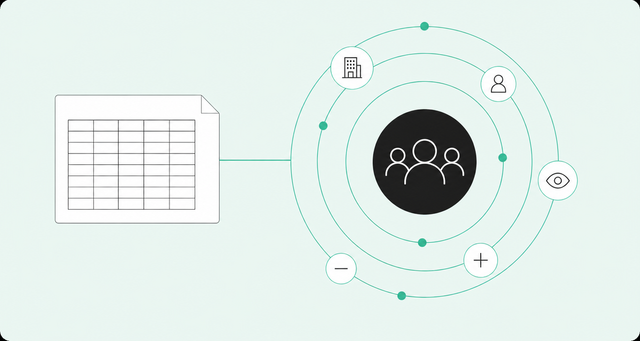
The account list you uploaded to LinkedIn on Monday is wrong by Friday. Two accounts closed, a champion changed jobs, and three new accounts started reading your pricing page. Your ads don't know any of that.
That gap is the real question behind live LinkedIn audience sync. Does your paid audience reflect what buyers are doing this week, or what they were doing at the last spreadsheet export? For account-based marketing (ABM), where you focus spend on a defined set of accounts, the answer decides who sees your ads.
This guide gives you a plain comparison of both methods, a side-by-side decision table, and steps to switch. It also covers when a CSV is still the right call, because sometimes it is.
What's the Difference Between Live LinkedIn Audience Sync and a CSV Upload?
A static CSV upload is a one-time snapshot of accounts or contacts, and you must replace the whole list to update it. Live LinkedIn audience sync continuously adds and removes accounts or contacts as your data changes, without pausing campaigns. One is a photo of your market, and the other is a subscription to it.
Both methods feed LinkedIn Matched Audiences, the LinkedIn feature that lets you show ads to companies or contacts from your own data. The difference is how that data gets there and how long it stays accurate.
LinkedIn's own documentation draws the same line. Its page on LinkedIn Matched Audiences use cases calls CSV "a static upload where advertisers must replace the entire list when updates are needed." It adds that the method is simpler to implement, but it "may cause temporary campaign pauses as the new list processes."
Here's the snapshot versus subscription idea in practice. A CSV records who looked like a good fit on the day you exported it. A live sync follows the rules that made them a good fit, so the audience shifts when buying signals shift.
Buying signals are actions that suggest an account is interested in buying from you. A pricing page visit counts. So does a former champion joining a new company.
How Static CSV Uploads to LinkedIn Matched Audiences Work
CSV uploads are the usual starting point because the workflow is familiar. You export a list from your customer relationship management (CRM) system, format the columns, and upload the file. The upload happens in Campaign Manager, LinkedIn's tool for building and running ads.
That process works fine for a single campaign. The trouble starts when you need the list to stay accurate for months.
The Upload Workflow
LinkedIn accepts two main list types. Company lists identify accounts by fields like company name and website domain. Contact lists use email addresses hashed with SHA256, a standard method that turns each address into a scrambled code for matching.
According to LinkedIn list upload requirements, "The list may take up to 48 hours to process." The same docs set a few size rules worth knowing before you build anything:
- Minimum size: Each list needs a minimum audience count of 300.
- Maximum size: A single list can hold up to 300,000 entries.
- Company list guidance: LinkedIn recommends uploading at least 1,000 companies.
None of this is hard. It's just a lot of steps to repeat every time the list changes.
Where CSV Lists Break Down
A list upload is a fixed segment. LinkedIn's list upload segments can't add or remove members on their own, so every change means a full replacement. Each replacement starts a new processing window and may cause a temporary pause in the campaigns using it.
Then there's the manual work. Someone exports from the CRM, cleans the file, checks the columns, and uploads it again. Nobody puts "refresh the LinkedIn list" on their quarterly goals, yet it keeps showing up on Friday afternoons.
Meanwhile, the market keeps moving. Accounts close, contacts change roles, and new accounts start showing interest. A CSV can't see any of it, so it goes stale the moment fit changes.
Here's what that looks like in a live campaign:
- Closed-won accounts keep seeing prospecting ads: You pay to pitch customers who already signed.
- Closed-lost accounts stay in rotation: Sales moved on, but your ads didn't.
- New in-market accounts wait in line: They don't join the audience until the next export.
How Live LinkedIn Audience Sync Works
Live sync flips the model: A source system defines the audience with rules. That source might be a CRM, an ABM tool, or a buyer intelligence platform. When a record starts or stops matching the rules, the change streams to LinkedIn through its Streaming API.
The Matched Audiences API overview says initial processing "could take up to 48 hours." After that, any addition or removal of users and companies happens "in near real-time," though LinkedIn notes some changes can take up to 24 hours. Streaming needs approved API access, and many teams use a partner integration instead of building their own.
Signal Triggers: What Moves an Account In or Out
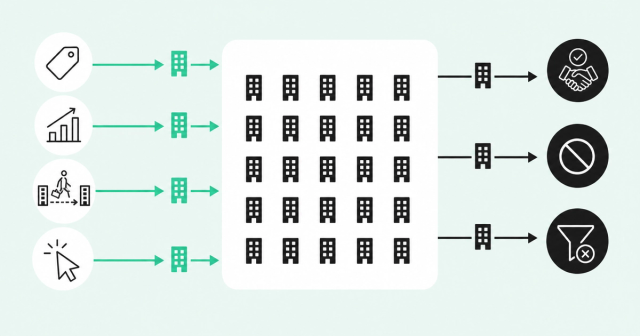
Rules-based audiences only work when the rules reflect real buying behavior. Entry rules decide who joins, and exit rules decide who leaves. If you want more ideas for both, browse these examples of buying signals.
Common entry signals include:
- Pricing page visits: Repeat visits suggest an account is comparing options.
- Product usage spikes: A jump in activity from a trial account points to growing interest.
- Champion job changes: A past champion at a new company already knows your product.
- Ad engagement: Accounts that click your ads have already raised a small hand.
Exit signals matter just as much. Closed-won, closed-lost, and disqualified accounts should leave the audience, and so should accounts that no longer fit your ideal customer profile (ICP). Nothing says "our teams don't talk" like a prospecting ad served to a customer who signed last week.
Company vs. Person Audiences
A company audience reaches an account broadly, meaning anyone LinkedIn matches to that company. A person audience reaches specific members of the buying committee, the group of people involved in the purchase decision.
Live sync lets either type update as signals change. A company audience can add an account the day it shows interest. A person audience can add a new VP who just joined the buying committee and drop someone who left.
Company audiences are wide, and person audiences are precise. For a deeper look at why individual buyers matter, read about person-level signals in ABM.
Live Sync vs. CSV Upload: Side-by-Side Comparison
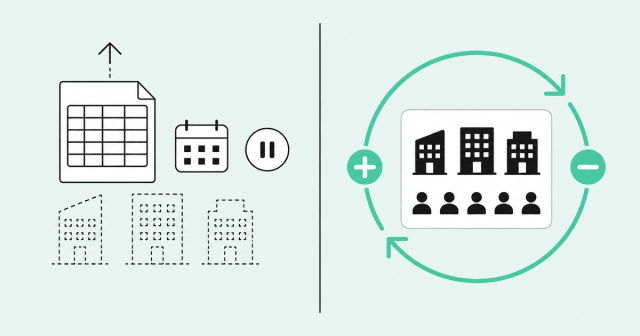
Here's how the two methods compare on the factors that affect your day-to-day work.
| Factor | Static CSV upload | Live LinkedIn audience sync |
|---|---|---|
Freshness | Accurate on the day you export | Near real-time updates after up to 48 hours of initial processing, though LinkedIn notes some changes can take up to 24 hours |
Match decay | Drifts as accounts close, contacts move, and fit changes | Adds and removes members as records enter or leave the rules |
Manual effort | Export, clean, and reupload for every change | Set the rules once, then adjust them as needed |
Campaign continuity | Full replacement may cause temporary pauses | Streams changes without disrupting campaigns |
Signal triggers | No change until someone exports again | Signals move accounts in or out on their own |
Technical setup | Simple: a file and Campaign Manager | Approved API access, and many teams use a partner integration |
Sales and marketing alignment | Lags behind CRM updates | Follows the same records sales works from |
The biggest operational difference is continuity. With a CSV, every refresh carries a small risk: you fix the list and may pause the campaign doing it. With live sync, the audience changes while the campaign keeps running.
Alignment is the quieter win. When paid audiences follow the same rules sales uses, a person-level ABM strategy stops being a slide and becomes a shared workflow.
When a CSV Upload Is Still Enough
Live sync isn't always worth the setup. CSV uploads are simpler, and simple has real value when the list won't change during the campaign.
A CSV is usually fine for these cases:
- One-time event lists: Conference attendees don't need streaming updates.
- Short flights to small named-account lists: A two-week push to a fixed list won't drift much.
- Segment tests: Try a new segment with a CSV before you build rules around it.
- Teams without integration access: If you can't get approved API access or a partner integration, CSV is the workable option.
Just remember that LinkedIn's minimum audience count of 300 still applies to small lists. Here's a simple rule of thumb: If the list will be wrong before the campaign ends, use live sync. If it won't, use a CSV.
How to Move From CSV Uploads to Live Sync
Switching doesn't require a big-bang migration. You can move one audience at a time and keep your current campaigns running while you do it.
The four steps below cover the basics. For a detailed walkthrough, see our playbook on signal-based LinkedIn ad targeting.
Step 1: Define the Audience as Rules, Not a File
Open your current CSV and ask why each account is on it. The answers become your filters. A solid audience usually has three layers:
- ICP fit: The industry, company size, and region that describe a good customer.
- Signals: Recent behavior that suggests timing, like pricing page visits or product usage.
- Exclusions: Closed-won, closed-lost, and disqualified accounts that shouldn't see the campaign.
If you can't explain why an account is on the list, that's useful information too. It probably shouldn't be there.
Step 2: Connect a Sync Source and Choose Company or Person Audiences
Pick a source system that can push audiences to LinkedIn. Then choose a company or person audience and set a sync cadence, which is how often the source sends changes. Before you push anything, check that your records include the fields LinkedIn matches on, because missing emails or domains mean fewer matches.
This is where Common Room by Zoom, a buyer intelligence platform, fits. Its Ads product builds live-synced LinkedIn matched audiences from Common Room signals and filters. That audience sync feature is currently in beta.
Ads pushes company or person audiences to LinkedIn and adds and removes members as fit changes. That way, paid lists stay current instead of freezing last week's CSV.
Match coverage views show field readiness before you push, and sync health notifications flag errors or undersized audiences. That matters because, in our experience, webhook, Zapier, or CRM hops break when tokens or field mappings fail.
To be clear about scope: Ads doesn't buy media, set bids, build creative, or replace Campaign Manager. Your team still runs campaigns in LinkedIn, and Ads keeps the audience accurate.
Step 3: Run Old and New Audiences in Parallel, Then Retire the CSV
Don't swap audiences overnight. Launch the synced audience next to your existing CSV audience and compare them before you move budget.
Watch these checkpoints during the overlap:
- Processing time: Give the new audience up to 48 hours of initial processing before you judge it.
- Audience size: Keep each audience at or above LinkedIn's minimum audience count of 300.
- Archiving: LinkedIn archives segments that sit unused for 30 days, even streaming ones, so keep the new audience in use.
- Match rate: Common Room's playbook expects 70-85% match rates based on Common Room data, though syncing will likely take a few days.
Once the synced audience matches and serves reliably, shift budget to it and retire the CSV. You've now replaced a recurring chore with a set of rules.
Step 4: Close the Loop With Sales
An audience that updates itself is half the job. The other half is making sure sales sees which accounts paid ads actually reached.
Common Room ingests ad impressions, clicks, and click-through rate (CTR) at seven-, 30-, and 90-day windows, plus Lead Gen Form submissions. Ad engagement from LinkedIn arrives at the company level only, while Lead Gen Form fills arrive at the person level. The LinkedIn Ads ingestion docs cover the setup.
Timing matters because buyers do much of their research alone. "Sixty-seven percent of buyers prefer a sales rep-free experience," according to the Gartner 2026 buyer survey. When that buyer finally reaches out, a rep who knows which accounts engaged with paid starts from context instead of a cold open.
More leads don't mean better pipeline. Better timing and shared context do.
FAQ About LinkedIn Audience Sync and CSV Uploads
How Is Live LinkedIn Audience Sync Different From Uploading a Static CSV List?
A CSV upload is a one-time snapshot you must replace in full to update. Live sync continuously adds and removes accounts or contacts as your data changes, without pausing campaigns.
Does Replacing a CSV List Pause My LinkedIn Campaign?
It may. LinkedIn's documentation says a full list replacement may cause temporary campaign pauses while the new list processes.
How Long Does a LinkedIn Matched Audience Take to Process?
Initial processing can take up to 48 hours. With streaming, later additions and removals happen in near real-time, though LinkedIn notes some changes can take up to 24 hours.
What Is the Minimum Audience Size for LinkedIn Matched Audiences?
LinkedIn requires a minimum audience count of 300. For company lists, it recommends uploading at least 1,000 companies.
Do I Need API Access to Use Live Audience Sync?
Yes, live sync uses LinkedIn's Streaming API, which requires approved access. Many teams use a partner integration instead of building their own.
Why Did My LinkedIn Audience Get Archived?
LinkedIn archives segments that go unused for 30 days, and that includes streaming segments. Keep the audience in use to avoid it.
Keep Your LinkedIn Audiences as Current as Your Pipeline
Your CRM changes every day, and your LinkedIn audiences should keep up without a Friday-afternoon export. If you want paid audiences that follow your buyer signals, we'll show you how it works. Request a demo.