Nobody dropped the ball. Your conversation intelligence tool knew what the buyer said, and your CRM knew the opportunity. They just never compared notes.
That's the real question behind conversation intelligence versus an integrated revenue platform. It's less about which vendor to pick and more about where insight should live so it actually reaches the deal.
Most go-to-market (GTM) stacks grew one tool at a time, so this gap is common. Salesforce surveyed 4,050 sales professionals for its 2026 vendor research.
The Salesforce State of Sales report found: "Only a third of sales teams use an all-in-one platform." It added: "The rest use a mix of standalone tools — an average of eight per team — risking tech bloat."
Quick Answer: How the Two Approaches Differ
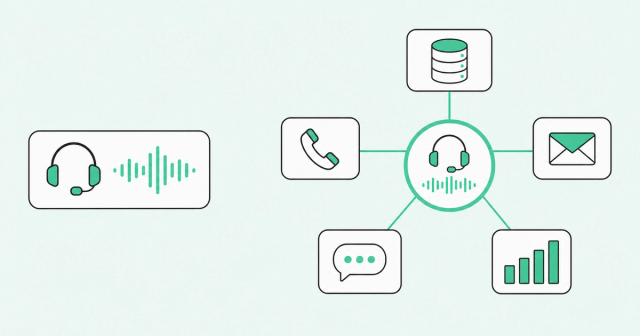
A standalone conversation intelligence tool records, transcribes, and analyzes sales calls so reps and managers can improve their conversations. An integrated revenue platform connects calls to buyer data, dialing, sequencing, coaching, and forecasting in one shared context that stays connected to your CRM.
Put simply, conversation intelligence answers one question: "How did that call go?" An integrated revenue platform also answers two more: "What should happen next, and is the number real?"
Here's the short version:
- Conversation intelligence: Helps you improve individual calls after they happen.
- Integrated revenue platform: Connects what buyers do and say to the next action and the forecast.
What a Standalone Conversation Intelligence Tool Covers
Conversation intelligence is software that records, transcribes, and analyzes sales conversations, according to the G2 conversation intelligence definition. It flags buyer intent, competitor mentions, and moments worth coaching.
Teams commonly use conversation intelligence software to review calls and coach reps, and also to spot deal risks and compliance issues. If you're new to the space, it helps to understand what AI sales coaching does beyond simply recording a call.
The standalone approach has real strengths:
- Narrow scope: One job means fewer decisions during rollout and less change for reps.
- Clear owner: Frontline managers or sales enablement usually own it from start to finish.
The limits come from that same narrow scope. Conversation intelligence tools center on recorded calls and meetings, and G2 notes that many also analyze emails and text messages.
The bigger gap is buyer activity outside the deal, such as website visits and quiet members of the buying committee. A buying committee is the group of people at the customer who weigh in on the purchase.
These tools also work after the fact. The call already happened, and the insight lands in a separate dashboard that someone has to remember to check.
Call this the lag gap: the distance between when an insight appears and when it reaches the systems where work happens. A competitor mention in a transcript only helps if it changes the next email, the deal stage, or the forecast call.
What an Integrated Revenue Platform Covers
An integrated revenue platform connects the systems that know about your buyers with the tools your team uses to act. It typically includes buyer intelligence, dialing, sequencing, coaching, and forecasting, all reading from and writing to one shared context layer.
Buyer intelligence means knowing who's in-market and who sits on the buying committee before anyone books a call. Sequencing means automated, multistep outreach across email and phone.
Why Disconnected Tools Miss the Whole Customer
Linda Lian, co-founder of Common Room, described the problem in the Revenue OS launch letter. Today's stack holds "a dozen systems that each know something about the customer, but none of them know the whole customer," she said.
The CRM knows the opportunity, and the call recorder knows what the buyer said. Neither one sees the procurement lead reading your pricing page all week, because that buyer intelligence sits upstream of any call.
How the Know, Act, Learn Loop Works
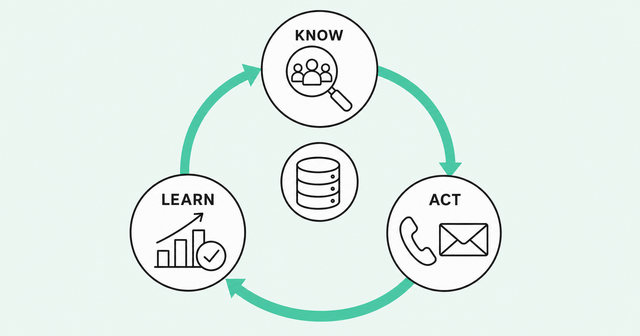
An integrated revenue platform works as a loop with three parts. Each part feeds the next.
- Know: Shared buyer context shows who's in-market, who's on the buying committee, and what they've done before a rep dials.
- Act: Dialing, sequencing, and coaching run on that context, so the next step reflects what the buyer actually did.
- Learn: Call outcomes, coached conversations, and closed deals write back to the shared record, so prospecting, coaching, and forecasting improve over time.
At Common Room by Zoom, we call this Revenue OS. Common Room's buyer intelligence sits underneath, and Zoom Revenue Accelerator handles dialing, engagement, coaching, and forecasting on top.
Run the opening deal through this model. The price objection lands on the deal record as a next step. The forecast flags the risk, and the manager sees it in the coaching queue.
Shared context matters even more once AI enters the workflow. An AI assistant can only reason about what it can see, which is why AI needs shared context across systems.
McKinsey's research points the same way. Per the McKinsey state of AI 2025 report, "this intentional redesigning of workflows has one of the strongest contributions to achieving meaningful business impact of all the factors tested."
That finding comes from McKinsey's November 2025 report, based on a mid-2025 survey of 1,993 respondents across industries and functions. It shows a correlation, not proof about sales tools, but it suggests the workflow around a tool matters as much as the tool.
Conversation Intelligence vs. Integrated Revenue Platform: Side-by-Side Comparison
Here's how the two approaches compare at a high level. You'll also see integrated tools called revenue intelligence platforms, and individual products vary, so treat this table as a starting frame.
| Factor | Standalone conversation intelligence | Integrated revenue platform |
|---|---|---|
Scope | Sales conversations, mainly calls and meetings | The full cycle, from first buyer signal to forecast |
Data sources | Call and meeting recordings and transcripts, and some tools also analyze email and text messages | Calls plus CRM records, email, engagement activity, and buyer signals |
CRM relationship | Often syncs notes or links to the CRM, with depth that varies by tool | Ask which CRM records it updates and which fields it writes back |
Forecasting | Varies by product | Forecast built from CRM data plus conversation and buyer signals |
Coaching | Core strength, with call review, scorecards, and coaching moments | Coaching tied to deal context and outcomes |
Dialing | Varies by product | Included, with call outcomes logged to the CRM |
Setup effort | Ask how integrations and data prep affect rollout | Ask how integrations and data prep affect rollout |
Cost structure | Ask for an itemized quote covering seats, tiers, and add-ons | Ask for an itemized quote covering seats, tiers, and add-ons |
Check what each tier and add-on includes before you compare quotes.
Does a Revenue Platform Replace Your CRM or Write Back to It?
Many integrated revenue platforms are built to work alongside your CRM, which usually remains the system of record. Some also overlap with CRM functions, so confirm where each record lives.
A system of record is the official source of truth for accounts, contacts, and deals. A system of action is where reps and managers do the work: making calls, running sequences, coaching, and calling the forecast.
Forrester on revenue orchestration, an October 23, 2026, analyst post, said, "Historically, Salesforce owned customer records while specialist providers owned execution." The same post notes that this separation is becoming less distinct as CRMs add orchestration.
What CRM Write-Back Means
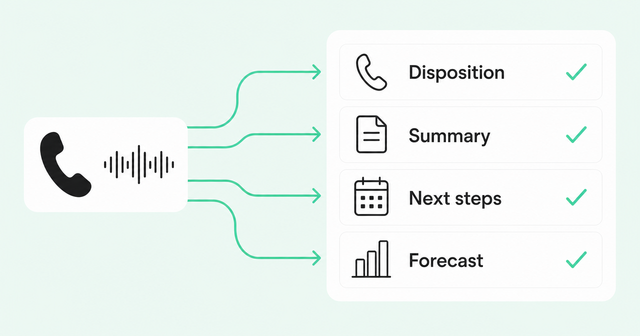
CRM write-back means a tool automatically updates CRM records with what happened, so reps don't have to retype it. Without write-back, insight stays stuck in the tool that created it.
That handoff into the CRM is where many teams lose value. The Bain 2025 commercial excellence survey reported: "Seventy percent of companies are failing to effectively integrate their sales plays into their revenue technology tools, such as solutions used for customer relationship management (CRM)."
Bain published the survey of more than 1,200 senior commercial executives on April 23, 2025. The 70% refers to companies running structured sales activities, and it reflects what respondents reported rather than an audit of any tool.
Manual entry adds to the problem. In the same Salesforce survey, reps reported spending about 60% of their time on nonselling work like data entry and prospecting.
Here's what a good revenue platform should write back:
- Call dispositions: The outcome of each dial, such as connected, left voicemail, or not interested.
- Notes and AI summaries: A short record of what the buyer said, asked, and pushed back on.
- Next steps: Agreed actions, with owners and dates attached.
- Forecast edits: Changes to stage, amount, or close date made during forecast reviews.
We built Zoom Revenue Accelerator to write summaries, next steps, and deal context back to Salesforce, HubSpot, and existing GTM tools. The Zoom Revenue Accelerator platform works alongside your CRM rather than replacing it.
Questions to Ask About CRM Fit
Before you sign anything, get clear answers on how write-back works. These four questions cover most of the risk.
- Which fields update: Ask for the exact objects and fields the tool writes to.
- Who controls the rules: Confirm RevOps decides which updates happen automatically and which need rep approval.
- Native or synced: Ask whether updates happen in real time or on a schedule, and how the tool resolves conflicts.
- CRM support: Check that it works with your CRM, whether that's Salesforce, HubSpot, or Microsoft Dynamics.
For a deeper look at sync rules and data inputs, read our guide to evaluating revenue forecasting software.
Can You Start With One Piece Like Coaching or Dialing?
Yes, as long as the piece you start with writes back to a shared record and can connect to the rest later. Starting small lets you solve one problem well before you change how the whole team works.
Zoom Revenue Accelerator's four products, Dial, Engage, Coach, and Forecast, each work standalone or together. No outcome data proves one starting point beats another, so start with the problem that hurts most today.
Starting With Coaching
Coaching is a good first step when managers can't sit in on every call. Reps feel that gap too: in Salesforce's 2026 State of Sales report, 46% of reps said they rarely get feedback on their sales conversations.
Look for scorecards built on your sales methodology, which is your team's agreed framework for qualifying deals, such as MEDDICC or BANT. Also look for updates that land in CRM fields instead of a separate dashboard.
Coach is one option here. It's AI coaching that works standalone, so you can buy it on its own and connect it to the rest of Zoom Revenue Accelerator later.
Starting With Dialing
Dialing makes sense first for outbound teams with low connect rates. A connect rate is the share of dials that reach a live person.
Two things matter most with a sales dialer. Every call outcome should log back to the CRM automatically. Call lists should also rank by buyer signal, so reps reach the people most likely to engage.
Zoom Auto Dialer works standalone with Zoom Phone. It's a dialer that logs to CRM, recording each call and its disposition on the record.
Starting With Forecasting
A standalone sales forecasting tool can run on CRM data alone. That's useful, but the forecast is then only as accurate as what reps entered.
Connecting conversation and buyer signals adds context the CRM doesn't hold, like a pricing concern raised on last week's call. Forecast runs on your existing CRM data on its own, and edits to stage, amount, or close date write back to the source CRM record. That's the idea behind forecasting grounded in deal signal: start with the data you have, then add signal as you connect more pieces.
Decision Checklist by Team Size and Stack Maturity
The right approach depends on your team size, how many disconnected tools you already run, and how much pressure sits on the forecast. Use this table as a starting point, then pressure-test it with the vendor questions below.
| Your situation | Likely fit | Why it fits |
|---|---|---|
Small team with a narrow coaching need | Standalone conversation intelligence may be enough | One clear problem, one owner, and a simple forecast |
Growing team with several disconnected tools | Start with one piece that writes back to the CRM | Closes the most painful gap without a full rollout |
Mid-market or enterprise team with RevOps and forecast pressure | Integrated revenue platform | Shared context across dialing, coaching, and forecasting matters most at scale |
Any team planning to use AI agents in sales | Prioritize shared context and CRM write-back | AI can only act on the data it can see |
Standalone is the right call more often than platform pitches suggest. If your team is small and the main problem is call quality, a focused tool may be all you need.
Adding tools also carries a cost of its own. In the Gartner seller overwhelm survey of 1,026 B2B sellers, "50% are overwhelmed by the amount of technology needed."
Gartner's September 2024 release also reported that overwhelmed sellers were 45% less likely to attain quota. That's an association, not proof that tools cause missed quota.
Salesforce's 2026 survey, with a different sample and question, found 42% of reps felt overwhelmed by too many tools.
Whichever path you choose, ask every vendor these questions:
- Day-one data: What will the tool show in week one, using only the data you already have?
- Write-back rules: Which CRM fields does it update, and who approves those changes?
- Historical pilot: Can you test it on past deals and calls to compare its read with what actually happened?
- Connection path: If you start with one piece, how does it connect to the rest later?
FAQ
How Is an Integrated Revenue Platform Different From a Standalone Conversation Intelligence Tool?
A standalone conversation intelligence tool records and analyzes calls to improve conversations after they happen. An integrated revenue platform connects those calls to buyer data, dialing, coaching, and forecasting in one shared context that stays connected to your CRM.
Does a Revenue Acceleration Platform Replace a CRM, or Does It Write Back Into One?
Many revenue acceleration platforms are built to work alongside your CRM, which usually remains the system of record. Some also overlap with CRM functions, so confirm where each record lives.
Does a Sales Forecasting Tool Work Standalone, or Does It Require a Full Revenue Platform?
A sales forecasting tool can run standalone, so check whether it works on your existing CRM data and how complete that data is. Forecast, for example, runs on your existing CRM data on its own.
Do I Need a Full Revenue Platform Suite, or Can I Start With Just One Piece Like Coaching or Dialing?
You can start with one piece, such as coaching or dialing, if it writes back to the CRM and can connect later. Pick the piece that solves your most painful gap today.
Can Conversation Intelligence Be Used Alongside a Revenue Platform?
You can, as long as both tools write to the same CRM record and you agree which one owns each field. Check that call insights reach the deal record, so insight doesn't split across systems.
Conclusion: Pick the Approach, Then the Vendor
The difference comes down to where insight goes. Conversation intelligence improves the call, while an integrated revenue platform carries what you learn into the next action, the CRM, and the forecast.
Before you book vendor demos, take three steps:
- Audit where insights stop: Trace one recent lost deal and note where key information never reached the CRM.
- Check write-back: List the fields each current tool updates automatically, and mark the gaps.
- Pilot one piece: Start with coaching, dialing, or forecasting, and judge it on whether your CRM gets more accurate.
If you'd like to see how shared context works across dialing, coaching, and forecasting, we'd be glad to walk you through it.