
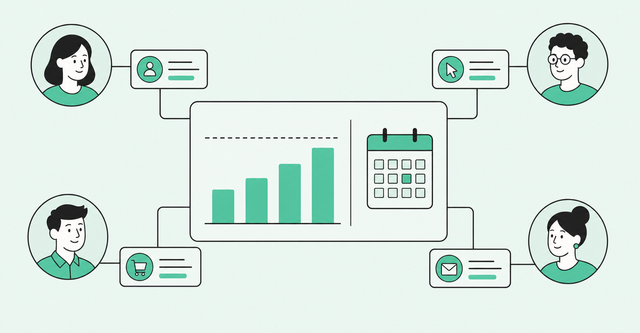
It's Monday morning, and the commit call is about to start. Every rep has a number, every manager has adjusted it, and nobody can explain why last quarter's "sure thing" slipped to next quarter.
Gartner's sales AI research, published in 2024, shows you're not alone. It found "only 7% of teams achieve a forecast accuracy of 90% or more, and the median accuracy is 70% to 79%." That's a lot of confident Monday calls landing in the wrong place.
Revenue forecasting software is supposed to fix this. This guide covers how these tools work, how sales and finance tools differ, how to compare them, and how to test one before you sign.
What Is the Best Revenue Forecasting Software?
The best revenue forecasting software depends on which forecast you need. For sales pipeline forecasts, look at Salesforce Revenue Intelligence, HubSpot Sales Hub, Gong Forecast, Clari Forecast, Aviso, Revenue Grid, and Common Room by Zoom. For finance planning, look at Anaplan, Pigment, Cube, and Workday Adaptive Planning.
Revenue forecasting software is a tool that predicts how much money your company will bring in over a set period. Sales tools build that prediction from open deals in your CRM (customer relationship management system, where reps track accounts and deals). Finance tools build it from budgets, past results, and business plans.
So the best sales forecasting software for a CRO (chief revenue officer) isn't always the best forecasting software for a CFO. Pick the job first, then the tool.
Sales Forecasting vs. Finance Forecasting Tools
Most "best of" lists mix both types of tools together, which makes shopping harder. Sales forecasting software and finance revenue forecasting tools answer different questions for different owners.
| Sales forecasting tools | Finance forecasting tools | |
|---|---|---|
Who owns it | Sales leaders and RevOps (revenue operations) | CFO and FP&A (financial planning and analysis) |
Question it answers | Which deals will close this quarter? | What will revenue, costs, and headcount look like? |
Data inputs | CRM deals, rep calls, buyer activity | Accounting data, budgets, CRM as one input |
Time horizon | Current quarter, often week by week | Several quarters to several years |
Example tools | Salesforce Revenue Intelligence, Gong Forecast, Clari Forecast | Pigment, Cube, Workday Adaptive Planning |
Think of it as a spectrum, though. Some finance tools, such as Anaplan, also offer sales forecasting apps, so the line between the two types can blur.
If your main pain is the Monday commit call, start with a sales forecasting solution. If your main pain is the annual budget, start with a finance tool.
The 4 Jobs a Forecasting Tool Does
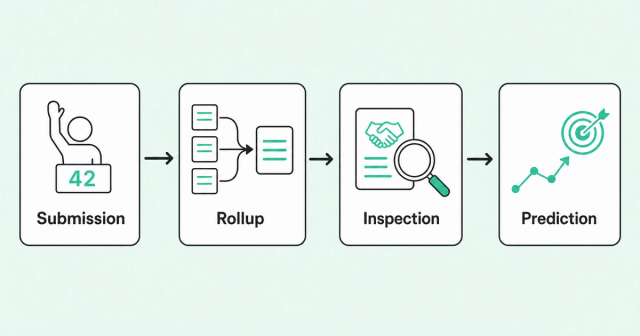
Every forecast moves through the same four steps. Knowing them helps you see where a tool helps and where it stops.
- Submission: Reps and managers enter their call, meaning the number they expect to close.
- Rollup: The tool adds those calls into one number for each team, region, and the whole company.
- Inspection: Leaders drill into the deals behind the number to test whether it holds up.
- Prediction: The tool estimates the likely outcome from data, apart from what reps say.
In our view, many forecasting tools stop at rollup. A rollup tells you whether you're on plan. It can't tell you why.
That gap matters because rollups depend on what reps report. If a rep's commit rests on one friendly contact, the rollup looks healthy right up until it isn't. Here's more on why commits slip without warning.
How to Evaluate Revenue Forecasting Software
Feature lists look similar from vendor to vendor. The four criteria below help you separate tools that just total your pipeline from tools that help you trust it.
One thing sits under all of them: data readiness. If your CRM data is messy, any revenue forecasting software will inherit the mess. If you're also weighing reporting tools, you can compare sales analytics tools in our companion guide.
Data Sources and Signal Inputs
Some forecasting software reads only your CRM fields, like deal stage, amount, and close date. Others also read call recordings, emails, and buyer activity. A buyer signal is any action that shows interest or risk, like a new stakeholder joining a call.
- CRM only: The forecast reflects what reps typed in, which may lag what buyers are doing.
- CRM plus calls: Conversation data adds context on deal health and next steps.
- CRM plus buyer activity: Engagement and people changes can flag risk before a rep updates the record.
Ask every vendor one plain question. Which deals and signals will this tool actually see on day one?
Pipeline Inspection and Rollups
Good inspection lets a leader click from the company number down to a single deal. You should be able to go from CRO to manager to rep to deal without exporting a spreadsheet.
Check how the tool handles forecast categories. These are the buckets reps sort deals into: commit (expected to close), best case (could close), and pipeline (early or unlikely this period). Strong sales forecasting tools let you see how deals move between buckets week over week.
CRM Sync and Write-Back
Write-back means an edit you make in the forecasting tool updates the deal record in your CRM. Without it, reps update two systems, and the two systems drift apart.
- Native or synced: Native tools live inside the CRM, while synced tools copy data back and forth on a schedule.
- Write-back rules: Ask who controls which fields the tool can change.
- CRM fit: Some Salesforce forecasting tools only work on Salesforce, which matters if you run HubSpot or Dynamics.
Data trust has been a problem for years. Gartner's 2020 sales operations survey found that "only 45% of sales leaders and sellers have high confidence in their organization's forecasting accuracy." The same 2020 release named poor data quality as one of the main contributors to inaccurate forecasts.
Accuracy Tracking and Explainability
Accuracy tracking means the tool compares past forecasts to what actually closed. If a tool can't grade your last call, you can't tell whether your process is improving.
Explainability matters just as much for AI forecasting software. A leader should see why the number moved, like which deals slipped or which amounts changed. A prediction you can't explain is hard to stand behind in a board meeting.
Revenue Forecasting Software Compared
The table below compares sales and finance revenue forecasting tools side by side. Salesforce Revenue Intelligence pricing lists $220/user/month, billed annually. HubSpot also publishes Sales Hub pricing, covered in its profile below.
| Tool | Forecast type | Data inputs | CRM support | Pricing |
|---|---|---|---|---|
Common Room by Zoom (Forecast) | Sales | CRM deal data, plus conversation data with Zoom Revenue Accelerator | Runs on existing CRM data | Not publicly listed |
Salesforce Revenue Intelligence | Sales | Salesforce pipeline and activity data | Salesforce | $220/user/month, billed annually |
HubSpot Sales Hub | Sales | HubSpot deal data | HubSpot | Sales Hub Professional from $90/seat/month, billed annually (per HubSpot) |
Gong Forecast | Sales | Revenue signals from the Gong platform | Confirm with vendor | Not publicly listed |
Clari Forecast (Salesloft) | Sales | Deal data | Confirm with vendor | Not publicly listed |
Aviso | Sales | CRM data and conversations | Salesforce and Dynamics, per Aviso | Not publicly listed |
Revenue Grid | Sales | Salesforce history and live pipeline activity | Salesforce (native) | Not publicly listed |
Anaplan | Sales forecasting app tied to wider planning | Scenario-based sales forecasts | Confirm with vendor | Not publicly listed |
Pigment | Finance | Financial planning data | Confirm with vendor | Not publicly listed |
Cube | Finance | Accounting, CRM, HR, and warehouse data | CRM as a data source | Not publicly listed |
Workday Adaptive Planning | Finance | Accounting systems and other data sources | Confirm with vendor | Not publicly listed |
Pricing pages change often, so confirm current numbers with each vendor before you budget.
How Buyer Signals Improve Forecast Accuracy
Here's our point of view, and you can test it in a pilot. Most forecasts rest on rep self-report, and self-report lags behind what buyers actually do.
Buyer intelligence is the practice of collecting and connecting signals about real people and accounts, so you know who's engaged and why. If you're new to the idea, start with what buyer intelligence is. In our experience, these signals act as leading indicators, meaning they change before the deal stage does.
- Engagement: We often see buyers stop opening emails or skip meetings before a deal stage changes.
- Job changes: In our experience, a champion who leaves the company can stall a deal overnight.
- Committee coverage: In our view, deals with one engaged contact carry more risk than deals with several.
- Call sentiment: We often hear concerns on calls weeks before a rep moves the close date.
Committee coverage deserves extra attention. Gartner's 2025 buyer survey, published in 2025, describes buying groups "ranging from five to 16 people across as many as four functions." A single-threaded deal, meaning one with just one contact, sees only a small slice of that group.
That's why we think forecasts get sharper when reps map the full buying committee early. It's also why Common Room connects the forecast to a unified buyer intelligence layer instead of rep notes alone. We haven't measured an accuracy lift, so treat this as a mechanism to test, not a promise.
How to Run a 30-Day Forecasting Pilot
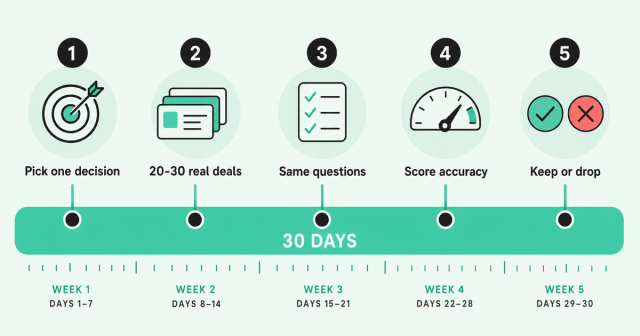
A demo shows you the vendor's best data. A pilot shows you how the tool handles yours.
AI is already part of most sales stacks. In Salesforce's 2026 State of Sales, 87% of sales organizations use some form of AI for tasks like prospecting, forecasting, lead scoring, or drafting emails. That vendor-run survey covers any AI use, so it doesn't mean most teams trust AI forecasts yet.
- Pick one decision: Choose a single call the tool should improve, like which deals to inspect each Monday.
- Use 20-30 real deals: Load live deals from the current quarter, including a few you already suspect.
- Ask every vendor the same questions: Use one script so you can compare answers fairly.
- Score accuracy and explainability: Compare the tool's call to the outcome, and check whether you can see why it moved.
- Keep it only if it changed a decision: If the tool didn't change what you did, it's another dashboard.
Thirty days is enough to see one month-end and several weekly calls. It's also short enough to keep reps from tuning out.
Revenue Forecasting Software FAQ
What's the Difference Between CRM Forecasting and Dedicated Forecasting Software?
CRM forecasting totals the deals and categories reps enter in the CRM. Dedicated forecasting software adds deeper inspection, accuracy tracking, and often outside signals like calls or buyer activity.
How Much Does Revenue Forecasting Software Cost?
Salesforce Revenue Intelligence lists $220 per user per month, and HubSpot lists Sales Hub Professional from $90 per seat per month, both billed annually. Most other tools here don't publish pricing.
Can ChatGPT Do Forecasting?
In our view, a general AI chatbot can help analyze pipeline data you paste into it. It won't stay connected to your CRM or grade past calls unless you build that setup.
Can I Forecast Revenue in Excel?
Yes, and in our experience many teams start there, but spreadsheets need manual updates and drift out of sync with the CRM as teams grow.
How Accurate Is AI-Powered Forecasting?
Accuracy varies by tool and data quality, and Gartner found median forecast accuracy sits at 70-79% across the teams it studied. Treat vendor accuracy claims as claims and test them on your own deals.
See Your Forecast Grounded in Buyer Signal
If your Monday number still depends on who sounds most confident, start with the signals behind each deal. We'll show you how Forecast connects your pipeline to the buyers and conversations that move it.