
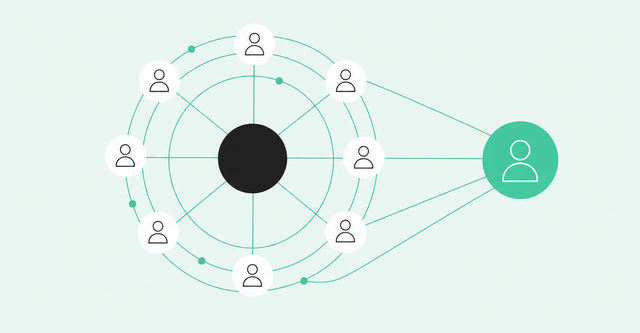
Your champion answers every email within the hour. They love the demo, share your deck internally, and tell you the deal's as good as done. Then, three weeks before close, someone from finance you've never met asks why the company is buying this at all.
That's the quiet risk of a deal that rests on one person. A B2B buying group almost always includes more people than the one you talk to, and the people you don't see can still say no. This guide shows you how to find each of them, track their engagement, and keep the deal moving.
What Is a B2B Buying Group?
A B2B buying group is everyone inside and outside a company who shapes a purchase decision. To identify every member, combine your CRM contacts, org research, person-level engagement signals, and call notes, then map each person to a role.
A buying group is bigger than most reps expect. Forrester's 2026 buying group research found: "The typical buying decision now includes 13 internal stakeholders and nine external influencers, with that number rising for more complex or strategic purchases."
The Core Roles in a Buying Group
Account-level data can tell you a company is researching your category. It can't tell you which people are doing the research or what each one needs to hear. That's why good mapping happens at the person level, one role at a time.
Those roles cut across the org chart. Forrester's 2024 buying decision findings report: "On average, 13 people within an organization are involved in the buying decision, with 89% of purchases involving two or more departments." Here are the roles you'll see most often:
| Role | What they care about | When they show up |
|---|---|---|
Champion | Solving their team's problem and getting credit for finding the fix | Early, often the first to reply or book a meeting |
Economic buyer | Budget, return on investment, and business risk | Mid-cycle, often right before a proposal |
Technical evaluator | Fit, security, and integration with current tools | During trials, pilots, and security reviews |
End user | Whether the tool makes daily work easier | During trials and rollout planning |
Blocker | Protecting a current tool, budget, or priority | Anytime, often late and often quietly |
Procurement and legal | Terms, pricing, compliance, and vendor risk | Late-stage reviews, unless you bring them in early |
Gatekeeper | Access to senior leaders and their calendars | Whenever you try to reach the economic buyer |
External influencer | Their reputation as a trusted adviser | Research and shortlist stages |
Not every deal includes all eight roles, and one person can hold two. A finance leader might act as both the economic buyer and the blocker.
Economic Buyer vs. Technical Evaluator
The economic buyer owns the budget. This person cares about return on investment, total cost, and the risk of picking the wrong vendor. They rarely care how your API works, as long as someone they trust has checked it.
The technical evaluator owns fit. They test security, data handling, and how your product connects to the tools the team already uses. They seldom approve spend, but a failed security review can end a deal faster than any budget debate.
You need both, because either one can stop the deal. A strong business case won't survive a failed security review, and a clean technical review won't fund itself.
Warning Signs of a Single-Threaded Deal
A single-threaded deal is one where a single contact carries the whole deal. From the inside, it feels healthy: the champion replies fast, meetings happen, and the opportunity moves through stages on schedule.
The trouble is that one person rarely decides alone, and groups struggle to agree. Gartner's 2025 buyer survey of 632 buyers put it plainly: "Seventy-four percent of B2B buyer teams demonstrate unhealthy conflict during the buying decision process." When you only hear from the champion, you can't see that conflict until it shows up in your forecast.
Use this checklist in your next deal review. If you check two or more boxes, treat the deal as single threaded until you can prove otherwise.
| Warning sign | What it looks like | What to do next |
|---|---|---|
One contact on every call | The same name appears on every meeting invite and email thread | Ask the champion who else should join the next call |
Forwarded decks, no new names | Your champion shares your materials but never introduces anyone | Offer a short walkthrough for the people reviewing the deck |
No economic buyer by proposal | You're pricing a deal for someone you've never met | Request a 20-minute business case review with the budget owner |
Unknown visitors on pricing pages | People from the account view pricing or security pages without contacting you | Identify who they are and add them to your map |
Champion job change | Your champion changes roles, leaves, or goes quiet after a reorg | Find a new sponsor and follow your old champion to their next company |
Stakeholder silent 30+ days | Someone who joined early hasn't engaged in a month | Send a role-specific update outside the group thread |
Champion job changes deserve extra attention. When your only champion leaves, the deal loses its only thread, so set a job-change alert on every key contact.
Most of these signs point back to the same root cause. They come from hidden members of the buying committee, the people who shape the decision but never show up in your CRM.
How to Map Every Stakeholder: A Step-by-Step Process
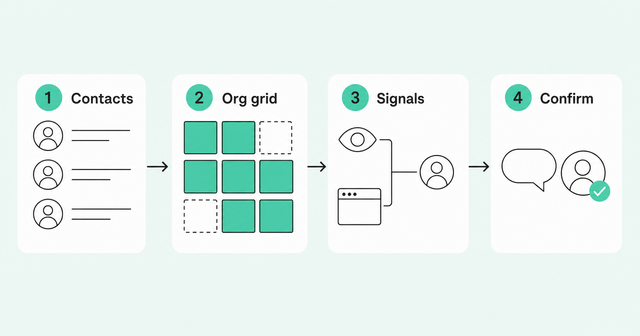
Good stakeholder mapping starts with evidence. A guessed org chart looks tidy, but it reflects who you think matters instead of who's actually weighing in.
The four steps below build your map in layers, and each step fills gaps the last one left open.
Step 1: Start With the Contacts You Already Have
Pull every contact tied to the account. That includes CRM records, opportunity contact roles (the people your CRM links to a specific deal), and anyone who's joined a meeting or email thread.
You'll often find people your team met once and then forgot. A security lead who joined one call six months ago still counts.
Tag each person with a role from the table above. Leave a role blank when you can't fill it, because those blanks show you exactly where the buying committee has gaps.
Step 2: Research the Org for Missing Roles
Start with your own closed-won deals, meaning the deals you've already won. Note which departments and seniority levels took part, and write that pattern down. That's your template for who usually sits in the buying group.
Next, look for people in those departments and levels at the current account. Build a simple grid with departments across the top and seniority down the side, then place each person in a cell. To see one way to lay it out, read how the committee matrix works.
The grid beats an org chart because it makes empty cells obvious. An org chart shows reporting lines, and reporting lines tell you little about who'll weigh in on a purchase.
Step 3: Layer In Engagement and Website Signals
Some members of the buying group are researching you right now without ever talking to your team. Buying signals, meaning actions that show interest in doing business with you, help you find them. Here are four worth watching:
- Pricing and security page visits: A visit to your security page often means a technical evaluator has started checking fit.
- Product usage: A new free-tier user from the account may be an end user testing the tool early.
- Job changes: A new hire who used your product at a past company can become a second champion.
- Community and social activity: Questions in your community or comments on your posts can reveal people you haven't met.
Signals only help when you can tie them to a real person. An anonymous pricing page visit tells you little, but the same visit from a named finance leader tells you a lot.
That's the job of identity resolution, which matches scattered activity to one real person and account. Teams that use identity resolution with Person360 can connect a personal email signup or an anonymous visit to a business contact at the account.
Step 4: Confirm Roles Through Call Notes and Your Champion
Your champion knows the internal politics better than any database. Ask a simple, low-pressure question: "To make this easy to approve, who else should I bring up to speed?" It frames the intro as help for them, so it doesn't feel like you're going around them.
Next, comb through your call notes. Buyers name stakeholders all the time, for example, "I'll check with IT" or "Our CFO will want to see this." Each of those lines points to a person you should add to the map.
Update the map after every meaningful touch so it stays current. With Common Room by Zoom, every call writes back to the same context layer as your buyer signals. That puts the names buyers mention right next to the activity you already see.
How to Multi-Thread Outreach Without Spamming the Account
Multi-threading means building relationships with several members of the buying group. Count people instead of touches: five emails and a LinkedIn message to the same champion still add up to one thread.
In 2025, the Gong Labs multi-threading analysis reported that "multi-threading boosts win rates by an average of 130% in deals over $50K." Gong studied 1.8 million opportunities and found that won deals had about twice as many buyer contacts as lost deals.
Keep two caveats in mind. Gong sells deal software, and this data comes from its own customers. It also shows an association rather than a cause, since winning deals naturally pull in more people.
So the goal is wider coverage that still feels personal. Here's how to reach more of the buying group without flooding anyone's inbox:
- Sequence the order: Start with the champion, then reach the evaluators, and bring in the economic buyer once you have a business case.
- Tailor by role: Give each person the details they care about, but keep one consistent story about the problem you solve.
- Skip the group email: Write to each person directly, because nobody feels responsible for answering a message sent to six people.
- Coordinate your team: Agree on who owns each contact so two reps never email the same person in the same week.
Multi-threading works best when your outreach follows the map you built above. For role-by-role tactics, see our multi-threading framework for complex deals.
Tracking Buying Group Coverage in Pipeline Reviews
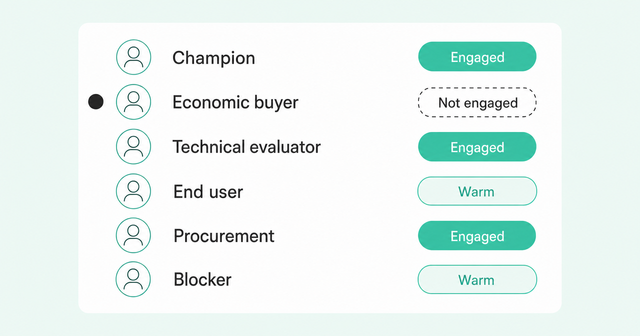
Most pipeline reviews ask, "How many contacts do we have?" A better question is "Which roles are still uncovered?" A deal with 10 marketing contacts and no one from finance still has a big gap.
Set coverage bars by stage. For example, you might expect a champion plus one other role by discovery, a technical evaluator by evaluation, and an engaged economic buyer by proposal. Bigger accounts usually need higher bars, so review coverage thresholds by account tier before you set yours.
Simple engagement statuses keep these reviews honest. Common Room uses three of them, and each one has a clear definition.
Engaged means direct engagement with your team in the last 30 days. Warm means activity in the last 30 days that falls short of Engaged, like a pricing page visit. Not engaged means no qualifying recent activity.
ForgeX shows what this looks like in practice. Davis Potter, CEO of ForgeX, found that in the company's best deals, 90-95% of the buying group was actively engaged at close.
The ForgeX team treated anyone with no engagement in 90 days as lost and reviewed that list every month. You can read more about Davis's approach in why one champion isn't enough.
A person-level buying committee map makes this review faster. Buying Committee shows each person's role, status, and recent touchpoints in one view, so you can spot coverage gaps before they stall a deal.
Want to see who's missing from your own deals? Request a demo, and we'll walk through a buying group map with you.
Frequently Asked Questions
These quick answers recap the most common questions about mapping a buying group.
How Do You Identify Every Stakeholder in a B2B Buying Group, Not Just the Main Champion?
Combine CRM contacts, role research across departments, person-level signals, and introductions from your champion. Then map each person to a role and track their engagement over time.
How Do You Spot Single-Threaded Deals Before They Stall?
Watch for one contact on every touch, no economic buyer by proposal, and stakeholders who've gone silent for 30 days or more. Then check role coverage, rather than contact count, in every pipeline review.
Can a Sales Engagement Platform Multi-Thread Outreach to Several Stakeholders at the Same Account Automatically?
Yes, when it runs on person-level buyer intelligence, a platform like Zoom Engage can add each committee member to a role-specific sequence. You still need someone to coordinate timing and keep each message relevant to that person's role.
How Many People Are in a Typical B2B Buying Group?
It depends on who's counting: Gartner's 2025 survey found groups of five to 16 people across as many as four functions. Forrester's 2026 research counts 13 internal stakeholders plus nine external influencers in a typical decision.
What's the Difference Between a Buying Group and a Buying Committee?
The terms are mostly interchangeable. "Buying committee" often implies the formal group that signs off, while "buying group" includes everyone who shapes the decision.