
It's Friday afternoon. A sales leader decides demo-page visits deserve more credit and bumps the weight in the lead scoring model. By Monday, marketing-qualified lead (MQL) volume has doubled, and nobody knows why.
Reps work a pile of leads that aren't ready. Marketing celebrates a number that won't hold. RevOps spends Tuesday reverse-engineering a change nobody wrote down.
The model didn't break. The process around it did. This guide covers who should own lead scoring model changes, who can edit what, and how to change a model safely without waiting on engineering.
Who Should Own Lead Scoring Model Changes?
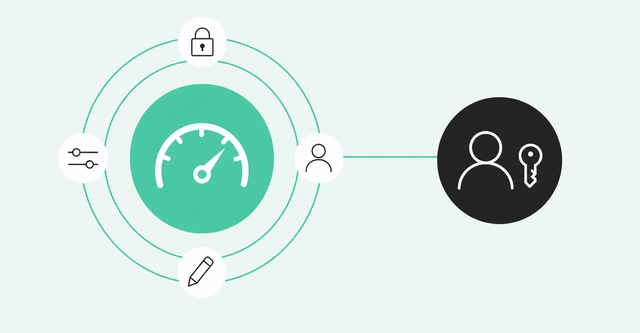
RevOps should own lead scoring model changes, ideally through one named revenue architect who's accountable for the model. Marketing and sales propose changes and give feedback, but only the owner publishes them.
A lead scoring model is the set of rules and weights that turns a person's fit and behavior into a score. It tells reps who to work first. A revenue architect is the person who designs how go-to-market (GTM) data, systems, and workflows fit together.
Governance is the set of rules that decides who can change the model, who approves each change, and how you track it. Good governance keeps one source of truth and still lets everyone see and question the score.
This guide focuses on governance after launch. If you're still designing your model, start with how to build a lead scoring model.
Why Lead Scoring Models Drift After Launch
Score drift happens when a model's scores slowly stop matching who actually buys. It rarely starts with one big mistake. It usually starts with four small ones:
- Unowned edits: Someone with admin access changes a weight, and nobody else hears about it until volume shifts.
- Conflicting definitions: Sales and marketing each use their own idea of a qualified lead, so the score can't satisfy both.
- Stale CRM data: Titles, company sizes, and contact details go out of date, and the model keeps scoring them anyway.
- Unreviewed AI retraining: An AI model updates its own weights as new data arrives, and no one checks what changed.
The definition problem is common. Gartner surveyed 243 chief sales officers (CSOs) and senior sales leaders in late 2024. In Gartner CSO survey findings, 49% of CSOs report their sales organization's definition of a qualified lead differs greatly from marketing's definition.
That's the sales-side view. Still, no model can score well against a definition two teams don't share.
Data quality is the other half. Validity surveyed 602 CRM users and admins in the US, UK, and Australia in 2025. In the Validity CRM data report, 76% said less than half of their organization's CRM data is accurate and complete.
Validity sells data-quality tools, and those are self-reported answers. But a scoring model reads CRM fields all day, so shaky fields mean shaky scores.
None of these causes is a math problem. They're ownership problems, and the fix starts with a name.
Step 1: Assign a Single Model Owner
Most scoring disputes trace back to one gap: nobody owns the model. Lots of people touch it, and nobody answers for it.
Decision rights around AI are fuzzy at the top, too. In the same Gartner survey, only 23% of CSOs are accountable for AI selection, while 68% only provide inputs or stay informed. That stat covers choosing AI tools, not editing scores, but it shows how often accountability goes unassigned.
Use a RACI to Separate Accountable and Responsible Roles
A RACI is a chart that lists who's responsible, accountable, consulted, and informed for each decision. Responsible people do the work. The accountable person owns the outcome and makes the final call.
A RACI for lead scoring should name exactly one accountable person. Several people can be responsible for parts of the work, like adding a new signal or cleaning up a field.
Pick the Right Team for the Owner Role
RevOps usually makes the best owner because it sits between marketing and sales and already runs the CRM. Marketing ops knows the engagement signals best. Sales leadership knows which leads actually convert.
That's why marketing ops and sales leadership work best in responsible and consulted roles. They shape the model without owning every publish decision.
Why One Name Beats a Committee
Committees feel fair, but they slow every decision and blur accountability. When a score goes wrong, you end up with five people who each approved a piece of it.
- Faster decisions: One owner can approve a low-risk weight tweak the same day instead of waiting for the next meeting.
- Clear accountability: When volume spikes, everyone knows who to ask and who can reverse the change.
- Consistent logic: One person keeps the model's rules coherent instead of stacking competing edits on top of each other.
One owner doesn't mean one editor. Marketing ops, sales, and data teams still propose changes, run tests, and flag problems. The owner decides what goes live.
Plan for the Single Point of Failure
A single owner creates a new risk. What happens when that person goes on vacation or leaves the company?
Name a backup owner with the same publish rights. Then write down the model's logic somewhere both people can find it.
The Validity report points to a related gap. Among organizations with no full-time CRM data-quality owner, only 18% plan to hire one in the next 12 months. If a dedicated hire isn't coming, a documented backup is the next best thing.
Step 2: Define Who Can Propose, Approve, and Publish Changes
Once you've named an owner, spell out what everyone else can do. Four actions cover most of it: propose a change, approve it, publish it, and view the reasons behind a score.
Clear permissions answer the question "Can I change this?" before anyone asks it. They also keep the owner from becoming the only person who understands the model.
Copy This Role and Permission Table
Use this table as a starting point and adjust it for your org. Every role can see why a lead scored the way it did. Only the model owner can publish.
| Role | Propose changes | Approve changes | Publish changes | View score reasons |
|---|---|---|---|---|
RevOps model owner (revenue architect) | Yes | Yes, final sign-off | Yes | Yes |
Marketing ops | Yes | Consulted on engagement signals | No | Yes |
Sales leadership | Yes | Co-approves threshold changes and model swaps | No | Yes |
Marketing leadership | Yes | Co-approves threshold changes and model swaps | No | Yes |
Reps | Through the feedback channel | No | No | Yes |
Data and IT | Yes, for data and integration fixes | Consulted on new data sources | No | Yes |
Reps can't approve or publish, but they can see reasons and send feedback. Step 3 explains why that line matters most for AI-generated models.
Scale Approvals to the Size of the Change
Not every change needs a meeting. A decision inventory lists each type of change, how risky it is, and who has to sign off.
A small weight tweak can go from the owner to production after a quick test. A model swap needs leadership approval and a staged rollout. You'll find a risk table for sorting changes in Step 4.
Build Governance Into the System Instead of an Approval Queue
Approval-based governance routes every change through a person who says yes or no. It feels safe, but it turns RevOps into a bottleneck and pushes teams to work around the model.
System-based governance puts the rules inside your tools and process. Permissions decide who can edit, the change log records what happened, and everyone can see score reasons without asking.
That's the idea behind governance without gatekeeping. RevOps designs the guardrails, then gets out of the way.
Step 3: Restrict Rep Edits to AI-Generated Scoring Models
An AI-generated scoring model learns its weights from your data instead of from hand-set rules. That makes it powerful, and it makes unreviewed edits riskier. One change can ripple through thousands of scores.
Inputs matter even more with AI. Salesforce 2026 sales statistics show that 84% of data and analytics leaders agree AI's outputs are only as good as its data inputs.
If a rep changes a field or a weight to favor their own territory, the model learns from that, too. So reps should see the reasons behind a score without editing the weights. Here's how to set that up:
- View-only access for reps: Reps can see a score and the signals behind it, but they can't change weights or thresholds.
- A shared feedback channel: Reps flag bad scores in one place, like a Slack channel or a CRM field, so the owner spots patterns.
- Role-based permissions: Access follows the role instead of the person, so new hires and promotions get the right rights automatically.
- Separate rights for AI settings: Only the model owner and a named backup can change AI model settings or approve retraining.
Rep feedback is valuable. Reps see bad scores first, so the feedback channel should feel easy to use and get a visible response.
With granular enterprise permissions, Common Room lets you manage who can see, configure, and act on data and workflows. You set access once by role instead of chasing edits one by one.
Step 4: Run Changes Without Engineering Support
Many teams wait days or weeks for engineering to change a score. That delay pushes people to make quiet edits on their own, which is how drift starts.
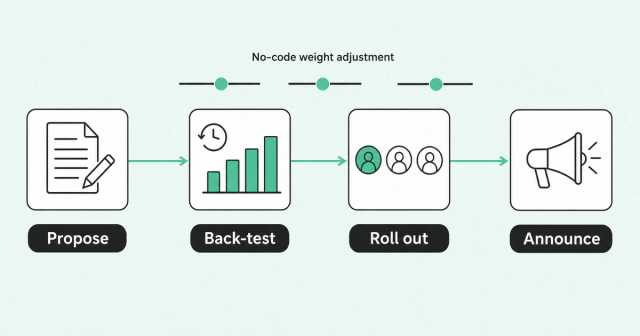
A revenue architect can run the whole change process with no-code tools. The workflow has four stages: propose, back-test, roll out in stages, and announce.
Propose the Change in Writing
Every change starts as a short written request. It should say what to change, why, and what result the requester expects.
Keep requests in one place, like a form or a ticket queue RevOps owns. That gives the owner a single list to review and a record to point back to.
Adjust Weights Without Filing a Ticket
The owner should be able to make an approved change in minutes. If every weight tweak needs a developer, your governance process will stall no matter how good it looks on paper.
With AI scoring with slider weights, Common Room lets you weight the signals that matter using simple sliders. Its Revenue Control Plane lets revenue architects define scores, build plays, and govern AI workflows with enterprise-grade permissioning, without engineering resources.
Back-Test Before You Publish
A back-test runs a proposed model against past leads to see how it would have scored them. If the new version ranks your closed-won deals higher, that's a good sign.
You can back-test in a copy of the model or a spreadsheet export of last quarter's leads. The signal-based scoring playbook walks through testing signals before rollout.
Match Testing to Change Risk
Match the depth of testing to the risk of the change. Use this table to decide who approves and how much testing each change needs.
| Change type | Example | Risk level | Who approves | Testing before publish |
|---|---|---|---|---|
Weight tweak | Raise the weight on pricing-page visits | Low | Model owner | Quick back-test on recent leads |
Threshold change | Raise the score an MQL needs | Medium | Model owner plus sales and marketing leadership | Back-test plus a volume forecast for sales |
New signal | Add product usage or job changes | Medium | Model owner plus data and IT | Data-quality check plus back-test |
Model swap | Replace a rules-based model with an AI model | High | Model owner plus sales and marketing leadership | Full back-test plus staged rollout |
Roll Out in Stages and Announce the Change
For medium- and high-risk changes, start with one team or segment for a week or two. Compare its results against the rest of the org before you publish everywhere.
Then announce the change where reps already work. Say what changed, why it changed, and what they'll notice in their queues.
Step 5: Audit and Roll Back Score Changes
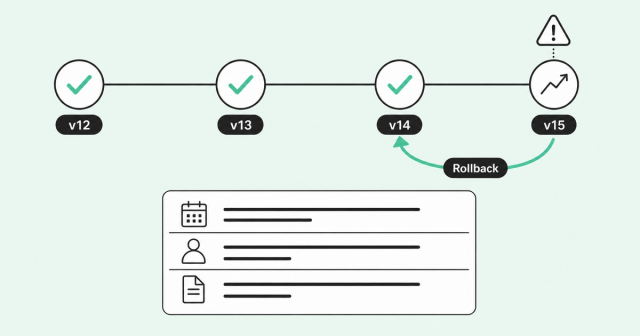
Even good changes sometimes go sideways. An audit trail is a record of every change to the model, and it tells you exactly what moved.
A rollback returns the model to its last approved version. With both in place, a bad change becomes a short detour instead of a lost week.
Log Every Change With These Fields
Keep a change log in a shared doc or your ticketing tool. Each entry should include these fields:
- Version number: Each change gets a simple label, like v14, tied to one state of the model.
- Publish date: The date shows when the change went live, so you can line it up with volume shifts.
- Change type: The entry names the type, whether it's a weight tweak, threshold change, new signal, or model swap.
- Before and after values: The log records the exact weights or thresholds that changed.
- Requester and approver: The entry names who asked for the change and who signed off.
- Reason: A sentence or two explains the problem the change should solve.
- Back-test result: A short summary shows how the new version scored past leads.
- Rollback plan: The entry names the version you'll restore if the change misbehaves.
Your change log doubles as version history. If you save each approved version, you can always restore the last one that worked.
Know When to Roll Back
Agree on rollback signals before you publish. Common ones include a sudden swing in MQL volume, a drop in lead-to-opportunity conversion, or a cluster of rep complaints about one kind of lead.
When a signal shows up, the owner restores the last approved version first and investigates second. Fixing forward under pressure usually creates a second problem.
Review the Model Every Quarter
Hold a quarterly review with the owner, marketing ops, sales leadership, and data and IT. Look at score distribution, conversion by score band, and the feedback reps flagged.
Transparency makes these reviews faster. With explainable lead scores, everyone sees the same reasons behind a score, so debates start from facts.
In Common Room, you can hover any score to see the behaviors and attributes behind it. Transparency and governance work together: everyone sees the model, and only the right people change it.
Lead Scoring Model Governance FAQ
Here are quick answers to the questions RevOps teams ask most about scoring model ownership. If you're evaluating tools, our lead scoring software comparison covers which admin controls to look for.
How Does a Revenue Architect Design a Scoring Model Without Engineering Support?
A revenue architect sets weights with no-code tools, like slider-based scoring, then back-tests the model against past leads before publishing. Common Room's Revenue Control Plane lets revenue architects define scores and govern AI workflows without engineering resources.
How Do RevOps Teams Decide Who Owns Scoring Model Changes Across a Large Org?
Most large orgs make RevOps the single accountable owner and name one revenue architect plus a backup. Marketing, sales, and data teams stay responsible or consulted through a RACI.
How Can a Company Control Which Reps Can Edit AI-Generated Scoring Models?
Use role-based permissions so reps can view score reasons but can't edit weights, thresholds, or AI settings. Give publish rights only to the model owner and a named backup.
What Should RevOps Do When Marketing and Sales Disagree on Scoring Criteria?
Get both teams to agree on one written definition of a qualified lead, then back-test each proposal against past closed-won deals. The model owner makes the final call based on the results.
How Often Should a Lead Scoring Model Be Reviewed?
Review it every quarter, and check it sooner if volume or conversion shifts suddenly. Log each review in the change log so the next one starts with context.
Give Your Lead Scoring Model One Owner and Clear Rules
Lead scoring models drift when ownership is fuzzy and edits are invisible. Name one owner, write down who can do what, and make every change testable and reversible.
When the process is clear, scoring changes stop being Monday-morning surprises. Request a demo to see how Common Room helps revenue architects govern scoring without engineering.