
It's 9 p.m. on a Thursday. An AI agent enrolls 400 contacts in an outbound email sequence, and they're the wrong 400. A few are open opportunities, some are customers, and one is your CFO's college roommate.
Every permission check passed. The agent had a valid permission set and edit rights on every record it touched. Your CRM permissions did exactly what you set them up to do.
That's the real question behind AI agent governance versus CRM permissions: your CRM controls access, but who controls what the agent does with it? You're not the only one asking. A global Deloitte agentic AI governance survey found "only 21% of respondents say their organizations have a mature governance model in place for agentic AI."
The Short Answer
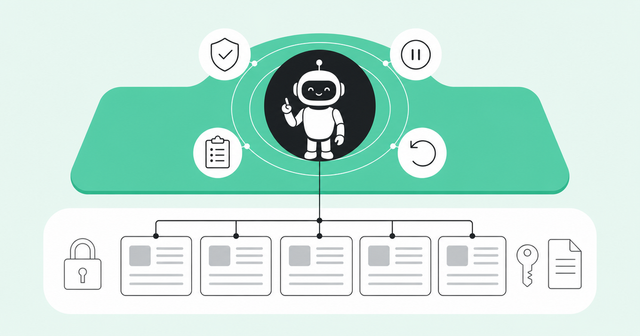
CRM permissions control which records, fields, and objects an identity can see or change. AI agent governance controls which plays and agents run, who approves their actions, what gets logged, and how you pause and roll them back. You need both: permissions are the floor, and governance is the layer above it.
A few terms first: An AI agent is software that takes actions on its own, like updating records or sending emails. An identity is any user account that logs in, whether it belongs to a rep or an agent. A play is a repeatable workflow, like scoring new leads and routing the best ones to reps.
Think of governance as your AI governance framework for revenue work. Common Room's version is the Revenue Control Plane: one central layer where revenue architects define scores, build plays, deploy agents, and automate workflows.
What CRM Permissions Control
CRM permissions are the rules inside your CRM that decide who can see and edit what. Salesforce object and field permissions docs state "Object permissions control whether a user can create, read, edit, or delete records of a particular object type."
Salesforce builds access from a handful of parts. Here's what each one does in plain language:
- Profiles: A profile sets the baseline for what a user can do and which settings they can reach.
- Permission sets: A permission set adds extra access on top of a profile without changing the profile.
- Object permissions: These decide whether a user can create, read, edit, or delete a type of record, like contacts.
- Field permissions: Also called field-level security, these decide whether a user can read or edit a single field.
- Org-wide defaults and sharing rules: Defaults set baseline record access, and sharing rules open access to groups of users.
All of these answer one question: can this identity read or edit this record? CRM vendors designed them for people clicking through a screen at human speed, one record at a time.
In our view, that's where the gap starts. Permission sets describe access, but they don't know which play an agent is running or whether a person approved the send. And rules that live in one tool don't always follow the agent into the other tools where it acts.
What AI Agent Governance Adds
AI agent governance covers how agents act: what they run, who signs off, what gets logged, and how you undo it. It matters because agents work faster than people, act in bulk, and move across tools in a single run.
Excessive agency is the security term for an AI system that can do more than it should. The OWASP excessive agency risk entry says "The root cause of Excessive Agency is typically one or more of: excessive functionality; excessive permissions; excessive autonomy." Tighter CRM permissions address the second cause, but they don't touch functionality or autonomy.
Which Plays Run (and Who Owns Them)
Start with an inventory. List every agent and play that touches the CRM or sends to buyers, then give each play one named owner and one live version.
Shared templates help here. When a play runs from a template with locked settings, nobody can quietly widen the audience, and every fix happens in one place.
You already know this pattern from edit permissions for scoring changes: one person proposes a change, another approves it, and only then does it publish. The same split works for plays.
Pair it with least privilege, which means each identity gets only the access its job requires. Common Room's command-line interface (CLI) and Model Context Protocol (MCP) server respect the same per-user permissions as the Common Room UI. There's no elevated service account, so an agent never gets broader access than the person using it.
Approvals Matched to Risk
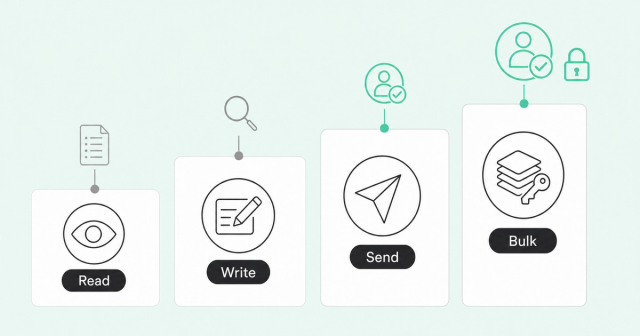
Not every agent action needs a person to approve it. Sort actions into risk tiers and match the approval to the stakes:
- Reads only: The agent researches accounts or summarizes activity, so logging is usually enough.
- Writes to the CRM: The agent updates fields or creates records, so scope it to specific objects and spot-check results.
- Sends to buyers: The agent emails contacts or enrolls them in sequences, so a person approves before anything goes out.
- Changes access or bulk data: The agent edits permissions or touches many records at once, so it needs approval every time.
The same OWASP entry recommends human approval for high-impact actions. That's what "human in the loop" means: a person checks the work before it reaches a buyer.
The goal is to govern AI without gatekeeping. Build the approval into the play itself, so low-risk work runs freely and only buyer-facing or bulk actions wait for a person.
Audit Trails and Rollback
An audit trail is a time-stamped record of who or what took an action, on which record, and when. For agents, you want one entry per action, tied to the play and version behind it.
Rollback means returning a play to its last known good version. You also need one central pause, so you're not clicking through five tools at 9 p.m.
On the access side, Common Room Enterprise plans can stream audit events to your SIEM, including sign-in, role, seat, and API token events. A SIEM (security information and event management tool) is where security teams collect and review logs. Events land in an S3 bucket you own, so any SIEM can read them.
AI Agent Governance vs. CRM Permissions: Side by Side
Here's how the two layers compare. Read the table as two layers that stack, rather than two options to choose between.
| CRM permissions | AI agent governance | |
|---|---|---|
Scope | Records, fields, and objects in the CRM | Plays, agents, and workflows across tools |
Question it answers | Can this identity see or edit this record? | Should this agent run this play, and who approved it? |
Who sets it | The CRM admin, per profile and permission set | Play owners and RevOps, per play and risk tier |
Granularity | Per object, field, and record | Per play, version, and type of action |
Approvals | Admins grant access ahead of time, with no check before each action | A person approves buyer-facing and bulk actions |
Audit trail | Not tied to a play, version, or approval | One entry per agent action, tied to its play and version |
Rollback | No play version to return to | Pause centrally and revert to the last known good version |
At scale | Each new agent needs its own permission review | One template, one owner, and one pause point per play |
The Revenue Control Plane covers the right-hand column. It gives you granular permissioning for who can see, configure, and act on data and workflows, with managed integrations into the tools you already run. Common Room Enterprise adds enterprise-grade permissions and security, including SSO, SAML, SCIM, SOC2, GDPR, CCPA, and zero data retention for AI.
How to Recover From an Overpermissioned AI Agent
An overpermissioned AI agent is an agent with more access or autonomy than its job needs. When one goes wrong, speed matters more than blame.
Plan for this before it happens. The NIST AI RMF Manage function calls for mechanisms "to supersede, disengage, or deactivate AI systems that demonstrate performance or outcomes inconsistent with intended use." NIST's AI Risk Management Framework (AI RMF) is voluntary, but it's a useful bar for your own runbook.
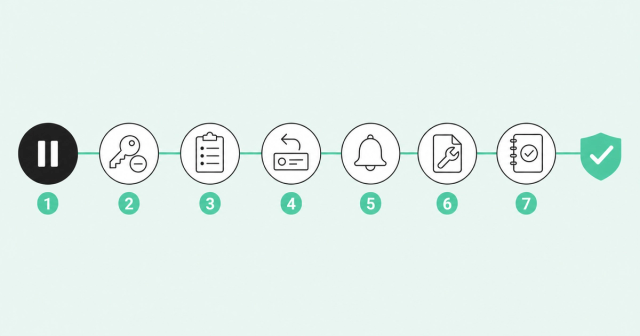
Here's the seven-step runbook we recommend:
- Pause the agent: Stop every play the agent runs from one central place before you investigate anything else.
- Revoke or narrow its scope: Cut access back to the minimum the agent needs, or remove it until you're done.
- Pull the action log: List every action the agent took, on which records, and when.
- Reverse or quarantine affected records: Undo the bad changes, or tag and hold the records so nothing else acts on them.
- Notify record owners: Tell the reps whose contacts or deals the agent touched, so they can follow up with buyers.
- Fix the template at the source: Correct the play template itself so every future run uses the fix.
- Document the incident: Record what happened, what you changed, and who approved the fix.
Step three only works if logging was on before launch. If it wasn't, you're piecing events together from scattered record histories. That also makes NIST's advice to preserve materials for forensic, regulatory, and legal review harder to follow.
We don't have a benchmark for how long recovery should take, and we'd be wary of anyone who claims one. Time your own drills and incidents, then use that number as your baseline.
When CRM Permissions Are Enough
This part is our editorial judgment, since no standard draws the line. Based on how we see RevOps teams run agents, you might not need a governance layer yet.
CRM permissions can be enough when an agent only reads data, never sends to buyers, and runs one play. They also hold up when a person reviews every output and a small team uses the agent.
Once agents write in bulk, send externally, or run across hundreds of reps, you need the governance layer. At that point, one bad template can reach hundreds of buyers before anyone notices.
The stakes go beyond one bad night. The Gartner agentic AI cancellation forecast predicts "Over 40% of agentic AI projects will be canceled by the end of 2027, due to escalating costs, unclear business value or inadequate risk controls." Risk controls are only one of those three reasons, but they're the one RevOps owns.
FAQ
How Does a Revenue Control Plane Differ From a Standard CRM Permission System?
A standard CRM permission system controls which records, fields, and objects an identity can see or edit. A Revenue Control Plane governs the scores, plays, agents, and workflows that act on that data, including who can see, configure, and act on them.
How Does an Admin Recover From an AI Agent That Was Accidentally Given Too Much Permission?
Pause the agent, narrow its scope, and pull the action log to see what it touched. Then reverse or quarantine affected records, notify owners, fix the template at the source, and document the incident.
Can I Just Give an AI Agent Its Own CRM User?
Yes, and you should, so the agent never inherits an admin's access. A user record still doesn't add approvals, versioning, or rollback, so you'll need the governance layer for those.
Do Audit Logs Prevent Agent Mistakes?
No, logs limit damage and speed up recovery, but they don't stop a bad action before it happens. Approvals and tightly scoped functionality are what prevent mistakes.
Next Step: Turn the Comparison Into a Checklist
If your agents write in bulk or send to buyers, it's time to add the governance layer. Our AI agent governance checklist turns this comparison into an action list for ownership, approvals, permissions, versioning, and rollback.
With the Revenue Control Plane, revenue architects deploy new plays in hours, without engineering resources, and keep governance built into every play. Want to see how that works for your team? Request a demo.