
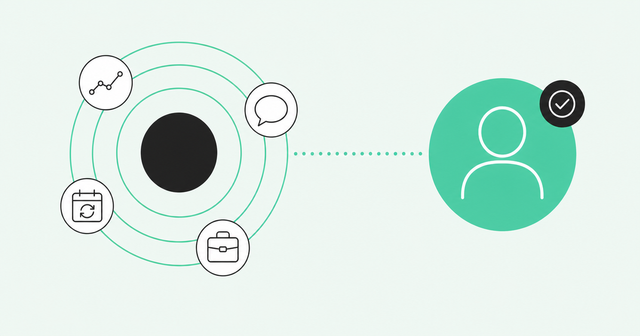
The renewal call is in two weeks, and the customer says they're not renewing. Your champion, the person inside the account who pushed for your product, left four months ago. Every dashboard still showed the account as healthy, and nobody on your team knew.
That's the core problem with post-sale data: Your CRM fields don't change when your customer does. It's also why choosing the best SaaS account management platform matters more than it used to. The Gartner CSO priorities survey found that "Seventy-three percent of CSOs are prioritizing growth from existing customers for 2025."
That survey covered chief sales officers (CSOs), but the pressure lands on post-sale teams too. This guide explains what a customer success platform does, how the main categories differ, and how to pick one for your team.
What Is the Best SaaS Account Management Platform?
The best SaaS account management platform depends on your motion: Gainsight for enterprise, ChurnZero for mid-market, and Vitally or Planhat for product-led teams. Teams already standardized on Salesforce or HubSpot can start with native customer success (CS) tools.
Most lists miss a separate category: customer intelligence platforms like Common Room, which feed those tools people-level signals. Put simply, a SaaS account management platform is software that helps post-sale teams track account health, renewals, and expansion.
SaaS Account Management vs. SaaS Management: Quick Clarification
If you searched for tools like Zylo, Torii, or BetterCloud, you're looking for a SaaS management platform. Those tools help IT and finance teams track software licenses and spend. This guide covers something different: managing customer accounts after the sale.
Why Post-Sale Teams Need More Than a CRM
Two numbers explain why retention gets so much attention. Net revenue retention (NRR) measures how much revenue you keep from existing customers after expansion, downgrades, and churn. Gross revenue retention (GRR) measures the same thing without counting expansion, so it tops out at 100%.
According to SaaS Capital retention benchmarks, "Across all SaaS companies, the 2025 median net retention is 101% and the median gross retention is 91%." Put another way, the median company loses about 9% of its revenue each year, and expansion barely wins it back.
The gap between typical and great is wide. McKinsey net revenue retention research found top-quartile-valued B2B SaaS companies reach 113% NRR, while bottom-quartile peers reach 98%. Top-quartile-valued means the 25% of companies with the highest valuations.
Here's the catch: A CRM records what you sold, but your customer keeps changing. People get promoted, new teams adopt the product, and the admin who knew your tool quits. Common Room has written about how teams spot churn risks and expansion in places their own systems don't watch, like communities and social channels.
CS Platforms vs. Account Intelligence Tools: What's the Difference?
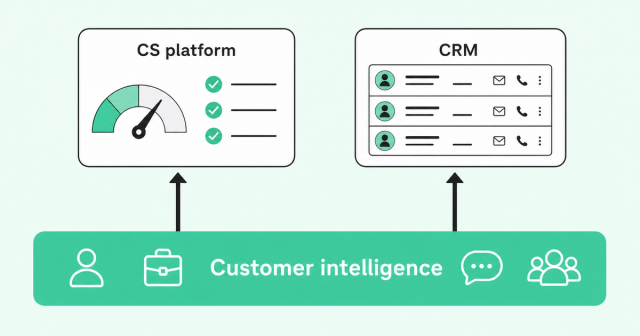
Account management software falls into three groups. They overlap, but each one answers a different question about your customers.
| Category | What it does | Core data | Best for | Gap |
|---|---|---|---|---|
Customer success platforms | Health ratings, playbooks, renewal tracking, and tasks for customer success managers (CSMs) | CRM fields, product usage, support tickets, and surveys | Teams with dedicated CSMs and repeatable programs | Sees mostly what flows in from your own systems |
CRM-native CS tools | Success views and renewal tasks inside Salesforce or HubSpot | CRM records and activity | Smaller teams that want one system of record | Limited product usage and outside signals without add-ons |
Customer intelligence platforms | Identity resolution, signal alerts, and suggested next steps | First-party CRM and product data plus outside signals like job changes and community activity | Teams that want earlier warning on specific people and accounts | Doesn't run renewals or CSM tasks, so it pairs with a CS platform or CRM |
Identity resolution means matching scattered activity, like a personal-email signup or a community post, to the right person and account. A customer intelligence platform uses it to build a unified buyer intelligence layer that feeds the other two categories. Your CS platform or CRM then works from what's changing now.
How to Evaluate a SaaS Account Management Platform
Feature lists start to look the same after the third demo. A better test is which signals each tool sees, how fast it sees them, and whether it ties them to a real person.
Use these four criteria to compare your options.
Health Signals: Product, Community, and Conversation Data
A health score is a single rating, often green, yellow, or red, that sums up how likely an account is to renew. Most tools build it from product usage, support tickets, and survey results.
Product usage is the baseline, and it's a good one. Stronger scores add community activity, support sentiment, and conversation data from calls and meetings. Those inputs show how people feel, which logins can't tell you.
Watch out for account-level averages. An account can look healthy because one power user logs in daily while the other 40 seats sit idle. Ask whether the platform lets you see who's active inside accounts, who's gone quiet, and who's new.
Expansion and Churn Signals
Expansion signals tell you an account is ready to grow. Churn signals tell you it might leave.
Both matter, but expansion drives a big share of growth. The Benchmarkit 2025 SaaS metrics report found that "Expansion ARR represents 40% of Total New ARR." ARR means annual recurring revenue, and that figure is a median across the companies Benchmarkit surveyed.
Common expansion signals include:
- New teams adopting: A second department starts using the product without a new contract.
- Seat-limit pressure: Active users approach or pass the number of seats the customer bought.
- Hiring surges: The account posts roles that match the people who use your product.
- Former champions at new companies: A past power user joins a company that fits your ideal customer profile.
Common churn signals include:
- Usage drops: Logins, active users, or key actions fall over several weeks.
- Rage clicks: Users click the same spot again and again, a sign they're frustrated.
- Champion departure: Your main contact leaves, and nobody picks up their influence.
- Competitor research: People at the account compare alternatives on review sites or in communities.
Former champions count twice. They're a retention risk at the old account and a warm lead at the new one. Common Room's champion job-change signal guide shows how to act on both sides.
Champion Tracking
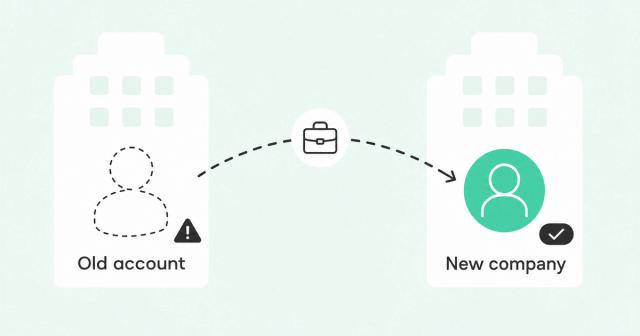
Champions are the people who keep your product alive inside an account: the admin, the budget owner, and the power user. When one of them leaves, the relationship can leave too.
People move more often than account plans assume. BLS employee tenure data puts a number on it: "The median number of years that wage and salary workers had been with their current employer was 4.1 years in January 2026." That means half of US workers have been with their current employer about four years or less, which is shorter than many multi-year customer relationships. Common Room's own data shows that 30% of the workforce changes jobs every 12 months.
There's an upside too. According to Common Room, former customers who move to a new company are three times more likely to become customers than cold prospects.
Without outside job-change data, many teams learn a champion left when an email bounces. Common Room's job-change tracking for champions spots the move and updates your CRM contact details automatically. That gives your team time to build a new champion before renewal.
CRM Sync and Identity Resolution
Two-way CRM sync is table stakes. Your platform should read accounts, contacts, and renewal dates from Salesforce or HubSpot, then write its findings back.
The harder question is identity resolution. Can the tool tie a signup from a personal Gmail address, or a community post under a nickname, to the right person and account? If it can't, the signal never reaches the CSM who needs it.
Bad matches have a real cost. Gartner data quality research from 2020 estimated that poor data quality costs organizations at least $12.9 million a year on average. CRM records also drift as people change roles, which is why CRM data decays even when nobody touches it.
Ask every vendor these questions:
- Match rate: What share of anonymous or personal-email activity does it link to a real account?
- Deduplication: How does it merge duplicate contacts and accounts over time?
- Freshness: How often does it update titles, companies, and contact details?
- Write-back: Which fields does it push to your CRM, and who controls them?
Then ask for a bakeoff, which is a side-by-side test on your own data. Common Room reports Person360, its engine for person-level identity resolution, delivered 30-50% higher match rates in bakeoffs and up to 79% fewer duplicate records.
Best SaaS Account Management Platforms Compared
Here's how the leading options compare at a glance. Pricing changes often, so request current pricing from each vendor.
| Platform | Category | Best for | Standout strength | Watch-out |
|---|---|---|---|---|
Gainsight | Customer success platform | Enterprise CS orgs | Health scorecards, journey orchestration, and a renewal center | Often needs a dedicated admin and a longer rollout |
ChurnZero | Customer success platform | Mid-market teams focused on churn | Real-time usage alerts and in-app engagement | Alerts depend on clean product usage data |
Vitally | Customer success platform | Product-led teams | Modern interface with docs and projects built in | Test complex account hierarchies during evaluation |
Planhat | Customer success platform | Teams that want a flexible data model | Custom data model and revenue management | Flexibility means more setup and configuration |
Totango | Customer success platform | Teams that want fast time to value | Prebuilt, modular programs | Prebuilt programs can feel rigid as needs grow |
Salesforce and HubSpot native CS | CRM-native CS tools | Teams standardized on one CRM | No new system to adopt | Lighter on product usage and outside signals |
Common Room by Zoom | Customer intelligence platform | Teams surprised by changes their CS tool didn't see | Signals tied to real people and accounts | Doesn't run renewals or CSM tasks, so pair it with a CS platform or CRM |
Common Room by Zoom
Common Room by Zoom is a customer intelligence platform. Person360 and Context360 tie product, community, social, CRM, and job-change signals to real people and accounts.
RoomieAI, the platform's AI layer, ranks those signals and suggests next steps for a specific account or person. Alerts arrive in Slack and email, where your team already works.
With Zoom, Common Room is part of Revenue OS. Zoom sits in the calls and meetings where buyers share what they care about, and Common Room supplies the buyer context. Here's how Common Room and Zoom work together.
In that model, Common Room supplies trusted buyer intelligence (KNOW), while Zoom's calling, sequencing, coaching, and forecasting tools turn it into coordinated action (DECIDE + ACT). A learning loop writes every call, deal, and signal back to that context, so priorities sharpen over time.
Be clear on fit. Common Room doesn't include a renewal center, CSM task manager, or health scorecard builder. Pair it with a CS platform or CRM, and use it to see changes in your accounts earlier.
Which Platform Fits Your Team?
Find the row that sounds most like your team today.
| Your situation | Where to start | Why |
|---|---|---|
Enterprise CS org with dedicated admins | Gainsight | Deep programs and structure for large teams |
Mid-market team focused on churn | ChurnZero | Real-time usage alerts and in-app engagement |
Product-led team | Vitally or Planhat | Usage-driven workflows and a flexible data model |
Standardized on Salesforce or HubSpot | Native CS tools | No new system until you've outgrown the CRM |
Lean team that needs quick wins | Totango | Prebuilt programs shorten setup |
Health score is green, but renewals still surprise you | Common Room alongside your CS platform or CRM | Person-level signals show champion moves and quiet accounts earlier |
Most comparison lists skip that last row. If it describes you, a new CS platform alone won't fix it, because the gap is in the signals feeding it.
Frequently Asked Questions
What's the best customer success intelligence platform?
The best customer success intelligence platform ties product, community, CRM, and job-change signals to real people and accounts, then suggests what to do next. Common Room by Zoom does this and pairs with your existing CS platform or CRM.
What's the difference between a CRM and a customer success platform?
A CRM records customers, deals, and contracts, while a customer success platform tracks health, adoption, and renewals after the sale. Many teams run both, with the CS platform reading data from the CRM.
When does a SaaS company need an account management platform?
You likely need one when CSMs manage too many accounts to track by hand, or when renewals keep surprising you. If your CRM still answers your team's questions, it's fine to wait.
How much do customer success platforms cost?
Pricing isn't always published, and it changes often. Ask each vendor for a written quote that covers seats, modules, and implementation.
Can a customer intelligence platform replace a CS platform?
Usually not, because intelligence platforms like Common Room don't run renewals, CSM tasks, or health scorecards. They work best when they feed a CS platform or CRM with earlier, person-level signals.
What signals predict churn in SaaS?
Falling usage, frustrated users, a departed champion, and competitor research are the most common warning signs. No single signal proves an account will leave, so look for two or three together.
The Bottom Line
The best SaaS account management platform for you is the one that fits your motion: enterprise programs, churn alerts, or product-led workflows. Then make sure it runs on signals that change when your customer changes.
Common Room turns the signals you already have into prioritized next steps for specific people and accounts. Request a demo to see it on your own accounts.