
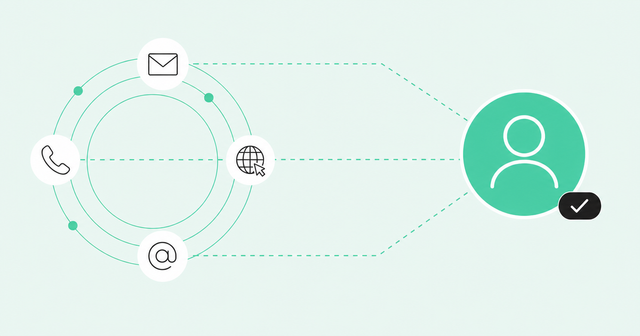
Your rep emails Kevin White on Monday. On Wednesday, a second rep emails him from a different record. By Friday, a third sequence lands in his inbox with a third job title, and Kevin replies with one word: "unsubscribe."
Nobody on your team did anything wrong. Your CRM held three records for one person, and three enrichment vendors each filled in their own version of the truth.
This guide shows you how to unify enrichment and identity data for accurate outreach. You'll get a five-step workflow and the mistakes that quietly undo it.
Why Outbound Breaks When Identity Is Fragmented
To unify enrichment and identity data, resolve identity first so every identifier points to one person, then enrich that single record. Next, set rules for which source wins when fields conflict, keep the record fresh, and route only unified records into sequences. Order matters here, because enriching before you resolve means paying to enrich duplicates.
Identity resolution is the process of connecting scattered identifiers, like emails, phone numbers, social handles, and website visits, to one person and one account. Enrichment adds missing details to that person's record, such as title, phone number, and company. If you're new to the topic, start with what B2B data enrichment covers.
Kevin shows up in your systems as kevin.white@acmecorp.com from a webinar signup. He's also "kevbosaurus" on LinkedIn and "K. White" on an old event list. Without identity resolution, those are three strangers, and each one gets its own enrichment, score, and sequence.
False merges cause the opposite problem. Say a tool attaches Josh G.'s email to Josh L.'s record. Every sync after that spreads the error, so the wrong Josh gets the sequence and the activity history stops making sense.
When we reviewed our top 25 customer questions from March-July 2026, duplicates, stale contacts, and wrong titles came up repeatedly in implementation calls. In other words, fragmented identity is the norm.
AI raises the stakes. The Salesforce State of Sales report found that "46% of sales pros with agents say data quality issues hurt their sales." That figure covers sales pros whose teams use AI agents, from a survey of 4,050 sales pros in 22 countries.
The same respondents ranked duplicate data No. 2 among their top data issues. An agent working from three Kevins doesn't get smarter. It just sends three emails faster.
Step 1: Inventory Every Source That Writes Buyer Data
You can't set rules for sources you don't know about. Start by listing every tool that writes to a person or account record. Then document what each one touches.
For each source, write down four things:
- Fields it writes: List every field the tool can create or overwrite, like title, email, phone, or company.
- Identifiers it carries: Note the keys it brings in, such as work email, personal email, LinkedIn URL, or a cookie ID.
- Refresh cadence: Record how often it updates, whether that's real time, nightly, or only when someone pulls a list.
- Record creation rights: Check whether it can create new records or only update existing ones.
Here's what a typical outbound inventory looks like:
| Source | Identifiers it carries | Fields it writes | Can create records? |
|---|---|---|---|
CRM, such as Salesforce or HubSpot | Work email, record ID, account ID | Owner, stage, account, title | Yes |
Each enrichment vendor | Work email, LinkedIn URL, name and company domain | Title, email, phone, company size | Often, so check |
Web visitor identification | IP address, cookie ID, company domain | Company, pages viewed | Sometimes |
Intent data | Company domain | Research topics, intent scores | Usually not |
Product signups | Personal or work email, user ID | Plan, usage, signup date | Yes |
Engagement tool | Work email | Activity, replies, bounces, opt-outs | Yes |
The last column causes the most trouble. Every tool that can create records can also create duplicates. If the honest answer to "who writes this field?" is "only ops really understands how it works," this step is overdue.
The inventory also doubles as your checklist when evaluating an enrichment vendor, since it shows which fields and identifiers a provider must support.
Step 2: Pick a Match Key and Resolution Rules
A match key is the identifier you use to decide whether two records belong to the same person. Your match key and the rules around it decide how many duplicates you merge and how many mistakes you make along the way.
There are two main approaches:
- Deterministic matching: Two records merge only when key fields agree exactly, like the same work email or the same email and company domain.
- Probabilistic matching: The system estimates how likely two records are the same person, using clues like name, company, social handle, and profile photo.
Each approach fails in a different direction. Strict deterministic rules miss real matches, like Kevin's LinkedIn handle. Loose probabilistic rules can merge two different Joshes.
There's no setting that removes both risks. As one peer-reviewed record linkage paper puts it, "There is always a trade-off between missed links and false links." Your job is to choose which error your outbound can tolerate and build review steps for the other.
Personal email signups need special handling. When someone signs up for your product with a Gmail address, no field on that record matches their work identity.
Field matching can't solve that. You need identity resolution that links the personal email to a business person and account whenever it finds a confident match. Otherwise, some of your warmest product users stay invisible to sales.
Merges are hard to undo at scale, so roll out rules in small batches:
- Start small: Test merges on a batch of a few hundred records before you run them across the database.
- Review low-confidence matches: Send uncertain matches to a human reviewer instead of merging them automatically.
- Log every merge: Keep a record of what merged and why, so you can reverse mistakes quickly.
For more on merge logic and record ownership, work through our CRM data hygiene checklist.
Step 3: Set Source Priority When Fields Conflict
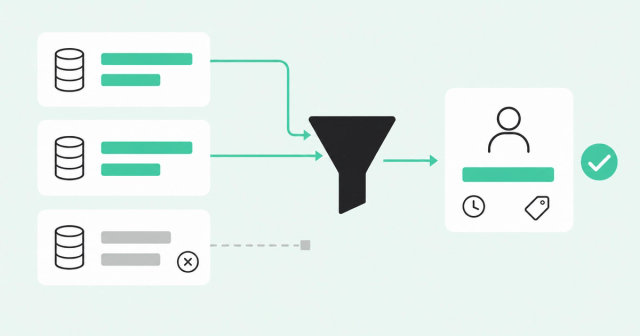
Once you know who a record is, you'll find that your sources disagree about the details. One vendor says Kevin is a director. Another says he's a VP.
Survivorship rules decide which value survives when sources conflict, field by field. Write them down once, and every sync follows the same logic instead of whichever vendor ran last.
| Field | Rule | Why it works |
|---|---|---|
Email | The verified, most recent value wins | Bounces signal list problems; Google's email sender guidelines say to reduce sending volume when messages start bouncing |
Title | The most recent value that two or more sources confirm wins | One outlier source can't rewrite the record |
Phone | The verified value wins | Reps don't waste calls on dead numbers |
Company | The CRM account owner's record wins, unless a job-change signal says otherwise | Ownership and territory depend on it |
Agreement between sources matters more than any single source. Say one provider lists John Smith as "Head of Engineering." Several others agree he's "Head of Data Science." Your rules should flag the outlier instead of writing it to the record.
Common Room's AI quality control uses Bayesian probability for this. It assigns real-time confidence scores for enrichment fields to every provider and field, then blocks enrichments that don't hold up.
Every field should carry where it came from and when you last confirmed it. That makes conflicts auditable, so you can explain any value a rep questions.
It also supports compliance. The UK's ICO accuracy principle guidance tells organizations to "ensure that the source and status of personal data is clear." That's UK guidance, but it's a sound habit wherever you sell.
Step 4: Keep Unified Records Fresh
Enrichment is a snapshot. The moment you enrich a record, it starts aging, because people change jobs, titles, and phone numbers without telling your CRM.
Job turnover data shows why. Per BLS employee tenure data, "the share of wage and salary workers with a year or less of tenure with their current employer was 20.6 percent." That figure is from January 2026.
The BLS JOLTS quits rate adds a monthly view: "Latest Quits Rate: 2.1%(p) in Sep 2026," where "p" means preliminary. Both figures cover US workers overall, so treat them as proxies for job turnover rather than contact decay rates.
Refresh records in two ways:
- Event-based refresh: Re-enrich a record when something changes, like a new signup, a job change, or an email bounce.
- Scheduled refresh: Recheck every active record on a fixed schedule, so quiet records stay current too.
Job changes deserve their own rule. Close the old record at the previous company and create a new, linked record at the new one. Keep the history, because a former champion at a new company is one of the warmest contacts you have.
Manual refresh doesn't scale. An enrichment waterfall checks providers in order until one returns a verified value. Tools with always-on waterfall enrichment keep running that check in the background, so contact data stays filled and fresh.
Step 5: Route Unified Records Into Sequences
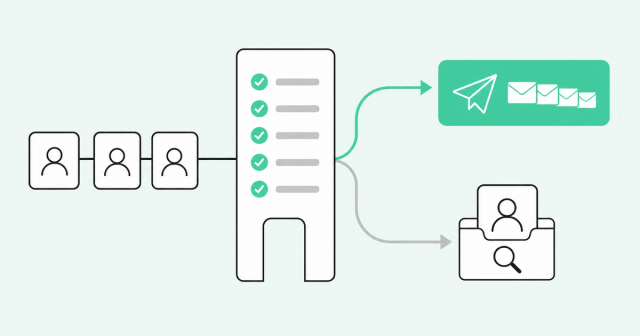
Only records that are resolved, fresh, and above your confidence rules should enter a sequence. Everything else goes to a review queue.
Run every record through this checklist before enrollment:
| Check | Passes | Fails |
|---|---|---|
One record per person | No open duplicates for this person | Two or more active records |
Verified email | Email passed verification within your refresh window | Unverified or bounced |
Recent title check | Two or more sources confirmed the title recently | Title is stale or sources disagree |
Owner assigned | One rep owns the person and account | No owner, or two owners |
Signal context attached | A recent signal explains why you're reaching out now | No reason beyond "fits the ICP" |
Signal context is the check most teams skip. A unified record should tell the rep why this person matters today, like a pricing page visit, a job change, or a product signup. Without it, your rep still sends a generic email to a perfectly clean record.
AI agents need the same guardrails. Block agents from acting on low-confidence matches, because an agent emails a false merge just as confidently as a real one.
In Revenue OS, Common Room's unified buyer intelligence feeds Zoom Engage sequencing directly. The record your rules approved is the record that enters the sequence. As reps work the sequence, activity flows back into that same intelligence layer, sharpening who counts as in-market for the next sequence.
Common Mistakes When Unifying Enrichment and Identity Data
Most unification projects stall for the same reasons:
- Enriching before resolving: You pay to enrich every duplicate. Each copy also ends up with slightly different data.
- Adding vendors without conflict rules: A new vendor adds more conflicting values. More data is creating less clarity when nothing decides which value wins.
- Letting every integration create records: Pick one system to create each object type, and have the rest upsert on a stable external ID. An upsert updates a matching record and creates one only when none exists.
- Matching on typed fields like name: People type names differently, so "K. White" and "Kevin White" never line up. Match on stable identifiers instead.
- Treating enrichment as a one-time project: Records start aging the day you enrich them. Build event-based and scheduled refresh into the process.
- Skipping source and date per field: Nobody can explain why a field says what it says. Nobody can fix it confidently either.
Where Common Room Fits
If the steps above sound like a lot of manual work, that's because they are. Common Room builds this order of operations into one layer, so identity comes first and enrichment follows.
The Person360 identity resolution engine stitches anonymous and known activity into one person-level profile. It links personal email signups to a business person and account when it finds a confident match. Then it enriches each profile through an AI-powered waterfall.
In head-to-head enrichment bakeoffs against alternatives, Person360 and Enrichment deliver 30-50% higher match rates. We cover those figures in how we compare contact databases. Enhanced identity merging reduces duplicate records by up to 79%, and AI quality control blocks inaccurate enrichments before they reach your CRM.
incident.io saw this firsthand. It reduced account duplicates by 70% across more than 140,000 accounts and matched 3,700 of 19,000 "Unknown Company" contacts to real accounts.
Common Room by Zoom now sits at the center of Revenue OS. Person360 resolves identity and enrichment into one buyer view, and Zoom's Engage, Auto Dialer, and Sales Assist turn that intelligence into coordinated action.
Every closed deal and every coached call writes back into the same shared context. Here's a closer look at how Revenue OS fits together.
To be clear about fit: Common Room works best when several sources write buyer data and reps have stopped trusting the CRM. If you run one enrichment vendor on a small, clean database, the rules in this guide and a quarterly audit may be enough for now.
Frequently Asked Questions
These are the questions RevOps teams ask most often when they start unifying enrichment and identity data.
What Is the Difference Between Data Enrichment and Identity Resolution?
Identity resolution decides who a record belongs to by connecting every identifier to one person and account. Enrichment adds what you know about that person, like title, email, and phone.
Is Data Enrichment the Same as Data Cleansing?
No, data cleansing fixes or removes outdated and duplicate data, while enrichment adds new fields to records you already have.
Why Must Identity Resolution and Enrichment Work Together?
Enriching unresolved records multiplies duplicates and cost, because you pay to enrich every copy. Resolution without enrichment leaves you with one accurate record that's too thin to act on.
What Match Rate Should You Expect From Enrichment?
It depends on your ICP, your regions, and the quality of your starting data. Run a bakeoff on a sample of your own records instead of trusting a headline figure.
How Do You Enrich Contact Data Responsibly?
Document the source and date for every field, collect only the fields a play actually uses, and honor every opt-out. For more detail, read our guide to handling privacy for enriched records.
Ready to see identity-first enrichment on your own records? Request a demo.