

Your reps dialed all morning. By lunch, their caller ID shows "Spam Likely," and the connect rate looks worse than last quarter's. Outbound volume is up, and results are down.
The best parallel dialer can win back some of that time. In a survey of 4,050 sales pros across 22 countries, Salesforce State of Sales found the average seller spends 40% of their time selling. Speed lives in the dialer, though, and pipeline lives in the data that decides who your reps call.
Quick disclosure: We're Common Room by Zoom, and we make Zoom Auto Dialer, one of the tools in this guide. The list below isn't ranked, and we stuck to facts we could verify.
What Is the Best Parallel Dialer for Sales Teams?
The best parallel dialer connects reps to live buyers without wearing out your phone numbers, and it logs every call outcome to your CRM. It also lets you switch to cascading dialing when number health matters, and it dials from a list ranked by buyer signals.
Most guides judge parallel dialers by how many lines they run. Extra lines only reach the people on your list faster, so the best-prioritized list matters more than the line count. Here's the short version, sorted by need:
- You run Zoom Phone and want signal-ranked lists: Look at Zoom Auto Dialer from Common Room by Zoom.
- You already use Apollo for data and sequences: Check Apollo's Advanced Dialer add-on.
- You already use CloudTalk for calling: Check CloudTalk's parallel add-on.
- You want a standalone parallel dialer: Check Salesfinity's published plans.
- You're comparing other dialers: Take the demo questions below to Orum, Nooks, Koncert, Kixie, and JustCall.
What Is a Parallel Dialer?
A parallel dialer is calling software that dials several phone numbers at once for one rep. When the first person answers live, it connects that person to the rep and drops the other calls.
That's what parallel dialing means in practice. Reps spend less time listening to rings and voicemail greetings, and more time talking.
Power Dialer vs. Parallel Dialer and Other Dialer Types
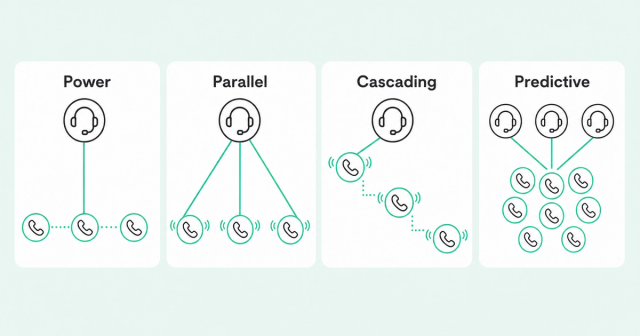
You'll hear four dialer types in most demos. Here's how they compare, and our guide to types of sales dialers goes deeper on each one.
| Dialer type | How it works | Calls at once per rep | Main tradeoff |
|---|---|---|---|
Power dialer | Dials one number after another, automatically | One | Calls one number at a time, then the next, with fewer dials per hour |
Parallel dialer | Dials several numbers at the same time and connects the first live answer | Several, set by the tool | Designed for more dials per hour, but our playbook notes extra answers can hear silence, then a hang-up |
Cascading dialer | Per our guide, starts several calls with a short delay between each one | A small, staggered set | Per our guide, designed to reduce double answers, with slightly fewer dials per hour |
Predictive dialer | Uses an algorithm to dial ahead of when agents will be free | Many, shared across a team | Dials ahead of rep availability, and can carry more risk of dropped calls |
Here's the trade in plain terms. When two people answer a parallel call at once, only one reaches your rep. Our dialer playbook notes the others can hear a brief silence and then a hang-up, a rough first impression for any buyer.
How to Evaluate a Parallel Dialer
Every parallel dialer demo opens with dials per hour, as if that alone made it the best parallel dialer. We use five criteria instead, and dial volume isn't one of them.
Each criterion ties back to one question. Will this tool create real conversations with the right buyers, without damaging your numbers or your data?
Connect Rates
Connect rate is the share of dials that reach a live person. Track live conversations per rep, since dial counts only show how busy reps were.
Across Common Room's GTM conversations, we see call connect rates around 2.5%, as we noted in our multichannel outbound sequence guide. At that rate, a rep who makes 400 dials can expect about 10 live conversations.
For an outside benchmark, see Cognism and WHAM's State of Cold Calling report. It puts the industry-average cold calling success rate at 2.7% in 2026, up from 2.3% the year before. Cognism sells contact data, and the 2026 report doesn't define the denominator, so treat it as a rough reference point.
Spam-Flag Risk and Number Reputation
Number reputation is how carriers and call-labeling apps rate a phone number based on its calling history. US carriers use analytics engines to score and sometimes label calls, and Bandwidth tracks those labels number by number, according to Bandwidth's number reputation overview. Bandwidth sells that monitoring service, so read it as vendor documentation.
That matters because people already screen hard. Hiya State of the Call reports that 86% of unknown calls go unanswered, based on a consumer survey of 12,000+ people in six countries. It's consumer data, so it doesn't measure B2B calls directly.
Carriers have reasons to stay cautious. YouMail 2025 robocall data estimates robocallers placed 52.5 billion calls to US consumers in 2025, and 57% were unwanted telemarketing or scam calls.
Our dialer playbook notes carriers can weigh how often calls go unanswered, how many people report them as spam, and whether calling patterns look suspicious. Here's the plain tradeoff: Parallel dialing can produce more short calls and hang-ups on people who answer second. So ask how each vendor handles numbers:
- Dedicated numbers: They belong to your organization, so your own team's calling habits shape their reputation.
- Pooled numbers: The vendor manages a shared set of numbers, so you can have less control over each number's history.
- Local presence: The dialer shows a caller ID with the prospect's area code, which is designed to raise answer rates.
Our parallel versus cascading dialing guide puts it plainly: "Because Zoom Auto Dialer runs on Zoom Phone, its numbers are dedicated to your organization." You decide how hard each one works.
CRM Sync and Workflow Fit
CRM sync means the dialer writes call data back to your CRM, the system where your team tracks contacts and deals. Without it, reps retype outcomes, and your reports drift away from what happened on the call.
A good parallel dialer handles this for you. Check that each of these writes back on its own:
- Disposition: The outcome label a rep picks, such as "meeting booked" or "wrong number."
- Notes: The rep's quick summary of what the buyer said.
- Transcript: A written record of the full call.
- Summary: A short recap your managers can scan in seconds.
- Next step: The follow-up task, with a date attached.
The dialer should also pull call steps from your sequences. A sequence is a planned series of emails, calls, and tasks for each prospect. If you run a multichannel outbound sequence, call steps should land in the dialer without copy and paste.
As that same guide notes, Zoom Auto Dialer pulls call tasks straight from Engage sequences. Reps then dial with buyer context already on screen.
Compliance
This section describes an FCC rule and FTC guidance. It isn't legal advice, so bring your counsel into any dialer decision.
As of November 2026, the FCC abandoned-call rule bars sellers from abandoning more than 3% of telemarketing calls answered live by a person. The rule measures that rate over a 30-day period for a single calling campaign. It counts a call as abandoned if a live rep doesn't connect within two seconds of the person's completed greeting.
Notice the denominator in the rule text (47 CFR 64.1200(a)(7)). The 3% applies to calls answered live, not total dials. So 1,000 live answers in a campaign means 30 abandoned calls is the ceiling for that 30-day window.
Parallel dialing raises a direct question here. When two people answer at once, one of them may wait longer than two seconds for a rep, or hear nothing at all.
The FTC's guidance on its Telemarketing Sales Rule (TSR) describes a similar problem with predictive dialers. The FTC said some calls are abandoned, so consumers are "either hung up on or kept waiting for long periods until a representative is available." It also said most calls between a telemarketer and a business are exempt from the TSR.
The FCC rule is separate from the TSR, so ask your counsel how each one applies to your calls, including B2B calls. Then ask each vendor how its dialer handles do-not-call (DNC) lists, timezone calling windows, and call recording consent.
Data on Who to Call
A dialer inherits every wrong number, stale title, and departed contact in your list. Faster dialing just reaches those bad records sooner.
In Validity CRM data research, 76% of 602 surveyed CRM users and admins said less than half of their CRM data is accurate and complete. Validity sells data-quality tools, and the figure is self-reported. Most SDR leaders still won't find it surprising.
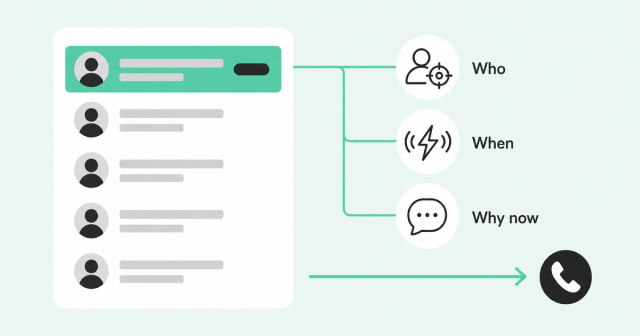
Buyer signals are actions that suggest someone may be ready to buy. A strong call list answers three questions for every row:
- Who: A person who fits your ideal customer profile (ICP) and holds a buying role.
- When: A fresh signal, such as a job change, a pricing-page visit, or a jump in product usage.
- Why now: The context your rep needs to open with something relevant.
Common Room by Zoom ranks call lists by these signals before the dialer starts. You can also send buyer intent alerts to reps, so in-market accounts rise to the top of the queue.
Parallel Dialer Comparison Table
Here's a factual side-by-side view. Pricing is as of November 2026, per vendor pages unless noted, and we list a price only where we found one published.
| Tool | Dialing mode | CRM integrations | Best for | Pricing model if publicly listed |
|---|---|---|---|---|
Zoom Auto Dialer (Common Room by Zoom) | Parallel and cascading, per Common Room; up to four concurrent calls, per Zoom | Salesforce, HubSpot, and Outreach call lists, per Zoom; Salesloft, per Common Room | Teams on Zoom Phone that want signal-ranked call lists | Native add-on to Zoom Phone; availability varies by plan |
Orum | Confirm with vendor | Check vendor's integration list | Confirm fit with vendor | We couldn't confirm published pricing on the vendor's site as of November 2026; ask the vendor |
Nooks | Confirm with vendor | Check vendor's integration list | Confirm fit with vendor | We couldn't confirm published pricing on the vendor's site as of November 2026; ask the vendor |
Apollo | Power, parallel, and international (Advanced Dialer add-on) | Check vendor's integration list | Teams already using Apollo | $149/mo, or $119/mo billed annually, per team |
CloudTalk | Parallel add-on, up to five lines | Check vendor's integration list | Teams already using CloudTalk | $39/user/mo add-on |
Koncert | Confirm with vendor | Check vendor's integration list | Confirm fit with vendor | We couldn't confirm published pricing on the vendor's site as of November 2026; ask the vendor |
Salesfinity | Parallel, up to five lines | Check vendor's integration list | Teams that want a standalone parallel dialer | Gold: $249/license/mo billed yearly, or $299 month-to-month |
Kixie | Confirm with vendor | Check vendor's integration list | Confirm fit with vendor | We couldn't confirm published pricing on the vendor's site as of November 2026; ask the vendor |
JustCall | Parallel dialing on the SalesPro plan, up to 10 lines | HubSpot, Salesforce, Pipedrive, and Zoho, per JustCall | Confirm fit with vendor | SalesPro is quote-based with a two-license minimum, per JustCall's page as of November 2026 |
Short Profiles of Each Parallel Dialer
Each profile covers what the tool is, any published pricing we found, and what to check in your demo. We kept them neutral and factual, with prices as of November 2026, per vendor pages unless noted.
One pattern applies to every tool below. Each one dials whatever list you load, so list quality still decides how many good conversations your reps have.
Zoom Auto Dialer (Common Room by Zoom)
Zoom Auto Dialer is a native add-on to Zoom Phone, and it dials from lists ranked by Common Room buyer signals. It's made for SDR teams that want every call tied to a clear reason to call.
- Dialing modes: It offers parallel and cascading modes, per Common Room. Zoom's Auto Dialer documentation sets the maximum at four concurrent calls per rep.
- Numbers: Per Common Room, its numbers are dedicated to your organization because it runs on Zoom Phone.
- Rep tools: Zoom's documentation lists local dial, which matches caller ID to the prospect's area code, plus voicemail drop and live transcription.
- Call lists: Zoom documents Salesforce, HubSpot, and Outreach call lists, plus Salesloft, per Common Room.
- Workflow: Per Common Room, it pulls call tasks straight from Engage sequences.
- Honest limit: It requires Zoom Phone, and availability varies by plan.
- What to check: Confirm which modes and integrations your plan includes. Ask how the ranked list updates as new signals arrive.
Orum
Orum is a sales dialing vendor; confirm its dialing modes in a demo. We couldn't verify its line limits or integrations on its own site, so the demo is where you'll get specifics.
- Pricing: We couldn't confirm published pricing on the vendor's site as of November 2026; ask the vendor.
- What to check: Ask for current line limits, seat minimums, and supported CRMs. Ask where the call list comes from.
Nooks
Nooks is a sales dialing vendor; confirm its dialing modes in a demo. Plans and limits can change, so get current details in writing.
- Pricing: We couldn't confirm published pricing on the vendor's site as of November 2026; ask the vendor.
- What to check: Ask for current line limits and seat minimums. Ask what writes back to your CRM after each call.
Apollo
Apollo is a sales platform that combines contact data, sequences, and calling. Its Advanced Dialer add-on adds power, parallel, and international dialing, sold at the team level.
- Pricing: It costs $149 per month, or $119 per month billed annually, per team, per Apollo's dialer page.
- What to check: Apollo's dialer page doesn't list a maximum line count, so ask. Ask how call outcomes sync to your CRM.
CloudTalk
CloudTalk is a cloud calling platform for sales and support teams. Its parallel add-on lets a rep dial up to five lines at once, per its help center.
- Pricing: The parallel add-on costs $39 per user per month, per CloudTalk's help center.
- What to check: CloudTalk's own pages differ on billing terms and line caps, so confirm both in writing.
Koncert
Koncert is a sales dialing vendor; confirm its dialing modes in a demo. Ask for a plan-by-plan breakdown before you compare it with other tools.
- Pricing: We couldn't confirm published pricing on the vendor's site as of November 2026; ask the vendor.
- What to check: Ask for line limits by plan and supported CRMs. Ask how admins control lines per rep.
Salesfinity
Salesfinity is a standalone parallel dialer for outbound sales teams. Its Gold plan includes unlimited dials on up to five lines, per its pricing page.
- Pricing: Gold costs $249 per license per month billed yearly, or $299 month-to-month, per Salesfinity's pricing page.
- What to check: Ask which CRMs it writes back to. Ask how reps decide who to call first.
Kixie
Kixie is a sales dialing vendor; confirm its dialing modes in a demo. Bring your number and CRM questions to the demo, since we couldn't verify those details.
- Pricing: We couldn't confirm published pricing on the vendor's site as of November 2026; ask the vendor.
- What to check: Ask for current line limits and supported CRMs. Ask who owns and monitors your numbers.
JustCall
JustCall's parallel dialer rings up to 10 numbers at once on its SalesPro plan, per JustCall's parallel dialer page as of November 2026. SalesPro needs a minimum of two licenses.
- Pricing: SalesPro pricing is quote-based; request a quote from JustCall.
- What to check: Ask what the second answer hears when several lines connect. Ask what writes back to your CRM.
When Cascading Dialing Is a Better Fit
Our guide defines cascading dialing as starting calls one after another with a short delay, so fewer people answer at the same moment. We built that pacing into Zoom Auto Dialer to protect the prospect experience, so fewer buyers hear dead air.
In our experience, cascading costs a few dials per hour. It tends to fit these situations best:
- Named-account outbound: Each contact matters, so a dropped first call costs more than a slower hour.
- Long-term number health: You plan to use the same numbers for months, so fewer hang-ups can help protect them.
- Mobile contacts: Mobile numbers reach the buyer directly, so dead air can land on the exact person you wanted.
- High-stakes first impressions: Executives and late-stage buyers tend to expect a rep on the line when they pick up.
Parallel still fits short-lived, high-volume lists, like event follow-ups or large SMB books. For a full breakdown, read our guide to parallel vs. cascading dialing.
Questions to Ask in a Parallel Dialer Demo
Bring these five questions to every demo, since the best parallel dialer for your team should answer all of them clearly. Our dialer buyer's framework covers the full checklist, including dedicated and pooled numbers.
- Number ownership: Ask whether your numbers are dedicated or pooled, and who monitors them for spam labels.
- Double answers: Ask what happens when two people answer at once, and what the second person hears.
- Line caps: Ask whether admins can cap lines per rep or switch a team to cascading.
- CRM write-back: Ask which fields write back, including disposition, notes, transcript, and next step.
- List quality: Ask how the dialer knows who to call and why now.
That last question matters most. The Gartner B2B buyer survey, published June 2025, found 73% of buyers actively avoid suppliers who send irrelevant outreach. Gartner reached that figure in a survey of 632 B2B buyers conducted August through September 2024.
If the vendor's answer is "whatever list you upload," you'll need a better list. Pair the dialer with signal-based cold calling so reps call the right people first.
Frequently Asked Questions About Parallel Dialers
These are the questions SDR leaders ask most when they compare parallel dialers. Each answer is short, so you can share it with your team.
What Is the Best Parallel Dialer for Sales Teams?
The best parallel dialer protects your numbers, logs outcomes to your CRM, offers a cascading mode, and dials from a signal-ranked list. Compare tools on those four points before you compare line counts.
What Is the Difference Between a Parallel Dialer and a Power Dialer?
A power dialer calls one number at a time and moves to the next one automatically. A parallel dialer calls several numbers at once and connects the rep to the first live answer.
Is Parallel Dialing Legal?
The FCC caps abandoned telemarketing calls at 3% of live answers per campaign over 30 days, and parallel dialing can leave a second answer waiting. Ask your counsel how that rule and others apply to your team's calls.
How Many Lines Can a Parallel Dialer Call at Once?
Common Room supports up to four concurrent calls in Zoom Auto Dialer, and CloudTalk offers up to five lines, per its help center. Salesfinity lists up to five lines and JustCall up to 10 on SalesPro, so confirm limits with other vendors in the demo.
How Much Does a Parallel Dialer Cost?
As of November 2026, Apollo's Advanced Dialer add-on costs $149 per month per team, and CloudTalk's parallel add-on costs $39 per user per month. Salesfinity Gold costs $249 per license per month billed yearly, and JustCall's SalesPro is quote-based; for other vendors, ask for current pricing in the demo.
Is a Parallel Dialer Worth It for a Small Team?
It can be if your reps call large lists, but in our experience, small teams working named accounts get more from cascading or power dialing. Either way, start with list quality, since a small team has the fewest hours to spend on wrong numbers.
Do Parallel Dialers Integrate With HubSpot and Salesforce?
Integrations vary by vendor and plan, so check each vendor's integration list before you buy. Zoom documents Salesforce, HubSpot, and Outreach call lists for Zoom Auto Dialer, plus Salesloft, per Common Room, and availability varies by plan.
How to Choose the Best Parallel Dialer for Your Team
Pick the dialing mode that protects your numbers, whether that's parallel for short-lived lists or cascading for named accounts. Then rank the list by buyer signals, so every connect reaches someone with a reason to talk.
A ranked list, dedicated numbers, and clean CRM write-back turn connects into pipeline. Every call outcome then feeds the next list, so the list gets sharper each week.
Want to see Zoom Auto Dialer work from a signal-ranked list? Request a demo.