
How to Run a Multichannel Outbound Sequence (Email, Phone, LinkedIn)
Your SDR team's outbound lives in three places. Email runs in a sequencing tool, calls run in a dialer, and LinkedIn runs in a browser tab someone forgot to close.
So reps skip the call step, and the LinkedIn touch happens a week late. Meanwhile, three people at the same account get the same email on the same morning.
Nobody planned that. It's what happens when each channel runs on its own clock. Here's how to run email, phone, and LinkedIn in one multichannel outbound sequence. You'll get a sample 10-step plan, plus rules for dialer handoff, multithreading, CRM write-back, and measurement.
What a Coordinated Multichannel Outbound Sequence Is
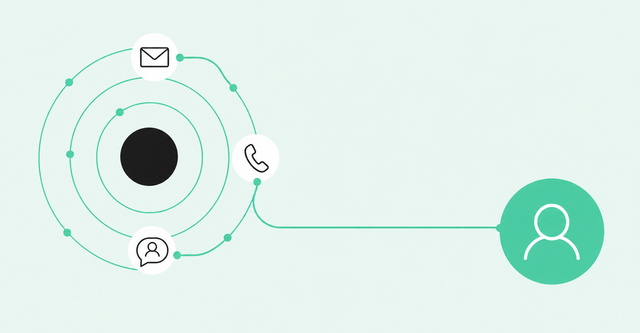
A coordinated multichannel sequence is one planned series of outreach steps across email, phone, and LinkedIn. Each step has its own channel, timing, and job. To run one, you put every channel in the same sequence, space the steps, and let replies and call outcomes decide the next step.
A sequence is the ordered list of touches a rep sends to one prospect. A sales cadence is the rhythm of that list: how many touches, on which days, and how far apart.
Many teams already use all three channels. They often run them in parallel, in separate tools, and nobody checks whether the email, the call, and the LinkedIn message tell one story.
Buyers have spread out, too. McKinsey's B2B Pulse research found that "B2B customers use an average of ten interaction channels in their buying journey (up from five in 2016)." That figure covers the whole buying journey, so read it as a reason to coordinate channels rather than a count of touches to send.
The simplest way to coordinate is to give each channel one job. Email carries context, phone adds urgency, and LinkedIn builds the relationship. If a step doesn't fit its channel's job, cut it.
Our Engage playbook lays out a multichannel, multi-threaded engagement motion, with email, call, LinkedIn Connect, LinkedIn Message, and task steps in one sequence. That single plan is what keeps the three channels telling the same story.
Step 1: Choose Channel Order and Spacing
Order and spacing decide whether your sequence feels like a conversation or a pile-up. Get them right once, and every rep inherits the same rhythm.
Start with the reason you're reaching out. The strongest sequences begin with a buying signal, so learn how to trigger outbound sequences from buying signals before you build the steps.
Order Channels From Light to Direct
Light-to-direct ordering means you start with low-pressure touches and move toward direct ones. An email or connection request asks little of the buyer. A call asks for their attention right now.
Signal strength can flip that order. At Common Room, we try to follow up high-intent web visits with a call and an email within 15 minutes.
As a starting point, we suggest spacing steps one to three business days apart. Closer than that can feel like pressure, and farther apart can let the thread go cold.
Keep LinkedIn steps personal. Have a rep review each connection request and message before it goes out.
Sample 10-Step Sequence
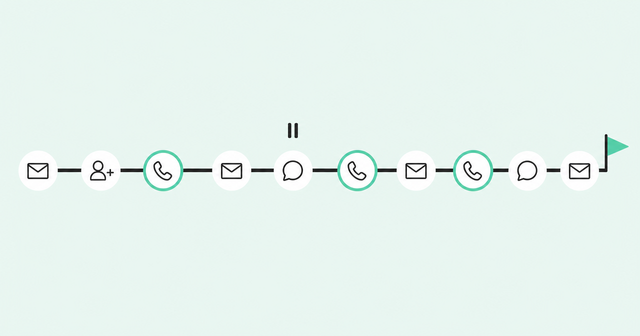
Here's a 10-step sequence that runs about 15 business days. Each step lists a goal, so reps know what the touch should accomplish.
| Day | Channel | Step | Goal |
|---|---|---|---|
1 | Email | Signal-based opener | Explain why you're reaching out now |
1 | LinkedIn | Connection request | Put a face to the name |
2 | Phone | Call plus voicemail | Add urgency and reference the email |
4 | Email | Proof point | Show a relevant result or use case |
6 | LinkedIn | Message (if connected) | Start a lighter, two-way conversation |
7 | Phone | Second call | Reach a live conversation |
9 | Email | Role-specific value | Tie the offer to this person's job |
11 | Phone | Third call | Make a final live attempt |
13 | LinkedIn | Follow-up message | Share something useful with no ask |
15 | Email | Breakup email | Close the loop and leave the door open |
The plan includes three calls on purpose. Cognism's cold calling statistics cite its 2025 State of Cold Calling Report: "By the third call, 93% of conversations occur." That's a share of the conversations in one vendor's dataset, so treat it as a planning guide for call steps.
Exit rules matter as much as the steps. A reply on any channel pauses every remaining step, including calls and LinkedIn tasks. A booked meeting, a bounce, or an opt-out ends the sequence for that person.
Step 2: Hand Call Steps to the Dialer Without Switching Tools
Ask any SDR leader why reps skip call steps, and you'll hear the same answer. The dialer lives somewhere else, so every call step means a new tab, a copied number, and a manual log.
A dialer is software that places calls for the rep, often several in a row. Reps spend less time dialing and more time talking.
The call step should be the call. When a rep opens it, the number, the buyer context, and the next task should already be waiting.
Skipped calls hurt your email steps, too. A Gong Labs analysis of 300M calls reported that "Cold calling nearly doubles your email reply rate (3.44% vs 1.81%) even if you don't connect live." That's an observed pattern in Gong's platform data, so test it against your own team's results.
Here's how the handoff works in Common Room by Zoom. Call steps in an Engage sequence launch directly into Zoom Auto Dialer, where it's enabled, and call outcomes feed back into the sequence.
Use those outcomes to decide what comes next. A connect with interest moves toward a meeting, a voicemail triggers a same-day email, and no answer moves to the next scheduled step. Zoom Auto Dialer can drop a voicemail automatically, so reps can pair each one with an email.
That voicemail-plus-email pairing has data behind it. Here's what Gong's voicemail data reported: "Gong data shows that leaving voicemails increases your email reply rate from 2.73% to 5.87%."
The same Gong analysis found that reply rates fell to 2.2% after three or more voicemails. Leave voicemails on one or two calls and keep each one short.
What you say matters as much as when you call. Our signal-based cold calling guide covers how to open a call when you already know why the buyer is in-market.
Step 3: Multithread Across Stakeholders Without Duplicate Touches
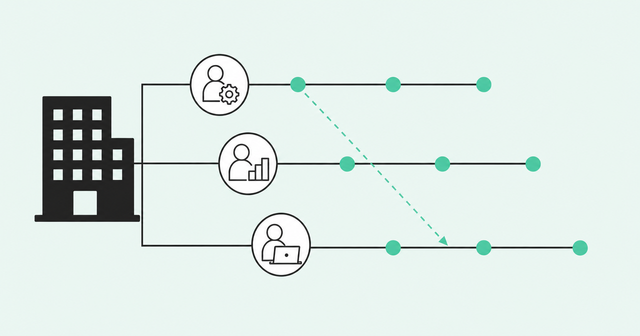
Multithreading means building relationships with several people at the same account instead of one. If your only contact goes quiet or changes jobs, the deal doesn't leave with them.
Pick contacts by signals, not just titles. The person reading your pricing page may matter more than the VP at the top of the org chart.
Before you enroll anyone, map every stakeholder in the buying group so each person has a clear role. Then give each role its own sequence.
A technical evaluator wants to know how it works. An economic buyer wants the business case. An end user wants to know what changes on Tuesday morning.
Copying one message to three people backfires. Each person should get a message built around their own role and priorities.
We recommend these five rules to keep multithreading coordinated:
- Stagger start days: Start each new stakeholder two to three business days after the last one.
- One channel per stakeholder per day: Never email and call the same person on the same day unless they replied.
- Tie triggers to another stakeholder: Advance one contact's step only when a colleague shows engagement.
- One reply pauses the account: Pause every sequence at the account when anyone replies, then decide who follows up.
- Cap active contacts per account: Keep three or four people active at once so the account never feels crowded.
Miguel Moreno, product lead for Zoom Revenue Accelerator, covers staggered timing and conditional triggers in his walkthrough of sequencing, dialing, and buyer intelligence in one motion. His example uses three stakeholders: Sarah, Mike, and Jamie.
In Engage, you enroll multiple stakeholders in coordinated sequences with staggered timing and role-specific messaging. Conditional triggers add the logic: Jamie's call step waits until Sarah opens her email at least twice.
Step 4: Write Back Activity to the CRM
Every email, call outcome, and LinkedIn touch should log to the same contact and account record automatically. When reps log by hand, the CRM shows what they remembered, which is rarely what happened.
Manual logging often breaks in predictable ways. In many teams, calls go unlogged on busy days, reps often skip logging LinkedIn touches, and the next rep can start from zero.
Set one simple standard for LinkedIn steps. When a rep completes the task, the touch should land on the same record as the emails and calls, so nobody has to guess what the buyer already saw.
In Common Room by Zoom, Auto Dialer logs call outcomes back to your CRM automatically. Your managers see real call activity instead of a Friday afternoon cleanup.
Write-back matters most for next week's list. Revenue OS works in three parts: know, act, and learn.
Common Room's shared buyer context handles the know part by showing who's in-market and why. Engage and Auto Dialer handle the act part by turning that intelligence into coordinated steps.
The learn part is the loop. Every call outcome, reply, and closed deal writes back to that shared buyer context, so your prioritization gets sharper with each sequence you run.
Step 5: Measure Reply and Meeting Rates by Channel
Measure each channel and each step on its own. A sequence-level reply rate hides the email doing all the work and the LinkedIn message nobody reads.
| Channel | Metric | What it tells you |
|---|---|---|
Email | Reply rate per step | Which messages start conversations |
Email | User-reported spam rate | Whether your sending stays healthy |
Phone | Connect rate | How often dials reach a live person |
Phone | Meetings per conversation | Whether call openers turn into next steps |
LinkedIn | Acceptance rate | Whether your requests feel relevant |
LinkedIn | Reply rate | Whether messages open a real dialogue |
All channels | Meetings booked per 100 enrolled | Whether the full sequence creates pipeline |
All channels | Stakeholder coverage | How many roles at each account you've reached |
For context, across Common Room's GTM conversations, we see email reply rates hover around 1% and call connect rates sit around 2.5%. Use those as reference points, then set your own baselines by segment.
There's no reliable public benchmark for LinkedIn reply or meeting rates. Measure your own and compare steps against each other.
Engage sequence analytics show which sequences, steps, and intervals convert. Use that view to cut steps that don't earn their place.
Review step data every two weeks. If one step trails the steps around it, rewrite it once, then cut it if it still lags.
Watch deliverability next to replies. Google's email sender guidelines state: "To comply with the sender guidelines, keep your user-reported spam rate below 0.1% and prevent it from reaching 0.3% or higher."
That rule applies to messages sent to personal Gmail accounts. It's still a useful ceiling for any outbound team.
Results will vary by segment and motion. Our post on the engagement decision loop covers how outbound, inbound, and book-of-business motions change the plan.
FAQ
These are the questions SDR leaders ask most when they build their first coordinated sequence. Each answer points back to the steps above.
What Sales Engagement Tool Runs Email, Phone, and LinkedIn Steps in One Coordinated Sequence?
Look for a tool that puts email, call, LinkedIn Connect, LinkedIn Message, and task steps in one sequence with shared timing and exit rules. Engage runs all of those steps in one sequence, so every channel follows the same plan.
Does a Sales Engagement Platform Hand Call Tasks Directly to a Dialer Without Switching Tools?
Some do, and Zoom Auto Dialer is one example. Call steps in an Engage sequence launch directly into Auto Dialer, where it's enabled, and call outcomes feed back into the sequence.
Can a Sales Engagement Platform Multi-Thread Outreach to Several Stakeholders Automatically?
Yes, if it supports coordinated sequences with staggered timing and conditional triggers. Engage lets you enroll several stakeholders with role-specific messaging and tie one person's next step to another person's engagement.
How Many Touchpoints Should a Multichannel Sequence Include?
As a starting point, we suggest testing eight to 12 touchpoints over two to three weeks. Then adjust by buyer, with faster steps for high-intent signals and more spacing for senior stakeholders.
Should Email, Calls, or LinkedIn Come First?
Let the signal decide. For cold prospects, open with email or a LinkedIn connection request, and for high-intent activity, call quickly with an email right behind it.
Build Your Next Sequence Around Buyer Signals
A coordinated sequence works best when it knows who's in-market before the first step goes out. See how Common Room by Zoom connects buyer intelligence, Engage, and Auto Dialer in one plan.