
Sales prospecting lists are too often a case of dream versus reality.
The dream: a carefully curated, deeply researched, and impeccably organized collection of high-fit, high-intent buyers—all tailored to a rep’s book of business.
The reality: a slapdash spreadsheet of names, contact details, and very little context—pulled together and uploaded to a CRM in between cold calls.
But the dream is real. You can get ready-to-buy contacts from in-market accounts—all personalized, prioritized, and primed for outreach—refreshed daily right where reps work.
Here’s how organizations like Apollo GraphQL, Zapier, and Notion build better prospecting lists with Common Room.
Get warm prospects replenished in real time
Problem
Standard prospecting lists are static documents (or dashboards) that start going stale as soon as they’re created.
Not to mention that creating custom lists for each and every rep on payroll is a pain in the neck.
Solution
Our customers use segments to build dynamic prospecting lists that auto-populate with new contacts (and fresh buying signals) every single day.
Prospects and companies are added to or removed from segments based on predetermined actions (think things like website visits, product usage, and social engagements) and attributes (think things like role seniority, capital raised, and tech stack configuration).
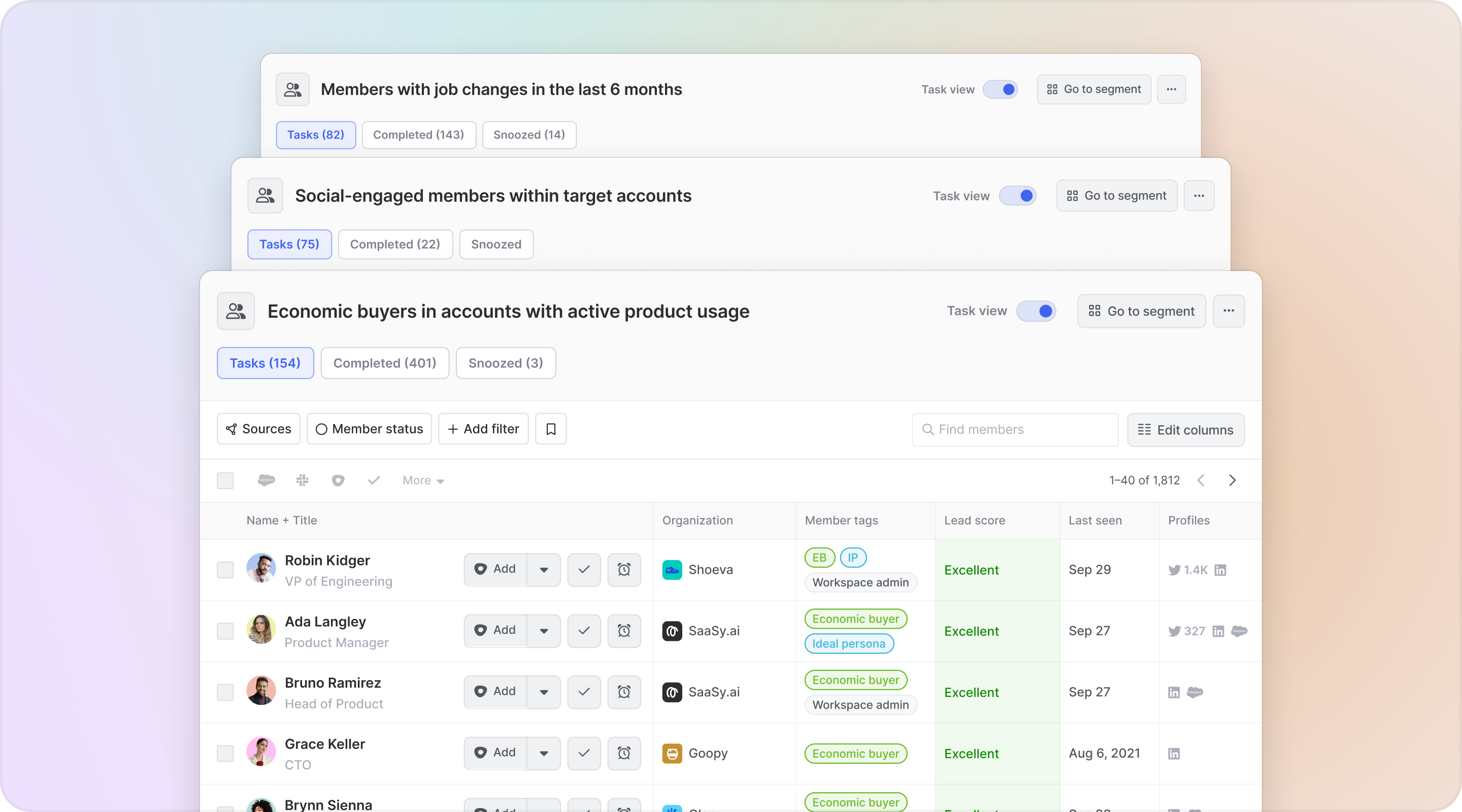
Common Room’s segments feature allows you to automatically add individuals or organizations to auto-replenishing lists based on customizable criteria. This makes it easy to quickly surface, monitor, and engage specific people and companies at scale.
Meanwhile, our bidirectional integrations with systems of record like Salesforce and HubSpot make it possible to tailor reps’ views of prospects based on CRM data (not to mention sync prospects with your CRM on the fly).
Go-to-market teams create team segments and assign them to predefined roles, like AEs, SDRs, and BDRs. Whenever a rep clicks into a segment assigned to their role, their view is automatically updated based on preselected CRM fields.
IntegrationsCommon Room’s integrations with dozens of data sources—including popular digital channels, CRMs, data warehouses, sales execution platforms, and more—allow you to organize and access all your data in one place. This makes it easy to take action on buying signals fast.
Since every segment is auto-customized based on a rep’s book of business, our customers can scale winning sales plays across the whole team minus the manual grunt work.
Strategy
Apollo GraphQL uses team segments to create customized, auto-replenishing prospecting lists for its account executives and sales development representatives.
For AEs, segments are customized based on the accounts they own. For SDRs, they’re customized based on prospects in preassigned regions.
“Common Room allows us to import all of the data from Salesforce—accounts, prospects, ICP data, and more—so that whenever reps log in, their view is tailored to their account base and their territory,” said GTM Program Manager Aisha Nins.
This makes it far easier to create more granular prospecting lists—like former product users who recently joined high-fit companies or economic buyers at ICP-match accounts who are interacting with competitors on social—and replicate them across the team.
Results
Putting high-intent, high-fit prospects right at reps’ fingertips helped Apollo GraphQL drive 26% of qualified leads.
“Common Room made the operationalization process easy and within a few days we were off to the races,” Aisha said. “Our sales team has realized real results with meetings booked.”
Stack rank contacts and companies at speed
Problem
Prospecting lists tell you who to go after, but they don’t tell you who to go after first or how.
Lead and account scoring can help, but traditional scoring tools are black boxes that ignore key buying signals and offer very little in terms of context.
Solution
Our customers use signal-based scoring to separate the best prospects from the rest.
Contacts and accounts are ranked as excellent, good, fair, or not a fit depending on bespoke fit criteria—like company size, industry, and annual revenue—as well as behavioral criteria, like type and volume of signal.

Common Room’s lead and account scoring feature allows you to instantly evaluate all opportunities based on customizable fit and behavior criteria. This makes it easy to find and follow up on the best opportunities fast using every available signal.
Even better, team members see the reasons behind the score. Simply hovering over a contact or account’s score will reveal all of the factors that went into its ranking.
At the same time, calculated fields make it easy to zero in on the accounts generating the highest volume of signal, such as accounts with the most ideal personas, product sign-ups, or relevant job listings.
Our customers use calculated fields to quickly prioritize prospects based on whatever signal matters most to their GTM motion and sort them in descending order.
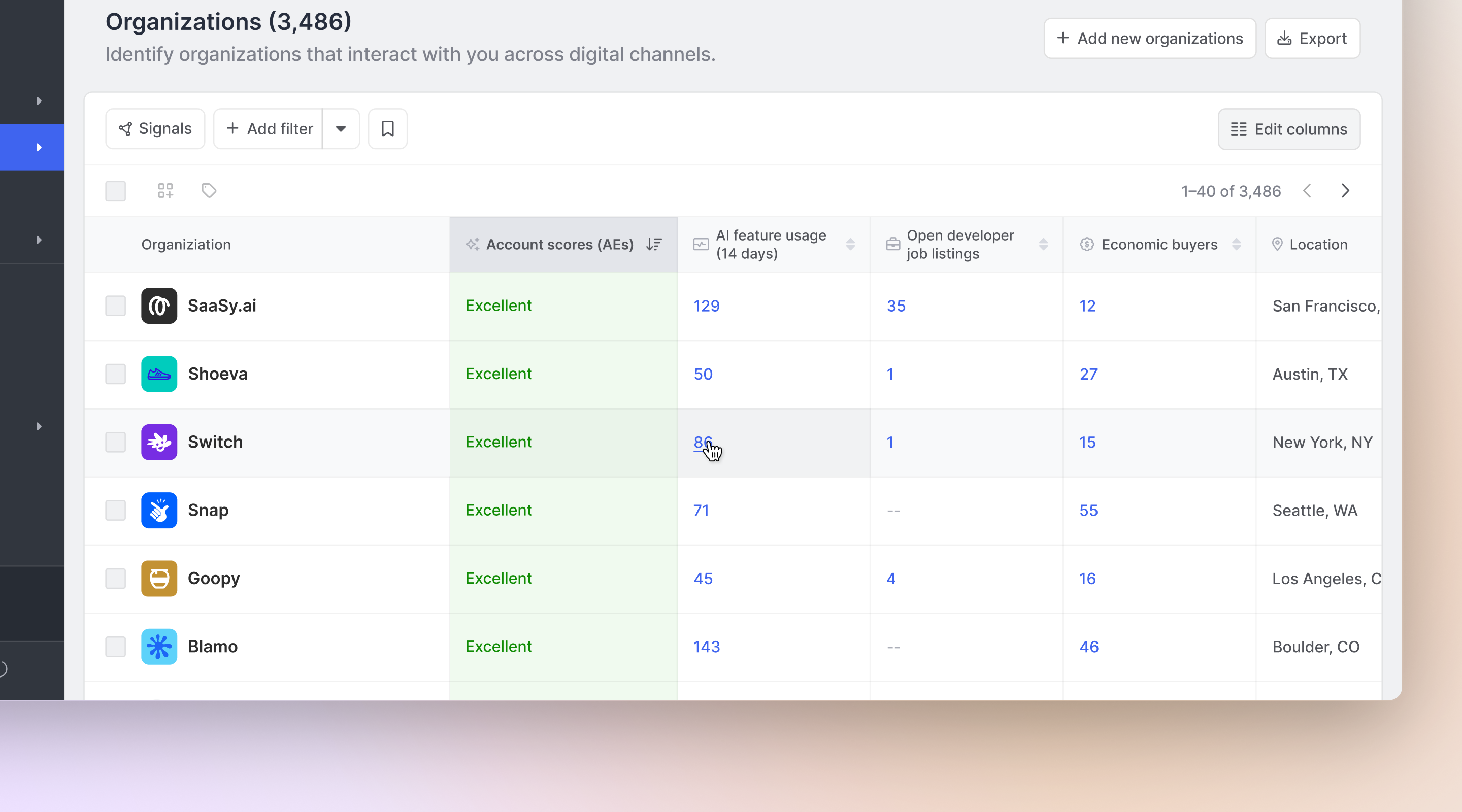
This makes it easy to identify the accounts that are most ripe for outreach, build a prioritized burndown list, and craft highly relevant messaging.
Strategy
Zapier uses a combination of product usage data and calculated fields to prioritize accounts and inform outreach.
Reps get a bird’s eye view of account-level activity and fit—from product sign-ups to economic buyer count—to help them figure out which orgs they should focus on first.
From there, they drill down into director-level stakeholders and above for outbounding.
“Common Room gives me a view of all the important contacts at one company,” said Strategic Account Manager Cathy Du. “All the info I need is all in one place and easy to sort through. It helps me find important contacts to outreach, understand who they are, and prioritize who’s most relevant.”
Results
Simplifying account and contact prioritization helped Zapier increase meetings booked by 31% in three months.
"Reaching the right stakeholders is critical to building a repeatable sales motion and increasing ACVs,” said Vice President of Sales and Customer Success Nalin Vahil. “Our teams had to jump back and forth between multiple tools to do that, and we were still missing key insights. With Common Room, we can identify the right stakeholders faster."
Terminate tab hopping
Problem
Building a list of names, email addresses, and phone numbers is one thing. Making it actionable is something else.
Hopping around multiple tools to enrich prospects, research accounts, and execute outreach eats up valuable time that could otherwise be spent selling.
Solution
Our customers use Common Room to auto-capture and aggregate all buying signals in one place—from pricing page visits and free trial sign-ups to LinkedIn comments and job changes.
Our AI-powered identity resolution and waterfall enrichment engine, Person360™, automatically reveals the people and accounts behind the signals and unifies all relevant info—including cross-channel activities, demographics, and firmographics—into a complete profile for every contact and company.
GTM teams then pick and choose which data points are displayed within a profile or segment view using fully customizable key fields and columns. This provides reps with a 360-degree view of prospects and their companies without the need for screen switching.

Common Room’s Person360 feature allows you to deanonymize, merge, and enrich signals from every channel connected to Common Room. This makes it easy to reveal the identity, intent, and context of every buyer and customer.
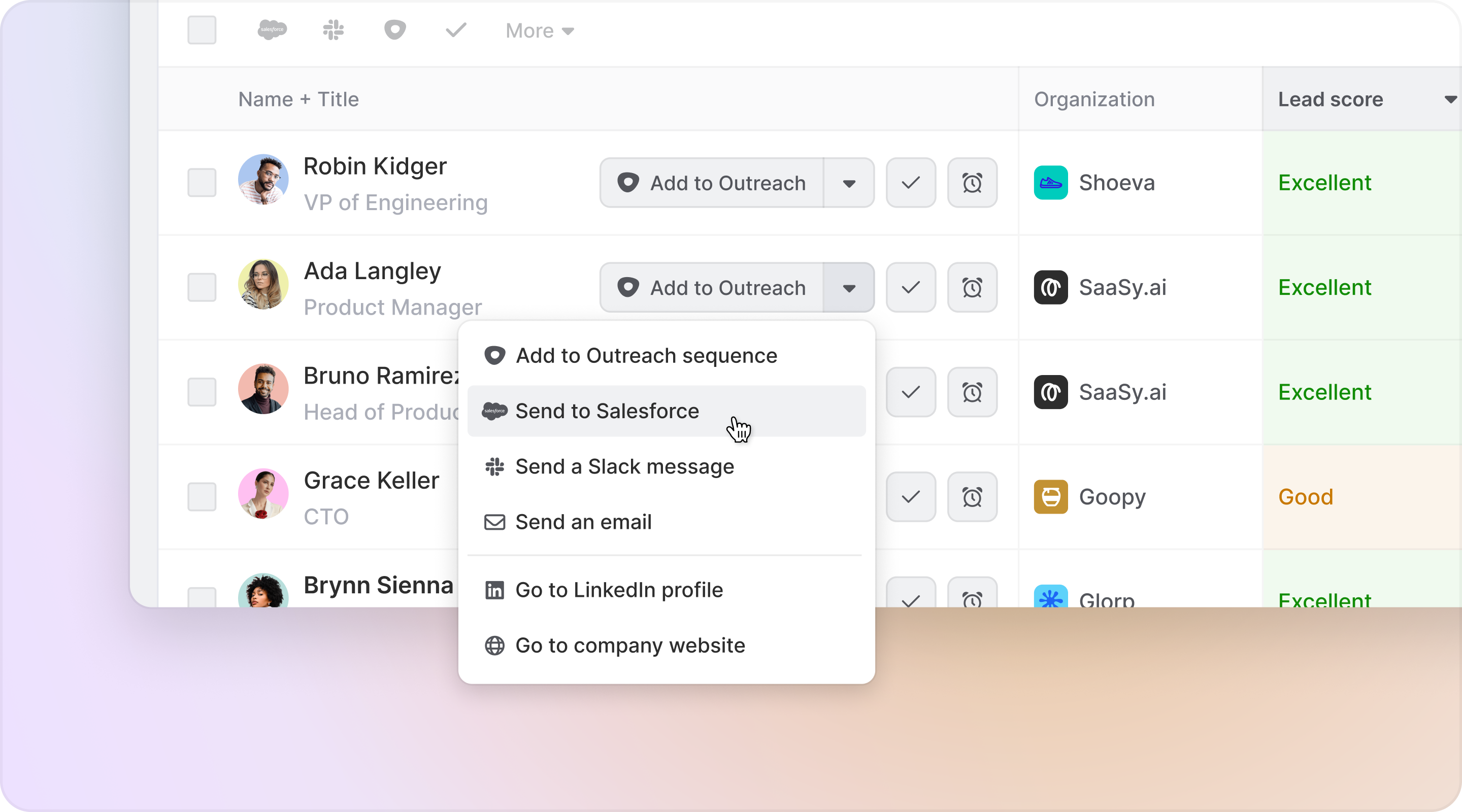
Reps take action directly from their prospecting lists in Common Room, whether that means sending an email or adding prospects to bespoke outbound sequences. Reps can add one or multiple contacts to personalized outbound sequences in their tool of choice, no tab hopping necessary.
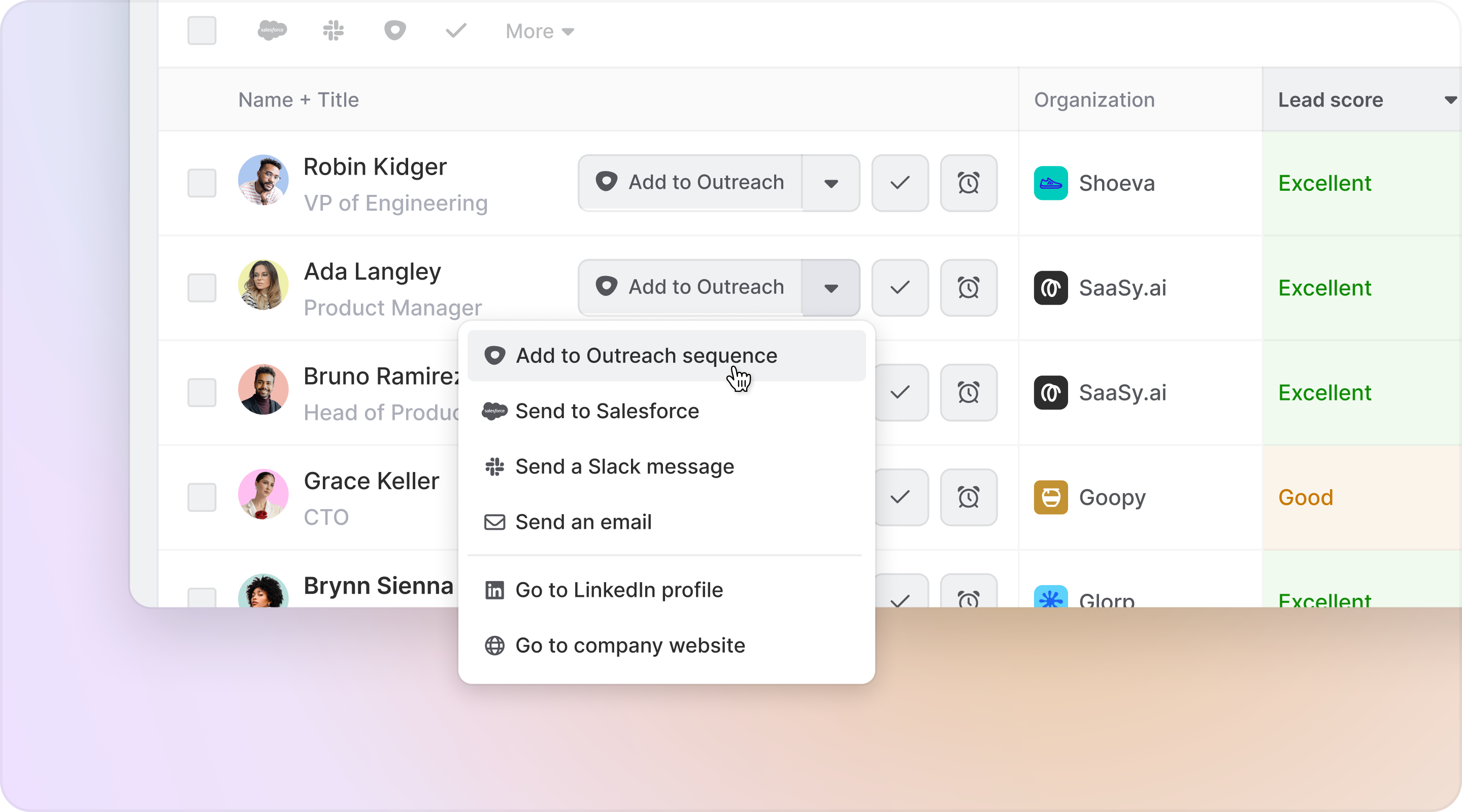
Common Room’s integrations with sales execution platforms—including Outreach, Apollo, Salesloft, Gong Engage, and more—allow you to add individuals to personalized email sequences from within Common Room. This makes it easy to engage buyers without switching tools.
In fact, our customers often automate the prospecting process from end to end.
Using Common Room’s workflows, any prospecting list can be turned into an outbound automation.
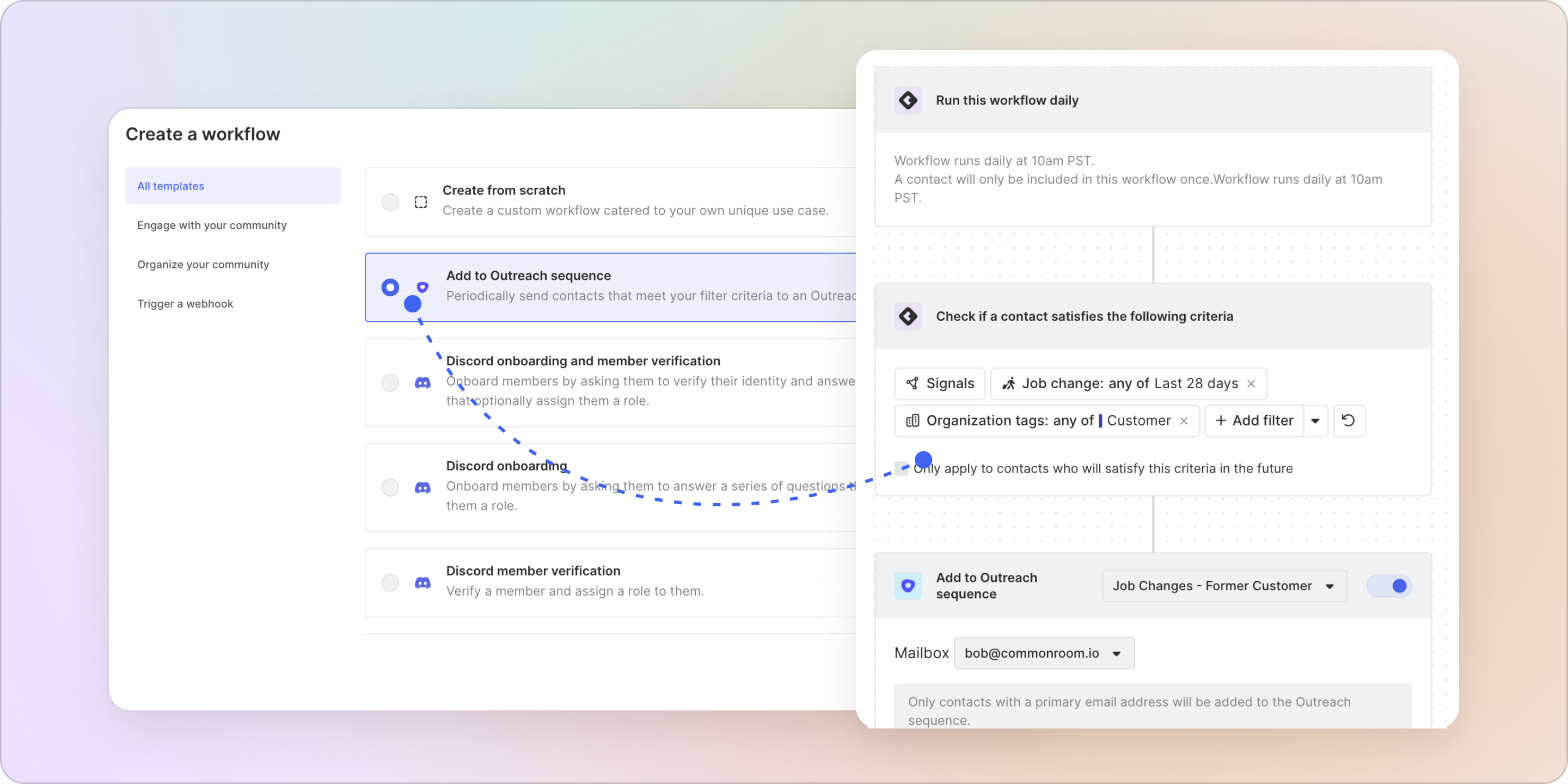
Common Room’s workflows feature allows you to create and customize automations based on specific demographic, firmographic, and activity details. This makes it easy to quickly track, organize, and engage people and accounts at scale.
If a contact or account matches predetermined criteria, they can be added to a segment and then pushed to a prebuilt sequence in the team’s preferred SEP.
Strategy
Notion uses Common Room’s Person360 to centralize all relevant sales intelligence in one place.
"Common Room has consolidated our prospecting stack and streamlined our sales prospecting motion,” said Pratyusha Ram, GTM Systems. “What once took hours and multiple tools to gather—product usage, job changes, social interactions—is now immediately available. Most importantly, it's helping us generate more pipeline!"
Using Common Room’s integrations with Outreach and Salesforce, reps go from signal to send as quickly as possible.
Any contact in a segment can be added to an Outreach sequence or Salesforce campaign right from Common Room with just a click.
Results
Accelerating both research and outreach helped Notion increase meetings booked by 30% per rep per month.
“The results speak for themselves,” said CRO Erica Anderson. “Common Room helps us reach the right people with the right message at the right time—faster and easier.”
Trade stale prospects for fresh ones, make it as easy as possible to prioritize them, and enable reps to reach out with the right message fast.
That’s how Common Room customers build better sales prospecting lists.
Take the pain out of prospecting with Common Room
Request a demo or get in touch to see how Common Room’s AI-powered customer intelligence platform helps you capture, enrich, and take action on every buying signal.