
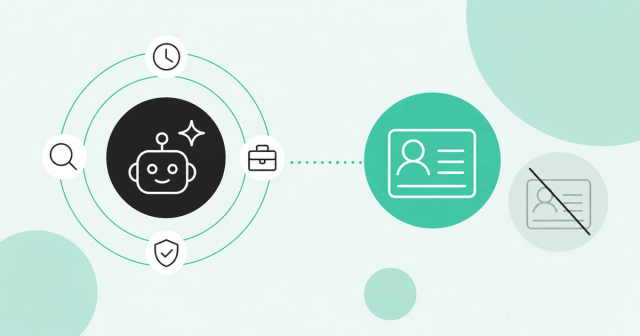
Your AI SDR just sent a sharp, personal email to a VP of sales. It mentioned her team's growth and her Q3 priorities. She left the company eight months ago.
Nothing in the CRM looked wrong. The record had a name, a title, and an email that didn't bounce. The agent did exactly what you asked, using stale CRM data that stopped being true months ago.
The Short Answer
AI prospecting agents avoid stale CRM data by checking each record at the moment they act. They read one unified identity layer, compare stored fields to live signals and recent verification dates, and pause for human review when confidence is low. The agent checks freshness before every send, not once a quarter.
An AI prospecting agent, sometimes called an AI SDR, is software that researches accounts, ranks people, and writes outreach on its own. That speed is the point, and it's also the risk. In the Salesforce State of Sales report, a vendor survey, 46% of sales pros with agents say data quality issues hurt their sales.
Most advice on this topic focuses on cleaning the CRM before launch. That helps, but your data starts drifting the day after cleanup ends. This guide covers the checks that protect each action, plus how to keep your records accurate between them.
Why CRM Records Go Stale
A stale record is one that was accurate when someone entered it but no longer matches reality. Nothing looks broken. The fields are full, the formatting is clean, and the email may still deliver.
Your CRM isn't broken. It's describing a world that no longer exists. Records usually drift for three reasons:
- People change jobs: A contact moves to a new company, and the old record keeps pointing to the former employer.
- Titles change inside the same company: A manager becomes a director, and her priorities and budget change with the title.
- Enrichment is a snapshot: Enrichment fills in fields from outside data sources, and that data begins aging the day after it lands.
People move often. BLS employee tenure data shows 20.6% of wage and salary workers had a year or less of tenure with their current employer in January 2026. That's a tenure figure, not a decay rate, but it shows how many people are new to their current employer.
Humans have a built-in defense here. A rep who sees an odd title usually pauses and checks LinkedIn before writing. An agent doesn't pause unless you build the pause in, and it can work through your whole book in minutes.
That's why stale data hurts more once agents enter the picture. For a deeper look at the causes, read our guide on how CRM data decays.
How Agents Check Freshness Before They Act
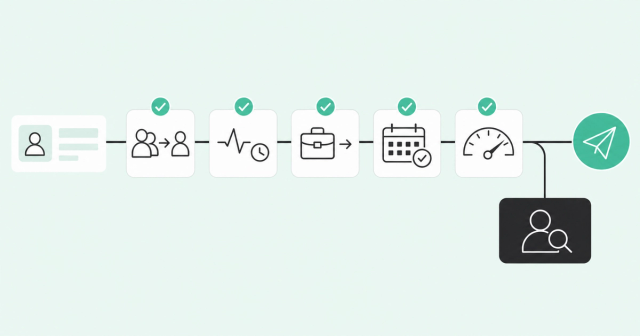
A well-built agent runs a short checklist on every record right before it ranks or messages someone. Each check answers one question. If the record fails, the agent doesn't guess: It stops, flags the record, or routes it to a person.
The stakes go beyond one awkward email. The Gartner AI-ready data forecast predicts that through 2026, organizations will abandon 60% of AI projects unsupported by AI-ready data. Here are the five checks that keep data freshness from becoming your project's weak spot.
| Check | What it asks | If it fails |
|---|---|---|
Identity | Is this one real person, or do duplicate records split them up? | Merge or link the records before the agent reads them |
Live signals | Does recent activity match what the record says? | Trust the newer evidence and flag the record |
Job change | Is this person still at this company in this role? | Stop outreach to the old record and flag it |
Source recency | When did a source last confirm title, company, and email? | Hold the send until a fresh source confirms the fields |
Confidence | Is the agent sure enough to act alone? | Send the record to a human review queue |
Resolve Identity First
Identity resolution is the process of linking every email, account, and activity that belongs to one person into a single profile. Without it, freshness checks don't mean much.
Picture three Kevins in your CRM. One has his old work email, one has a personal Gmail, and one lists his new title at a new company. An agent that checks the first Kevin may call him fresh, while the real, current Kevin sits in record three.
That's why agents should read unified, deduplicated person records, not raw CRM tables. Common Room handles this through identity resolution with Person360. Person360 links incomplete identifiers, like personal email signups and anonymous website activity, to one person.
Read Live Signals, Not Just Stored Fields
Stored fields describe the past. A title field tells you what was true the last time someone updated it.
A signal is a recent action that shows what a person is doing now. Website visits, product usage, and engagement with your content all count as signals, and each one carries a timestamp.
When a signal contradicts the record, the agent should trust the more recent evidence and flag the record. Say your CRM lists someone as a champion at Acme, but last week she signed up for a trial with a new company email. The newer signal wins, and RevOps gets a flag to fix the old record.
Detect Job Changes as They Happen
A job change is a hygiene task and a buying signal at the same time. The old record is now wrong, but the person behind it may be your warmest lead.
When an agent spots a move, it should stop outreach to the old record and flag it for an update. Then it should treat a former champion at a new company as a warm lead. That person already knows what your product does.
Don't wait for a quarterly audit to find these moves. Use job change tracking to spot them between audits instead of after them.
RoomieAI also sends Spark Briefs, daily AI-generated emails that highlight notable buyer activity across a rep's book of business. The Spark Briefs documentation lists job changes from key contacts among that activity.
Check Source Recency on Critical Fields
Source recency means how recently a trusted source confirmed a value. Before sending, the agent should require a recent verification date on three fields: title, company, and email.
Different fields age at different speeds. A company's industry rarely changes, but a person's title and email can change the day she switches jobs.
So record two things for every critical value: which source supplied it and when. If the verification date falls outside the window you set, the agent holds the send until a fresh source confirms the field.
You'll set those windows based on your own motion. Start strict on email and title, then adjust once you see how often the agent holds a send.
Set Confidence Thresholds and a Human Pause
A confidence threshold is the minimum level of certainty an agent needs before it acts alone. Below that line, a person decides.
Start with enrichment matches. If a tool isn't sure the Kevin Smith it found is your Kevin Smith, block that match from updating the record. Uncertain records belong in a review queue, not the send queue.
AI works best as leverage for your team, not as a replacement for judgment. Agents can handle research and drafts while humans make the calls that need context. RoomieAI prospecting agents write personalized 1:1 outbound, and human-led review stays in the loop.
What to Ask a Vendor About Data Freshness
Every AI SDR demo looks great with clean sample data. Your CRM won't look like the demo. Ask these questions before you sign:
- Where does the agent read identity from, and how does it handle duplicates?
- How does the agent detect job changes, and how quickly does it find them?
- Does the agent check a verification date for each critical field?
- What's the confidence threshold, and can I set it myself?
- What happens to records that fall below the threshold?
- Does an audit log show every action the agent took and why?
- Can a person approve messages before the agent sends them?
An audit log is a running record of every action the agent takes. Listen for specific, field-by-field answers. "Our AI keeps your data fresh" isn't an answer.
For the wider controls around permissions, approvals, and rollout, use our AI agent governance checklist.
How This Connects to CRM Hygiene
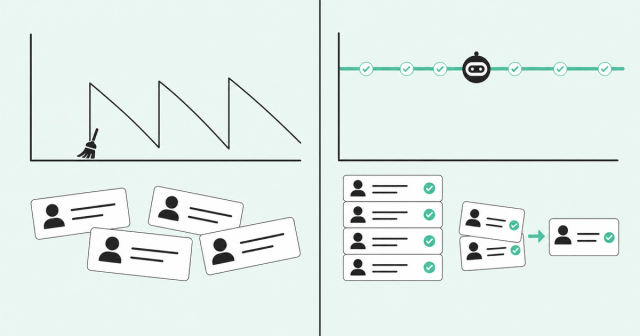
CRM hygiene is the ongoing work of keeping records accurate, complete, and free of duplicates. Execution-time checks and hygiene work together, and you need both:
- Checks protect each action: The agent verifies a record right before it ranks or sends.
- Hygiene keeps the base accurate: Clean records mean fewer holds, fewer flags, and a shorter review queue.
Most teams treat hygiene as an occasional cleanup project. Our CRM data hygiene checklist walks through that manual cadence. The catch is that records start slipping again the week after cleanup ends.
The fix is to move from episodic cleanup to continuous monitoring. DataAgent's continuous monitoring finds and resolves outdated and duplicate records, so your CRM stays aligned with reality.
Our docs explain how DataAgent works: It compares your Salesforce records against Common Room's real-time identity data, then flags outdated contacts and duplicates. Outdated contacts include old job titles, emails, and company associations, and duplicates cover both contacts and accounts.
From there, DataAgent runs bulk update and merge workflows with review settings you control. It logs every action in an activity log, so you can see what changed and when.
Our conversation with Jacki Leahy, a fractional RevOps leader, landed on the same point. "AI is so fun and cool, but the problem is always in the data set. If that's busted, the whole thing is just an arts and crafts activity," Jacki said.
FAQ
What CRM Data Problems Break AI SDRs?
The biggest problems are stale contacts, wrong titles, duplicate records, and missing customer status. Each one can lead an agent to email someone who left, pitch the wrong role, or prospect a current customer.
What's the Difference Between Data Cleaning and Enrichment?
Data cleaning fixes errors and merges duplicates in the records you already have. Enrichment fills in missing fields from outside sources, so it's only as current as the day it ran.
How Often Should You Refresh Contact Data?
Refresh critical fields like title, company, and email continuously instead of on a fixed schedule. Then have the agent confirm those fields at the moment it acts.
What Should Happen When a Contact Changes Employer?
Mark the old record as outdated, create or link a record at the new company, and pause outreach to the old one. Then treat the move as a signal, since a former champion at a new company can be a warm lead.
Who Should Own CRM Data Readiness for AI?
RevOps should own the rules, including which fields matter, how recent they must be, and where the confidence threshold sits. Reps and managers should review flagged records, since they know the accounts best.
Your agents are only as good as the context they read. Give them fresh, unified records, and they'll act on what's true today. Request a demo to see how Common Room keeps your CRM aligned with reality.